Blood Glucose Monitoring System - User’s Manual
Diagnostic Devices, Inc www.prodigymeter.com 1.800.243.2636
22
(where it meets the narow channel) until the
drop is drawn into the test strip and the
confirmation window is filled. The meter begins
to count down.
Voice SPEAKS: “Now testing.”
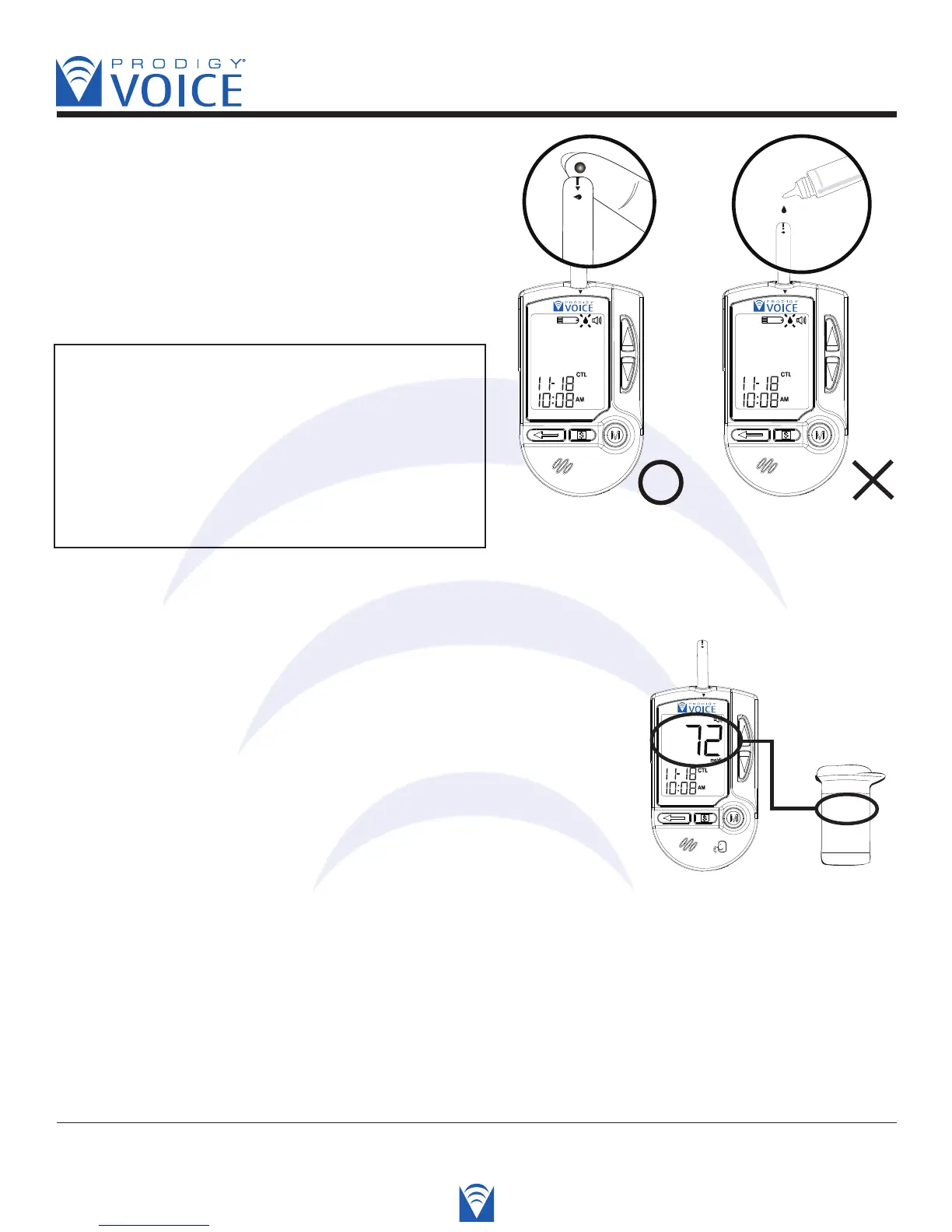
CAUTION: To avoid contaminating the control
solution with the content of the test strip, you
have to place a drop of control solution on
a clean surface or on your clean finger tip first,
then touch the strip to the drop.
DO NOT APPLY THE CONTROL SOLUTION
DIRECTLY TO THE TEST STRIP!
STEP 4 Read and Compare the Result
After counting from 6 to 0, the test result of control solution
is shown on the screen. Compare this result with the range
printed on the test strip vial. It should fall within this range.
Voice SPEAKS: “Your blood glucose is sevemty two
milligrams per deciliter.”
Out-of-range results
If test results fall outside the range printed on the test strip vial, check the section of
“Problem in Operation” section in troubleshooting guide and repeat the test. If you continue to
get out-of-range results, it means that the system may not be working properly. Do NOT
test your blood glucose. If you are unable to resolve the problem, contact the Technical
Support line at 800-243-2636.
Correct Incorrect



 To Next Page