EasyManua.ls Logo

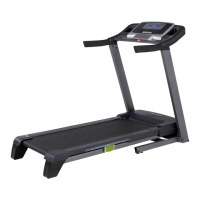
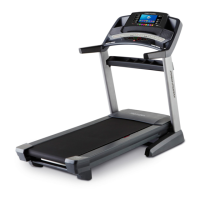
ProForm PRO 4500 - User Manual

ProForm PRO 4500
40 pages
Print Icon
To Next Page IconTo Next Page
Loading...
Serial Number
Decal
Model No. PFTL16011.0
Serial No.
Write the serial number in the space
above for reference.
CAUTION
Read all precautions and instruc-
tions in this manual before using
this equipment. Save this manual
for future reference.
QUESTIONS?
If you have questions, or if parts
are damaged or missing, DO NOT
CONTACT THE STORE; please
contact Customer Care.
IMPORTANT: Please register this
product (see the limited warranty
on the back cover of this manual)
before contacting Customer Care.
CALL TOLL-FREE:
1-888-533-1333
Mon.–Fri. 6 a.m.–6 p.m. MT
Sat. 8 a.m.–4 p.m. MT
ON THE WEB:
www.proformservice.com
www.proform.com
USER’S MANUAL

Questions and Answers

Summary

Important Precautions

Before You Begin

Part Identification Diagram

Visual guide to identify treadmill components and parts.

Assembly

Install Base and Uprights

Connect wires, attach base components, and secure uprights.

Install Handrails and Console

Mount handrails, pulse assembly, and console to the frame.

Final Assembly Steps

Attach trays, storage latch, and perform final tightening and leveling.

The Chest Heart Rate Monitor

Monitor Operation and Care

Steps for wearing, caring for, and troubleshooting the heart rate monitor.

Operation and Adjustment

Power Cord Connection

Instructions for connecting the power cord and using a surge suppressor.

How to Turn On the Power

How to Set Up the Console

Wireless Network Setup

Guide to connecting the console to a wireless network.

iFit Live Account Creation

Steps to create a new iFit Live account for online features.

How to Use the Manual Mode

Adjusting Speed and Monitoring Progress

Instructions for starting the belt, changing speed, and viewing workout metrics.

How to Use an Onboard Workout

Starting and Managing Workouts

Steps to begin, pause, and end pre-programmed treadmill workouts.

How to Use the Equipment Settings Mode

Console Configuration Options

Options to manage language, units, safety key, and console passcode.

How to Use the Maintenance Mode

Firmware Update and Incline Calibration

Instructions for updating software and calibrating the treadmill's incline.

How to Use the Wireless Network Mode

Network Connection Management

Steps to connect, disconnect, and manage Wi-Fi network settings.

How to Fold and Move the Treadmill

Folding, Moving, and Unfolding

Instructions for folding, moving, and unfolding the treadmill for storage and use.

Troubleshooting

Power and Console Issues

Solutions for power failures, console display problems, and demo mode.

Walking Belt Problems

Fixes for walking belt speed, alignment, slipping, and incline issues.

iFit Live and Network Issues

Solutions for iFit Live mode malfunction and wireless network connection problems.

Exercise Guidelines

Intensity and Workout Planning

Guidance on exercise intensity, workout structure, and frequency.

Part List

Ordering Replacement Parts

Limited Warranty

Summary

Important Precautions

Before You Begin

Part Identification Diagram

Visual guide to identify treadmill components and parts.

Assembly

Install Base and Uprights

Connect wires, attach base components, and secure uprights.

Install Handrails and Console

Mount handrails, pulse assembly, and console to the frame.

Final Assembly Steps

Attach trays, storage latch, and perform final tightening and leveling.

The Chest Heart Rate Monitor

Monitor Operation and Care

Steps for wearing, caring for, and troubleshooting the heart rate monitor.

Operation and Adjustment

Power Cord Connection

Instructions for connecting the power cord and using a surge suppressor.

How to Turn On the Power

How to Set Up the Console

Wireless Network Setup

Guide to connecting the console to a wireless network.

iFit Live Account Creation

Steps to create a new iFit Live account for online features.

How to Use the Manual Mode

Adjusting Speed and Monitoring Progress

Instructions for starting the belt, changing speed, and viewing workout metrics.

How to Use an Onboard Workout

Starting and Managing Workouts

Steps to begin, pause, and end pre-programmed treadmill workouts.

How to Use the Equipment Settings Mode

Console Configuration Options

Options to manage language, units, safety key, and console passcode.

How to Use the Maintenance Mode

Firmware Update and Incline Calibration

Instructions for updating software and calibrating the treadmill's incline.

How to Use the Wireless Network Mode

Network Connection Management

Steps to connect, disconnect, and manage Wi-Fi network settings.

How to Fold and Move the Treadmill

Folding, Moving, and Unfolding

Instructions for folding, moving, and unfolding the treadmill for storage and use.

Troubleshooting

Power and Console Issues

Solutions for power failures, console display problems, and demo mode.

Walking Belt Problems

Fixes for walking belt speed, alignment, slipping, and incline issues.

iFit Live and Network Issues

Solutions for iFit Live mode malfunction and wireless network connection problems.

Exercise Guidelines

Intensity and Workout Planning

Guidance on exercise intensity, workout structure, and frequency.

Part List

Ordering Replacement Parts

Limited Warranty

ProForm PRO 4500 Specifications

General IconGeneral
Incline0-12%
DeclineYes, -3%
Speed0-12 mph
FoldingYes
Weight Capacity300 lbs
Programs50+ iFit workouts
BluetoothYes

Related product manuals