7. 7
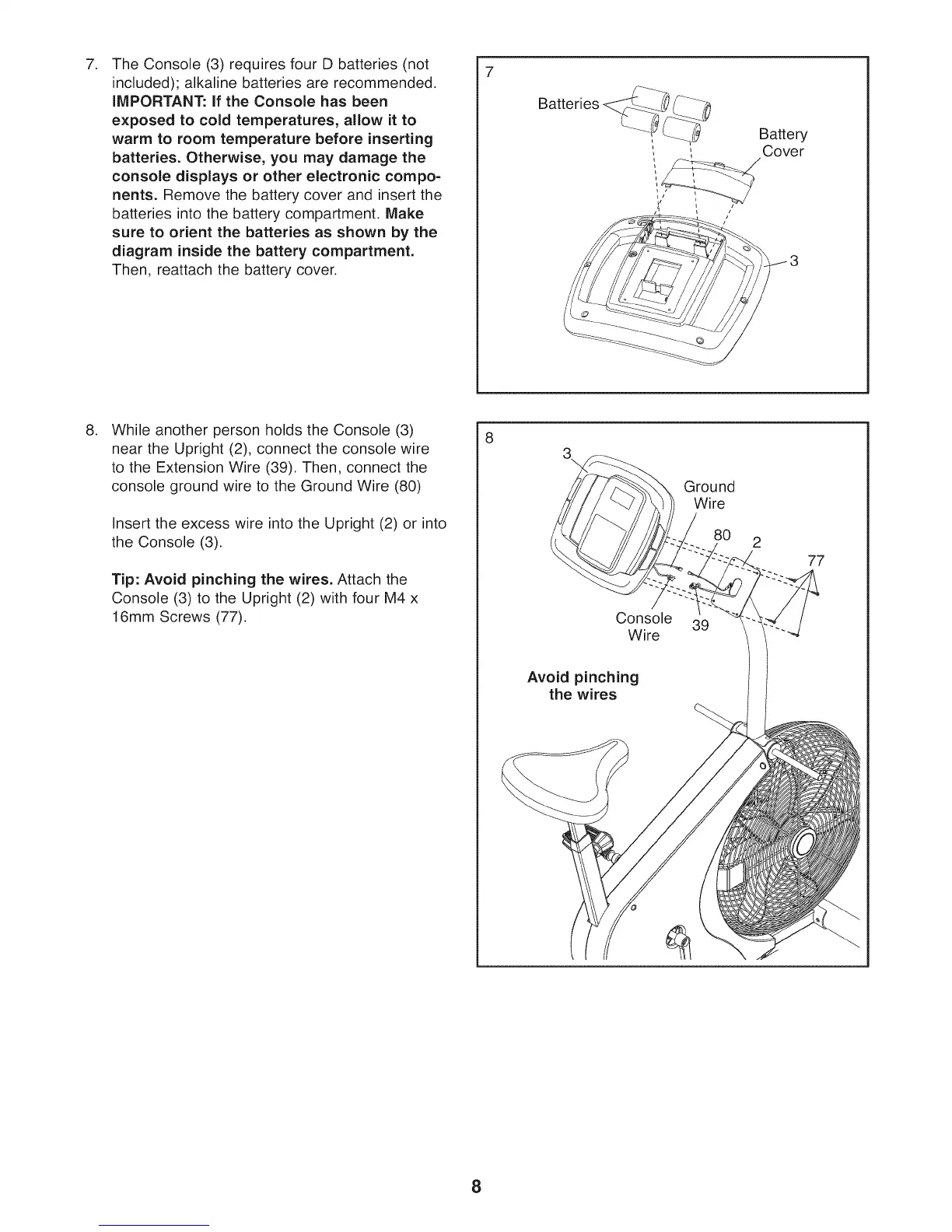
The Console (3) requires four D batteries (not
included); alkaline batteries are recommended.
iMPORTANT: if the Console has been
exposed to cold temperatures, allow it to
warm to room temperature before inserting
batteries. Otherwise, you may damage the
console displays or other electronic compo-
nents. Remove the battery cover and insert the
batteries into the battery compartment, Make
sure to orient the batteries as shown by the
diagram inside the battery compartment.
Then, reattach the battery cover.
, Battery
, , Cover
/
/
.
While another person holds the Console (3)
near the Upright (2), connect the console wire
to the Extension Wire (39). Then, connect the
console ground wire to the Ground Wire (80)
Insert the excess wire into the Upright (2) or into
the Console (3).
Tip: Avoid pinching the wires. Attach the
Console (3) to the Upright (2) with four M4 x
16mm Screws (77).
3\
Console
Wire
Avoid pinching
the wires
Ground
Wire
8O
39
2
77
8









 To Next Page