4. 4
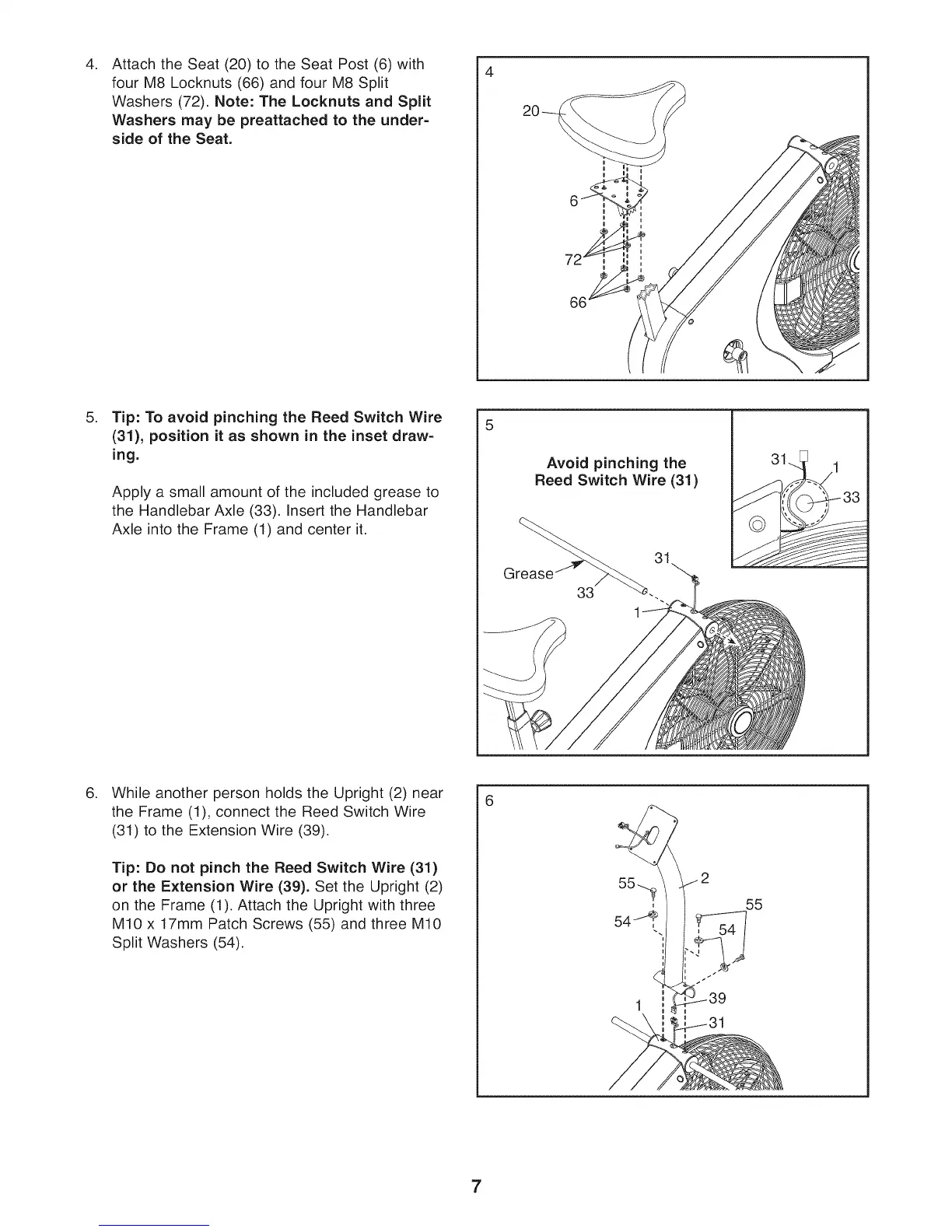
Attach the Seat (20) to the Seat Post (6) with
four M8 Locknuts (66) and four M8 Split
Washers (72). Note: The Locknuts and Split
Washers may be preattached to the under-
side of the Seat.
,
Tip: To avoid pinching the Reed Switch Wire
(31), position it as shown in the inset draw-
ing.
Apply a small amount of the included grease to
the Handlebar Axle (33). Insert the Handlebar
Axle into the Frame (1) and center it.
Avoid pinching the
Reed Switch Wire (31)
,
While another person holds the Upright (2) near
the Frame (1), connect the Reed Switch Wire
(31) to the Extension Wire (39).
Tip: Do not pinch the Reed Switch Wire (31)
or the Extension Wire (39). Set the Upright (2)
on the Frame (1). Attach the Upright with three
M10 x 17mm Patch Screws (55) and three M10
Split Washers (54).
7



 To Next Page