EasyManua.ls Logo

PROLiNK PRO2000LD - Page 13

PROLiNK PRO2000LD
37 pages
Print Icon
To Next Page IconTo Next Page
To Previous Page IconTo Previous Page
Loading...
11
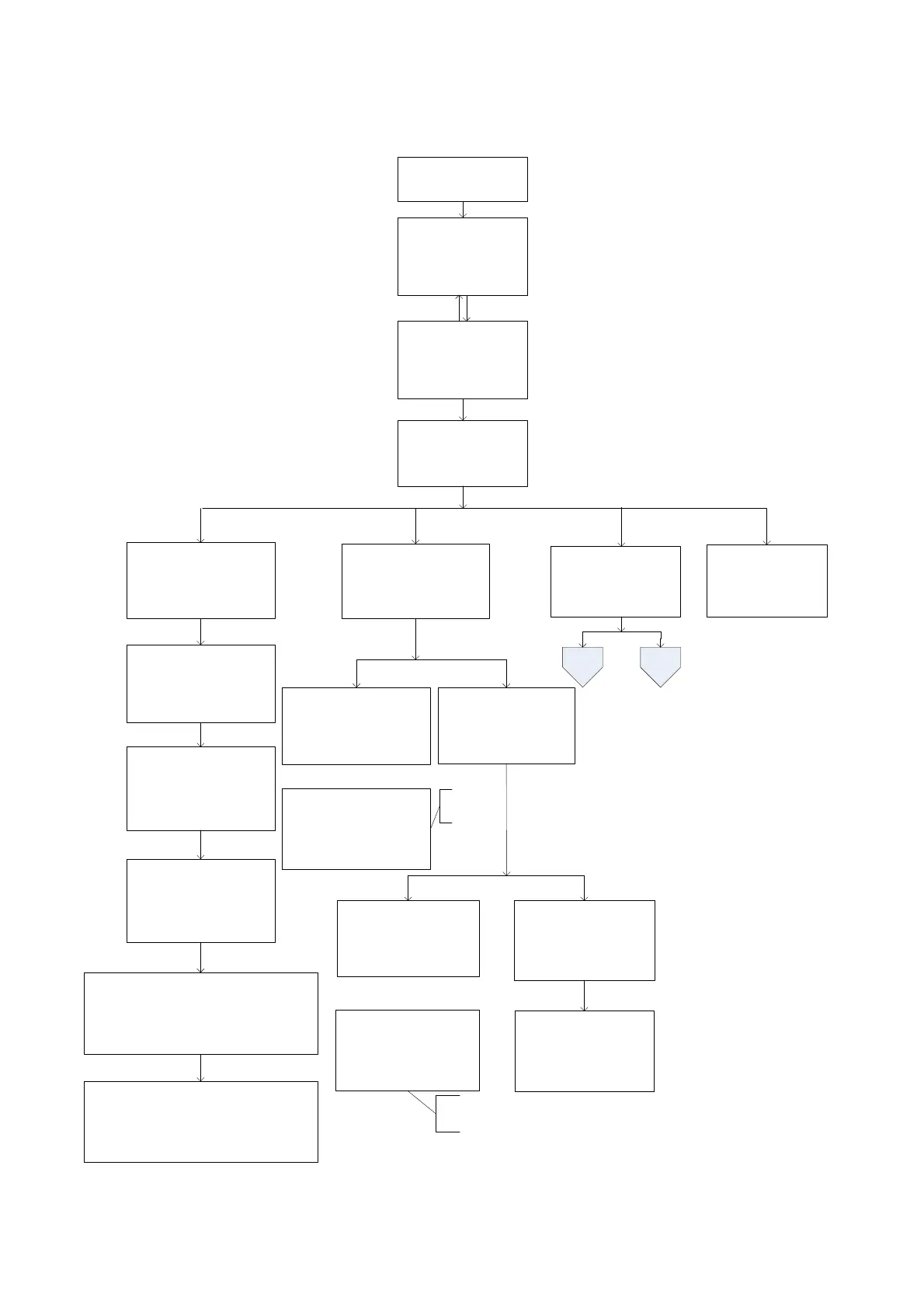
5.5.3 LCD Menu Tree
Users can check the status, view event log, set parameters and control of UPS via LCD panel. See below Menu
Tree.
1. Status
2. Event log
3. Setting
4. Control
Startup
…...
Power on
After 6
sec, enter default page
automatically.
Enter
Enter password
:
****
Settings&
Control Menu
Status Menu
Control
menu
yy-mm-dd hh:mm
Mode: xxxxx
OP-V: xxx.xV
Load : xxx%
1
. Serial No.
xxxxxxxxxxxxxx
2. I/P-V:
xxx.xV
3. I/P-F:
xx.xHz
4
. BAT V: xx.x V
5. BAT T:
xx°C
6. O/P-V: x
xx.x V
7. O/P-F: xx.xHz
8. O/
P-P
: xxxxVA
9. O/P-P: xxxxWatt
10. Load: x
xx%
11. Mode: xxxxx
12.
InvEV: xxxxx
13. InvTM: xxxx.xH
14. BukEV: xxxxx
15. BukTM: xxxx.xH
16. BstEV: xxxxx
17. BstTM: xxxx.xH
18. C1:Off(or On) C2:Off(or On)
19. C3:Off(or On) C4:Off(or On)
20. C5:Off(or On) C6:Off(or On)
21.
MainFW
: xx.xx
22.
LCDFW
: xx.xx
23. HW : xx.xx
1. Active Log
2. History Log
Active
Event
yy-mm-dd hh:mm
Over Load
In xxxxxx Mode
xx/xx
yy
-mm-dd hh:mm
Site fault
In xxxxxx Mode
xx/xx
History
Event
History Event
1. Inquiry
2
. Clear
Show all
current event
Clear all
history event?
Yes
No
yy-mm-dd hh:mm
Over Load
In xxxxxx Mode
xx/xx
Show all history event
200 log maximum
Setting
menu
……
yy
-mm-dd hh:mm
Site fault
In xxxxxx Mode
xx/xx
All history event
deleted !
Event Menu
5
. Help
Esc
UPS
-
2000A
Help
Default Password
: 1111
Default page
Menu page
Figure 9: LCD Menu Tree

Related product manuals