Forallenquiriespleasevisitwww.proroute.co.uk
Step3)atthetestPC,opentheIE,andinputhttp://183.43.55.249:80toentertheProroute
PROROUTE’s’sweb.
Notes:
1)TheProrouteH685’s’swebportdefaultis80.SomeISPblocktheport80becauseofsome
security.ThenpleaseconfirmtheISPhastheopenedport,andchangethewebportfor
PROROUTErouterbeforeremotevisiting.
PleaserefertoChapter3.3.14.1.1Routerwebportto
changethewebport.
2)IfyoucannotgetafixedpublicWANIP,youcanuseProrouteH685’s’sDDNSfeature.Referto
chapter3.3.14.1.3DDNSsettingstoconfigure.
Thenyoucaninputhttp://ddns:porttovisittheProrouteH685’s’swebport.
4.5WANRJ45Static(fixedIP)andCellularFailOverbackupredundancy
PleaseconnecttheRJ45WANportandtheupperRouterLANRJ45portviaRJ45cable.The
PROROUTEWANLEDshouldbeon.
Step1)logintotheProrouteH685web.
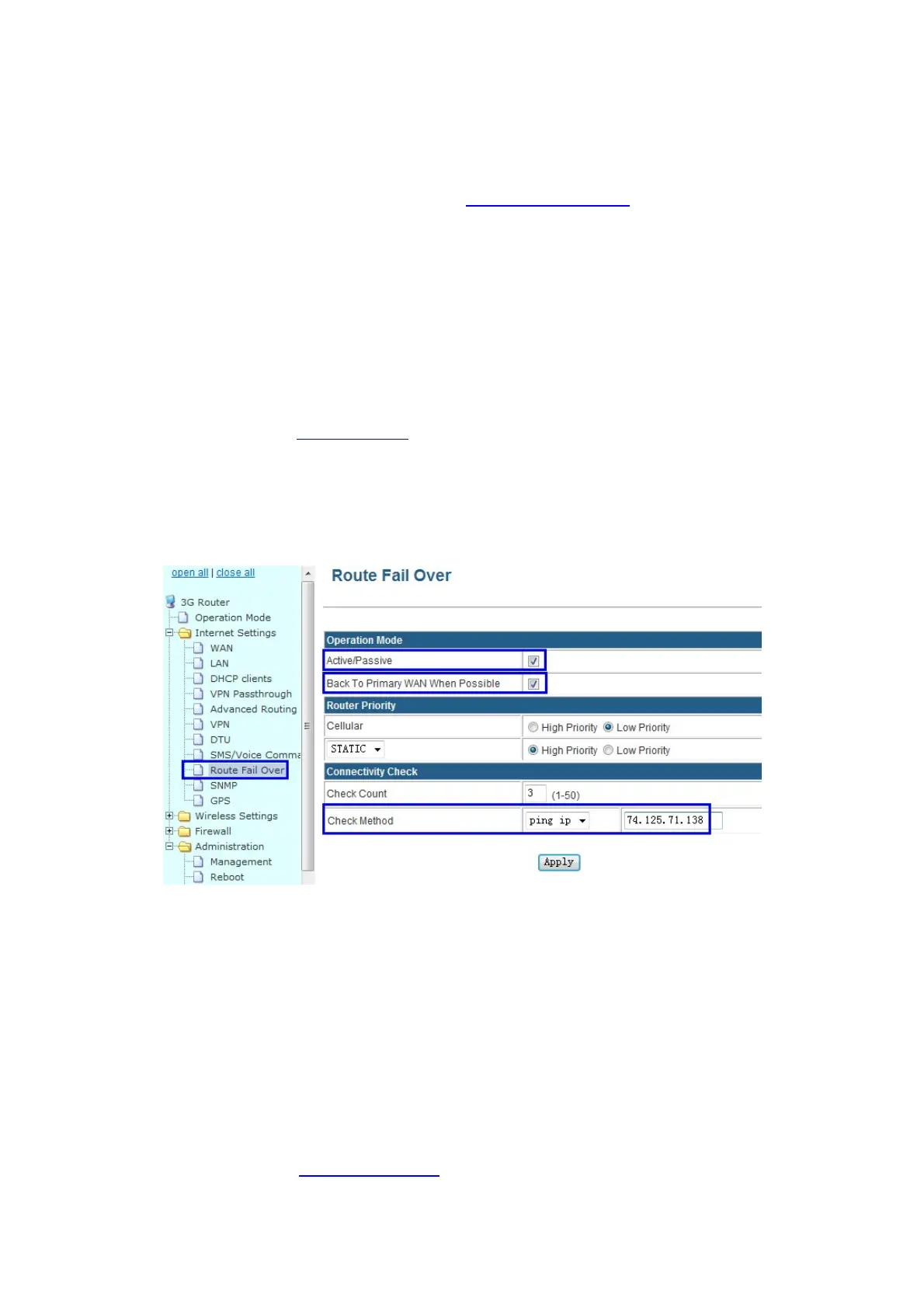
Step2)InternetSettings–RouteFailOver
Active/Pasive:tickit
BackToPrimaryWANWhenPossible:tickit(ifyouactivatethis,therouterwillautomatically
switchtoprimarymainlinefromsecondarylineifprimarymainlineresumetowork.Ifyou
don’tactivatethis,therouterwillkeepworkinginsecondarylineifprimaryline
fails.)
RouterPriority:YoucanselectmainlineandsecondarylineforCellularandWANRJ45
“STATIC/DHCP/PPPoE”
Forexample,herewesetCellularassecondaryline,andWANRJ45STATICasmainline.Then
chooseasthepictureabove.
CheckCount:fillinthenumberyouwanttocheckthe
lineavailabledetection.
CheckingMethod:fillinapublicIPaddressthatcanbepingthrough.



 To Next Page