Forallenquiriespleasevisitwww.proroute.co.uk
UserName:fillinthePPPoEusername
Password:fillinthePPPoEpassword
OperationMode:
KeepAlive:PPPoEwillremainonlineregardlessifthereisdatatransmission.
FillintheRedialPeriodtime.
OnDemand:PPPoEdialupwithdatatransmissionondemand.
Set theIdleTime.
PPPoEwillbeofflineifthesetidletimehasnodatatransmission.
Manual:Manuallydialuprequired.
Click“Apply”button.
Step4)
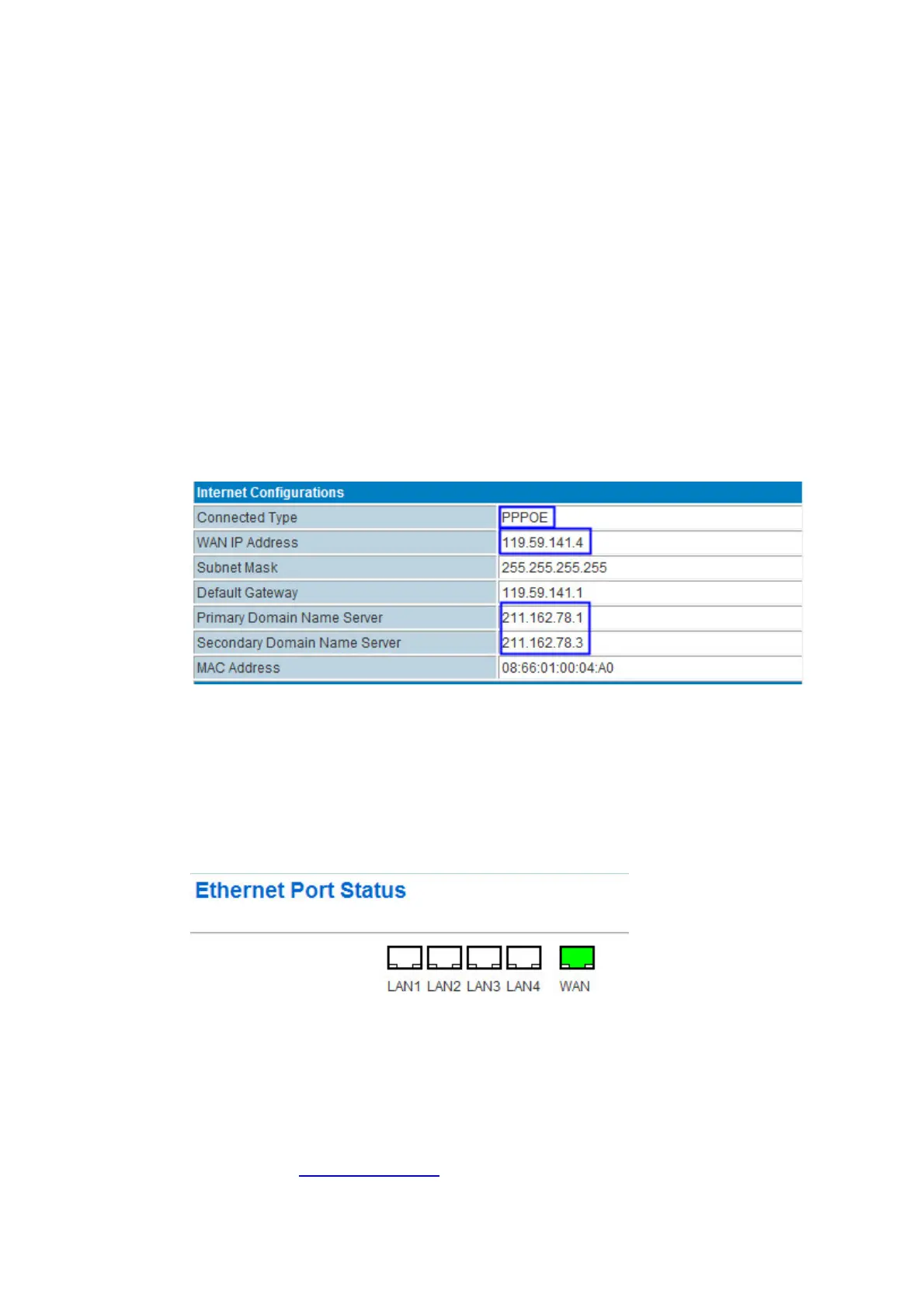
PROROUTEweb–Status,itdisplaytheWANIPoncethePPPoEisonline.
2.2.6 WANFixedIP
SettheProrouteH685WANviaaSTATIC
fixedIPfedbytheupperrouterviaSTATICfixedIP.
Step1)
ConnectRJ45cablebetweenUpperRouterLANRJ45toPROROUTEWANRJ45port.Once
it’sconnected,thePROROUTEWebEthernetPortStatuswilldisplay.
Notes:youmaynotseetheWANRJ45connectionstatus.Butitwill
flashtofreshthestatus
every30seconds.
Step2)
PROROUTEweb–OperationMode,choosethe“Gateway”mode



 To Next Page