Forallenquiriespleasevisitwww.proroute.co.uk
Step3)
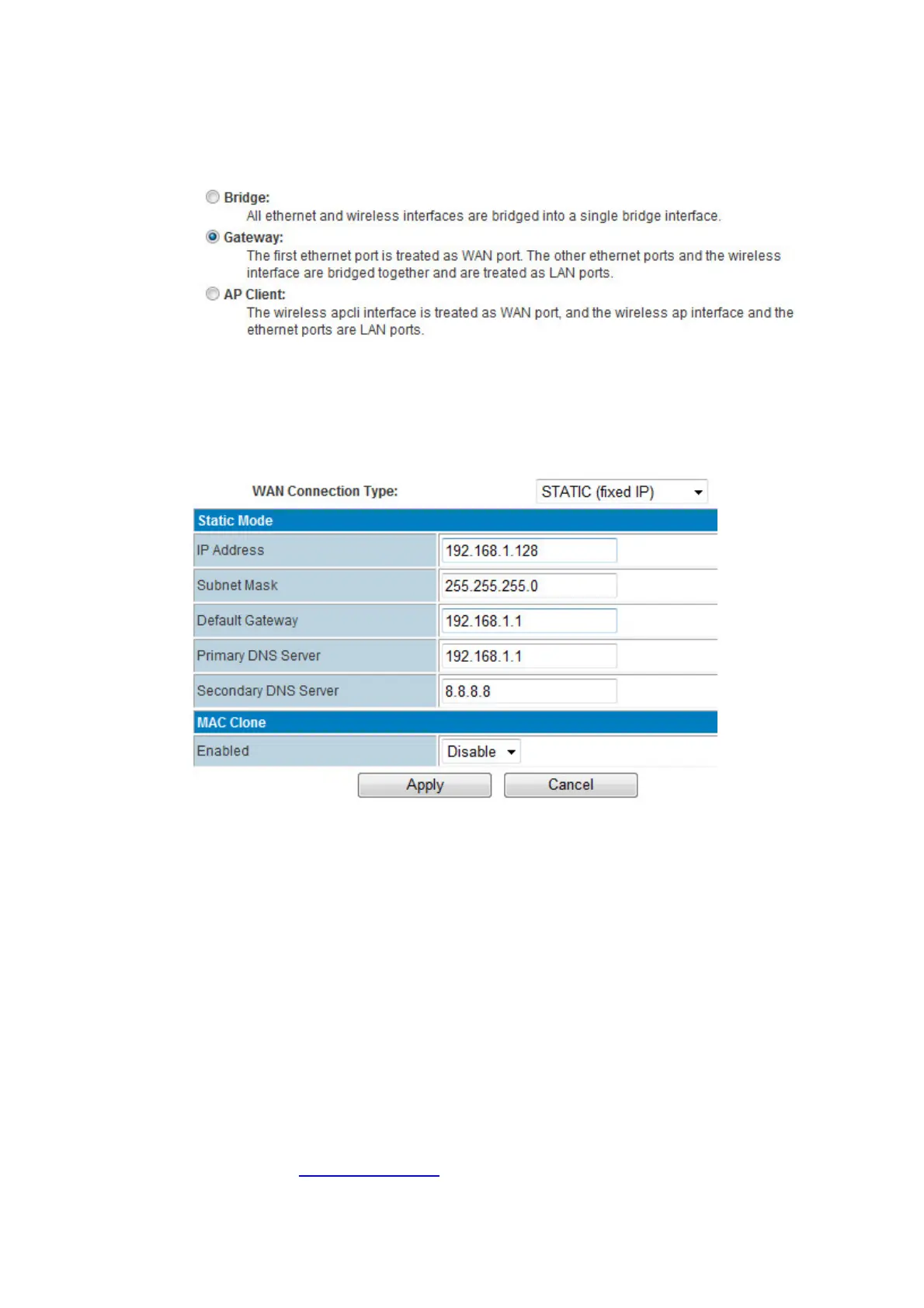
PROROUTEweb–InternetSettings–WAN–WANConnectionType,choose“STATIC(fixed
IP)”
WANConnectionType:choose“STATIC(fixedIP)”
IPAddress:fillinoneIPAddress.ThisIPAddressshouldbesamerangeoftheUpper
Router.Forexample,theUpperRouter
LANIPis192.168.1.1andSubnetMaskis
255.255.255.0,youcanfillintheparametersasabove.
SubnetMask:fillintheSubnetMaskfromtheUpperRouter.
DefaultGateway:fillintheUpperRouter’sGatewayIP.
PrimaryDNSServer:IfyourUpperRoutersupportsDNS
proxy,fillintheUpperRouter’s
LANIPasPrimaryDNSServer.OryoucanfillinthecorrectDNSServerIP.
SecondaryDNSServer:FillinaworkingsecondaryDNSServerIP.
Clickthe“Apply”button.
Step4)
PROROUTEweb–Status,itdisplaytheWANIPonce
theSTATIC(fixedIP)isonline.



 To Next Page