Forallenquiriespleasevisitwww.proroute.co.uk
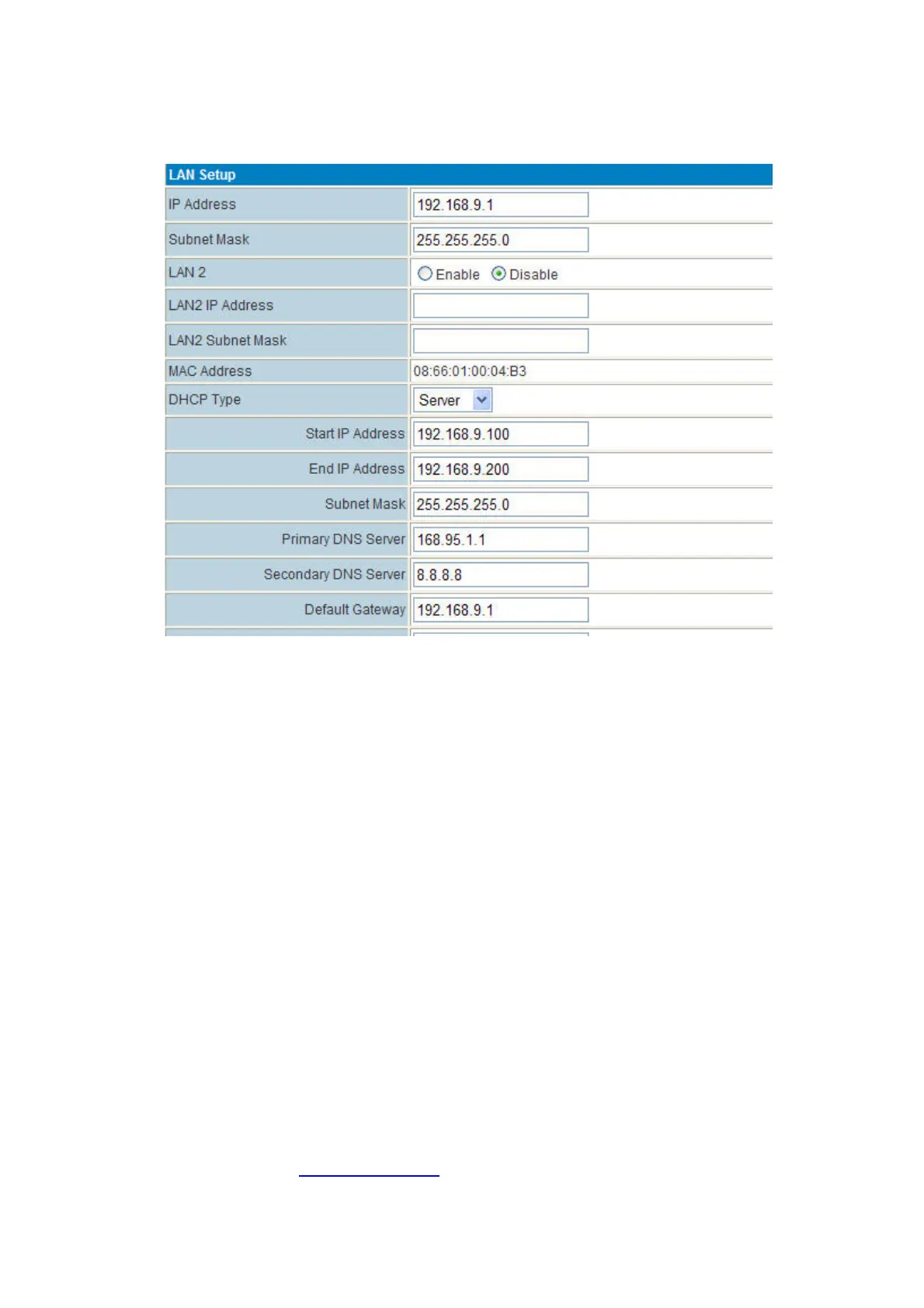
Step3)modifythe“DefaultGateway”toreflectthe“IPAddress”,thenclick“Apply”button.
4.10PPTPclientconnection
PPTPServer’sInfo:
PPTPServerIP:190.54.34.131
Username:vpnuser
Password:tekrem9876
RemoteLAN/Mask:192.168.130.0/24
PPTPServer’sAssignedNetwork:192.168.8.0/24(IfyourPPTPServerisnotAssignedtoProroute
PROROUTE’sIP
networkrange,thePPTPcanconnectbutcannotsenddatathrough.Alsoyou
canchangeP ROROUTELANIPintothePPTPserver’sassignednetworksuchas192.168.0.1or
192.168.1.1,etc.)
Step1)PuttheProrouteonline.
Step2)FillinthePPTPparametersasfollows,



 To Next Page