Setupmenuoperation- Soundmenuoptions
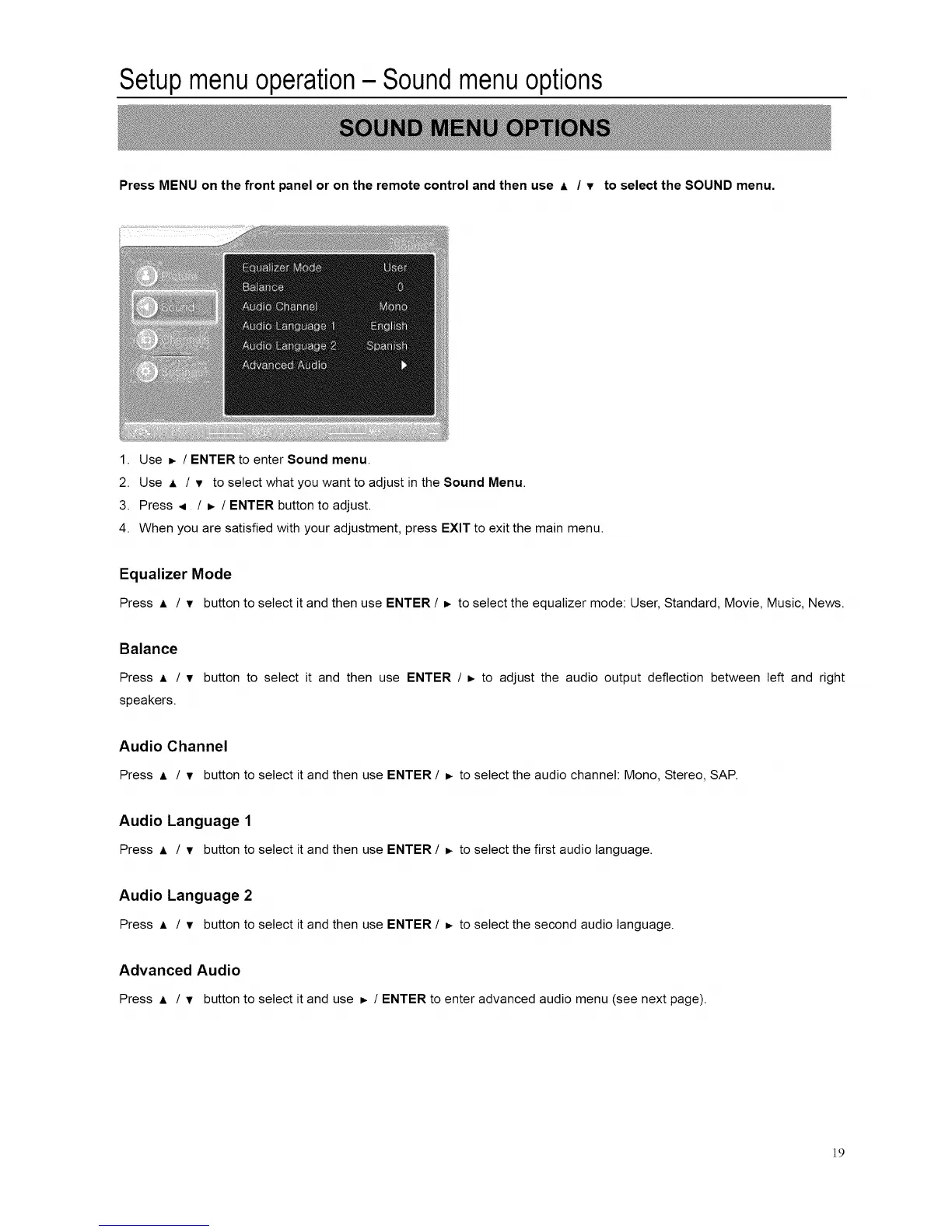
Press MENU on the front panel or on the remote control and then use A / v to select the SOUND menu.
1. Use _. / ENTER to enter Sound menu.
2. Use A / v to select what you want to adjust in the Sound Menu.
3. Press ,i. / _ / ENTER button to adjust.
4. When you are satisfied with your adjustment, press EXIT to exit the main menu.
Equalizer Mode
Press A / v buttonto select it and then use ENTER / _ to select the equalizer mode: User, Standard, Movie, Music, News.
Balance
Press _, / v button to select it and then use ENTER / _ to adjust the audio output deflection between left and right
speakers.
Audio Channel
Press ,1, / • button to select it and then use ENTER / _ to select the audio channel: Mono, Stereo, SAP.
Audio Language 1
Press A / • button to select it and then use ENTER / _ to select the first audio language.
Audio Language 2
Press A / • button to select it and then use ENTER / b to select the second audio language.
Advanced Audio
Press A / • buttonto select it and use _. / ENTER to enter advanced audio menu(see next page).
]P














 To Next Page