Reference MVI56E-MCM ♦ ControlLogix Platform
User Manual Modbus Communication Module
Page 192 of 209 ProSoft Technology, Inc.
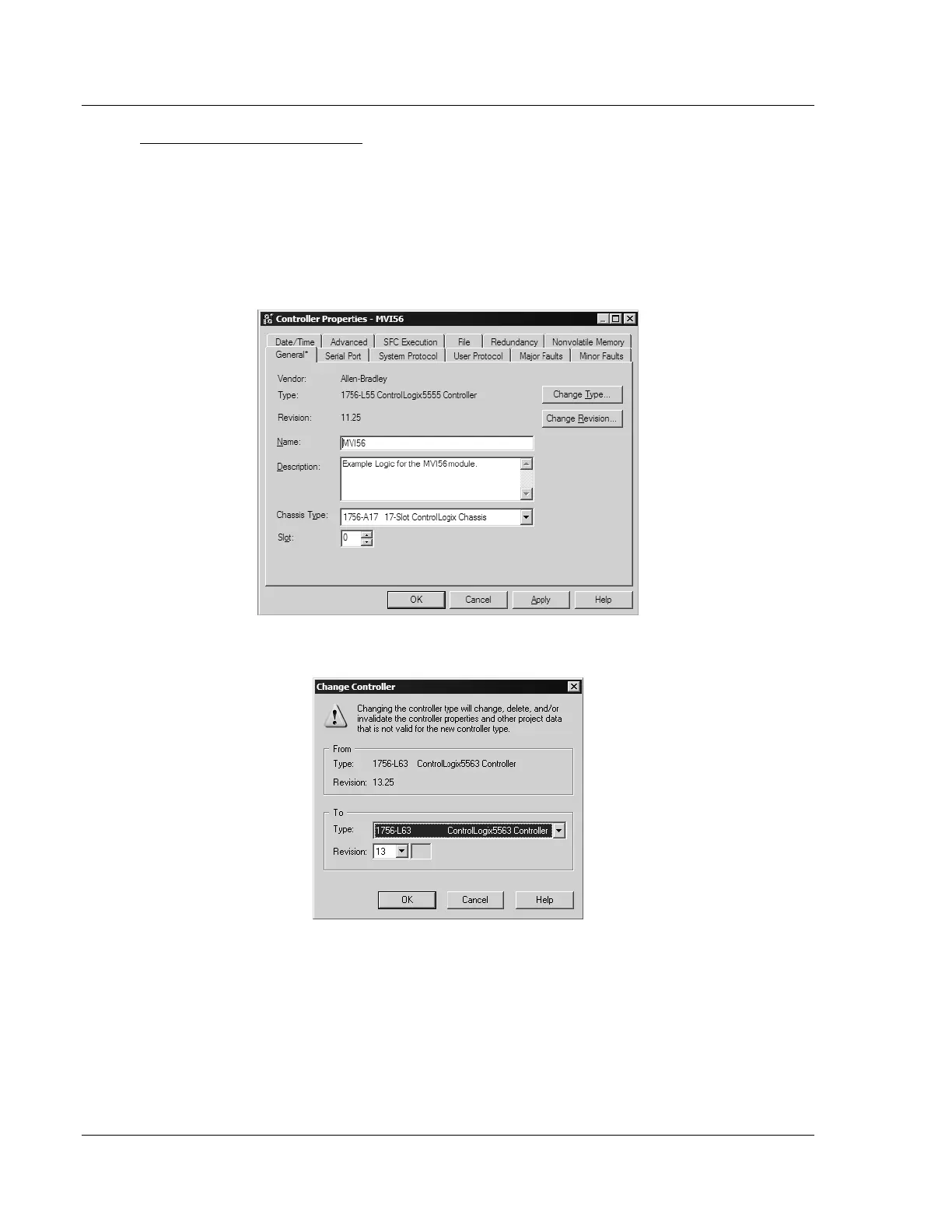
Choosing the Controller Type
The sample application is for a 1756-L63 ControlLogix 5563 Controller. If you are
using a different model of the ControlLogix processor, you must configure the
sample program to use the correct processor model.
1 In the Controller Organization list, select the folder for the controller and then
click the right mouse button to open a shortcut menu.
2 On the shortcut menu, choose PROPERTIES. This action opens the Controller
Properties dialog box.
3 Click the CHANGE TYPE or CHANGE CONTROLLER button. This action opens
the Change Controller dialog box.
4 Open the TYPE dropdown list, and then select your ControlLogix controller.
5 Select the correct firmware revision for your controller, if necessary.
6 Click OK to save your changes and return to the previous window.


 To Next Page