MVI56E-MCM ♦ ControlLogix Platform Reference
Modbus Communication Module User Manual
ProSoft Technology, Inc. Page 195 of 209
Note: If you receive an error message during these steps, refer to your RSLogix documentation to
interpret and correct the error.
6.10.2 Using the Sample Program in an Existing Application
1 Open the Sample Ladder Logic in RSLogix 5000.
2 Start another instance of RSLogix 5000, and then open your existing
application.
You will be adding the MVI56E-MCM module definition, and then copying
controller tags, ladder logic, and user defined data types from the sample
application into your existing application.
Defining Module in I/O Configuration
Note: You cannot perform this procedure while you are online to the controller.
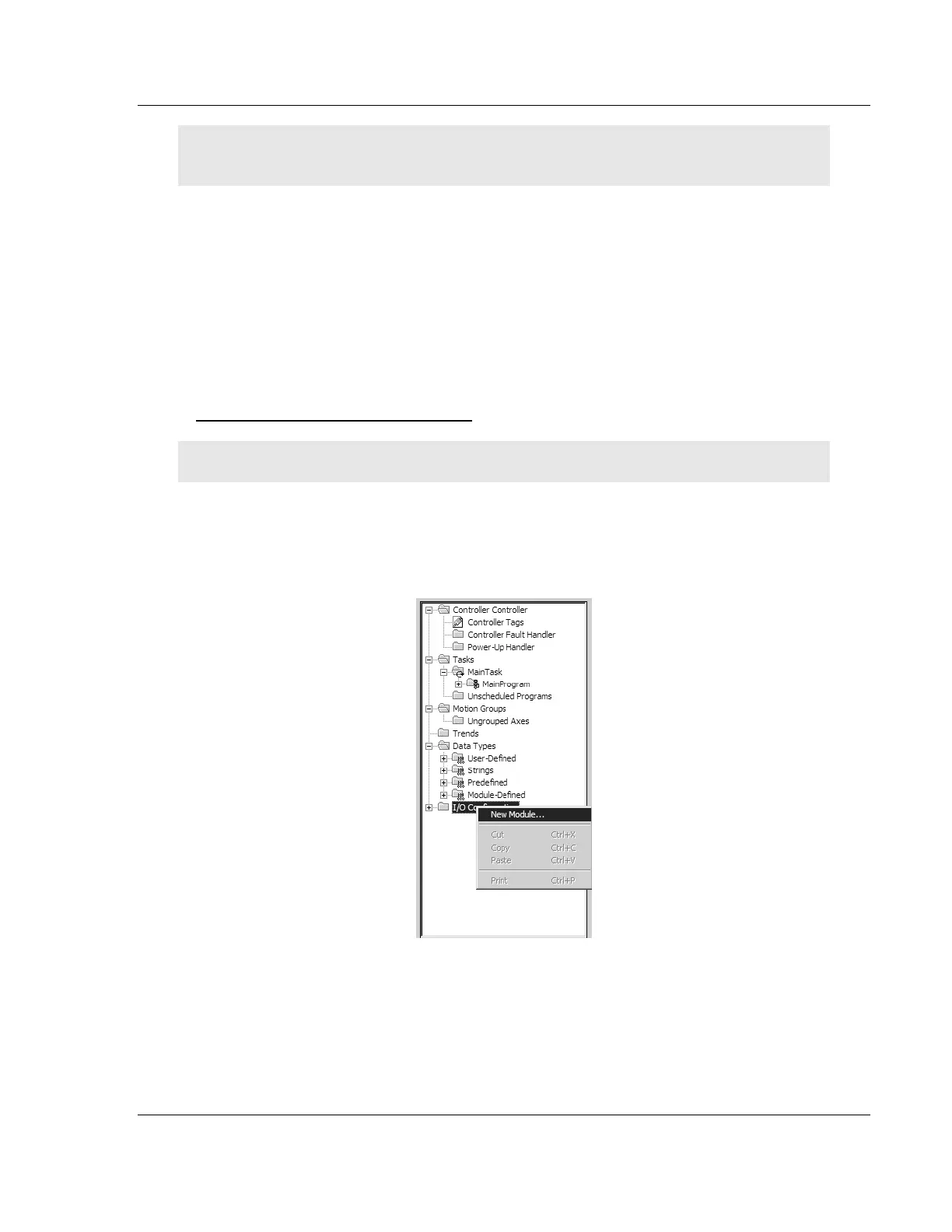
1 In the CONTROLLER ORGANIZATION list in RSLogix 5000, click the right mouse
button on the I/O CONFIGURATION icon to open a shortcut menu. On the
shortcut menu, choose NEW MODULE…. This action opens the SELECT
MODULE TYPE dialog box.


 To Next Page