N 93-531-79 ISSUE 1 NH Page 17 of 32 © Protec Fire Detection PLC 2012
10.5 Programming Loop Sounder Volume Levels
Most Protec loop sounder devices can have their volume levels individually programmed from the 6100. The
selections currently available are LOW, MEDIUM and HIGH. Please consult the specific datasheet for the
loop device to determine the dB output for each volume level.
In the Edit -> Device editor window repeated clicking on the Volume field for the relevant loop address
scrolls through the available choices.
10.6 Allocating a Class to a Loop Device
The activation behaviour of loop input devices can be altered by selecting the relevant option in the Class
field for that address. In general, detectors are set to automatic class and Manual Call Points are allocated
as manual class. Normally 6000/MIP devices are used to control various panel functions via the loop.
In the Edit -> Device editor window repeated clicking on the Class field for the relevant loop address scrolls
through the available class choices.
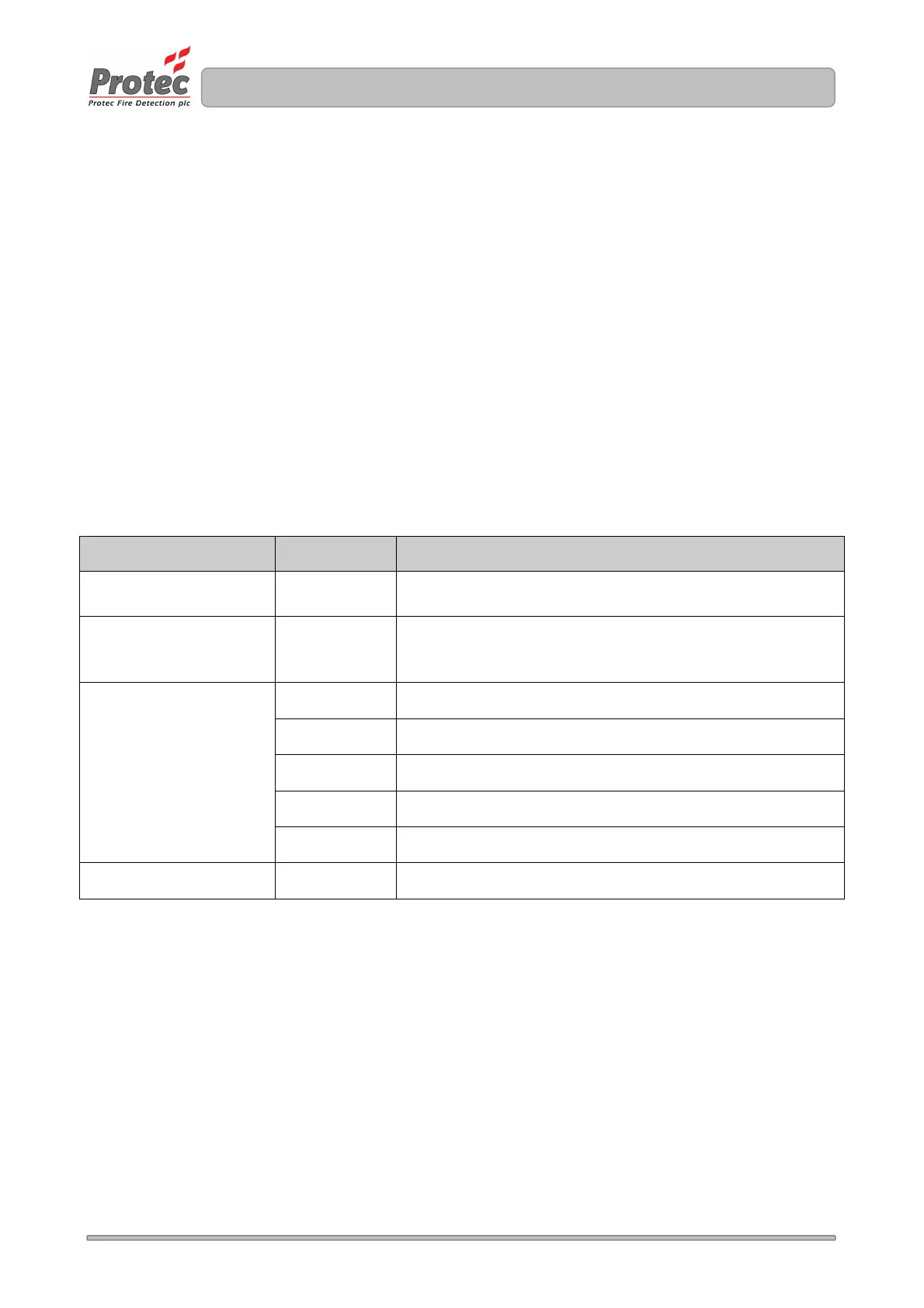
Table 10.1 details how the class should be allocated to various loop devices.
Table 10.1
Loop Input Device Class Operation
Automatic Detector Automatic Processed as an automatic device
Manual Call Point
Fast Response Interface
Manual Processed as a manual device
MIP
Silence Activation causes 6100 to silence
Reset Activation causes 6100 to reset ( silence must be done first )
Sound Alarms Activation causes 6100 to sound alarms
Accept Activation causes 6100 to accept ( mute buzzer )
IReset Activation causes 6100 to reset ( silence not required )
Other Automatic Processed as an automatic device
10.7 Setting a Loop Input Device to be Latching or Non-Latching
Loop input devices can be set as latching or non-latching. A latching device, once activated, can only be
reset from the 6100 ( by pressing Silence, then Reset at access level 2 or above ).
Non-latching devices cause the 6100 to automatically reset when they return to normal after being activated.
Note that the 6100 will only automatically reset if no other activations are present on the system. If several
non-latching devices are active, the 6100 will only reset when all devices have returned to the normal state.



 To Next Page