N 93-531-79 ISSUE 1 NH Page 23 of 32 © Protec Fire Detection PLC 2012
13.0 Programming Panel Configuration Data
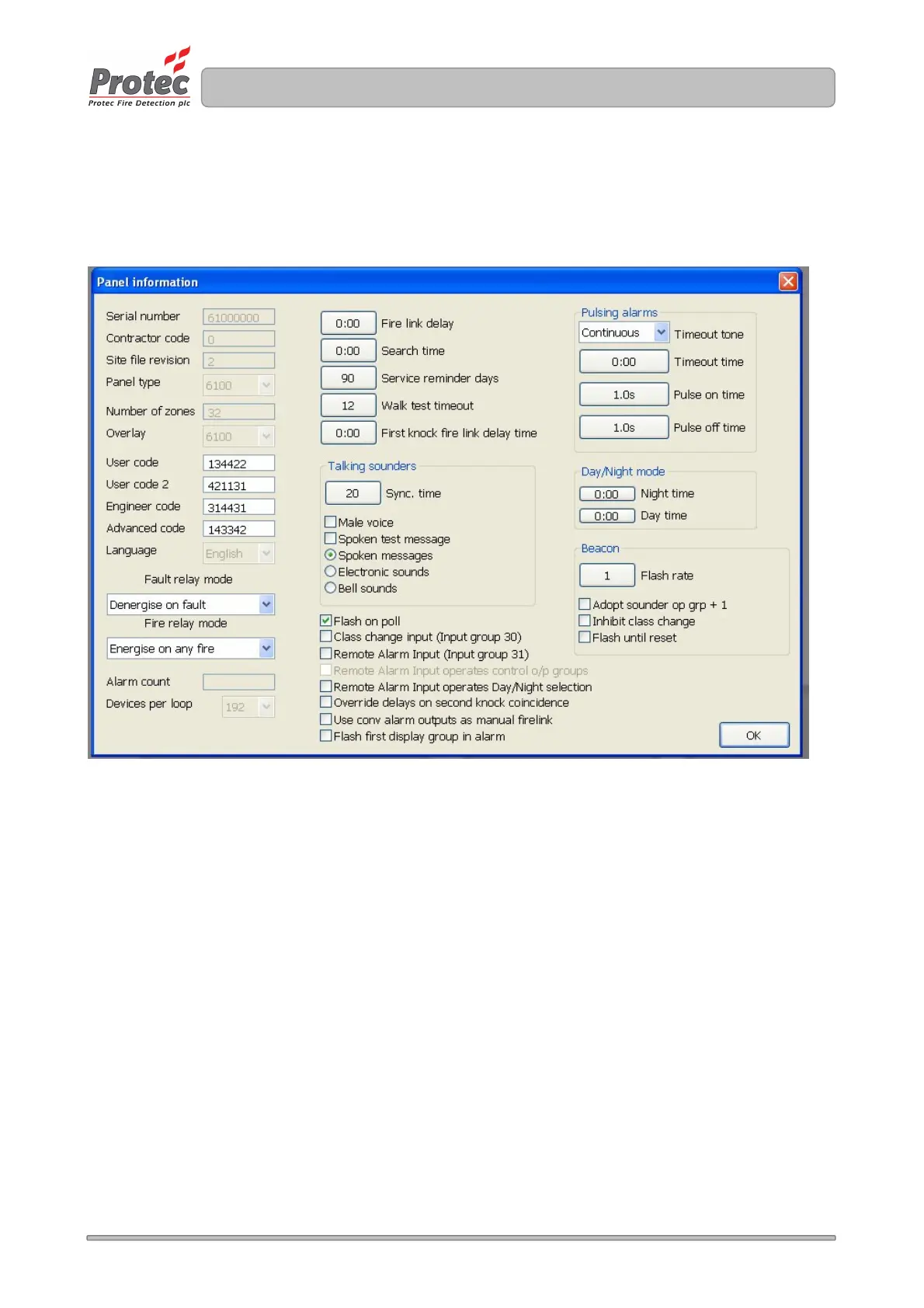
To edit panel configuration settings use the Edit->Panel info option. The window shown in Figure 13.0 is
displayed.
Figure 13.0
13.1 Programming the Panel Access Codes
The 6100 uses four codes to access various parts of the system.
The codes are:
User code Allows access level 2 functions to be accessed
User code 2 Same as User code, but also allows loop devices to be exchanged
Engineer code Allows access level 3 functions to be accessed
Advanced code Allows access level 4 functions to be accessed
To edit a code, click in the relevant code box, delete the current code and enter the new code ( codes must
be six digits long, using only digits 1, 2, 3 and 4 ).
13.2 Programming the Global Fire and Fault Contact Operation
The operation of the global fire contacts can be setup by clicking on the Fire relay mode box and selecting
the mode of operation as required. The global fire relay can be made to operate on any fire, just automatic
fires or just manual activations.



 To Next Page