N93-582-02 Issue 1 NH Page 24 of 28 © Protec Fire Detection plc 2015
14.0 Entering Panel Information
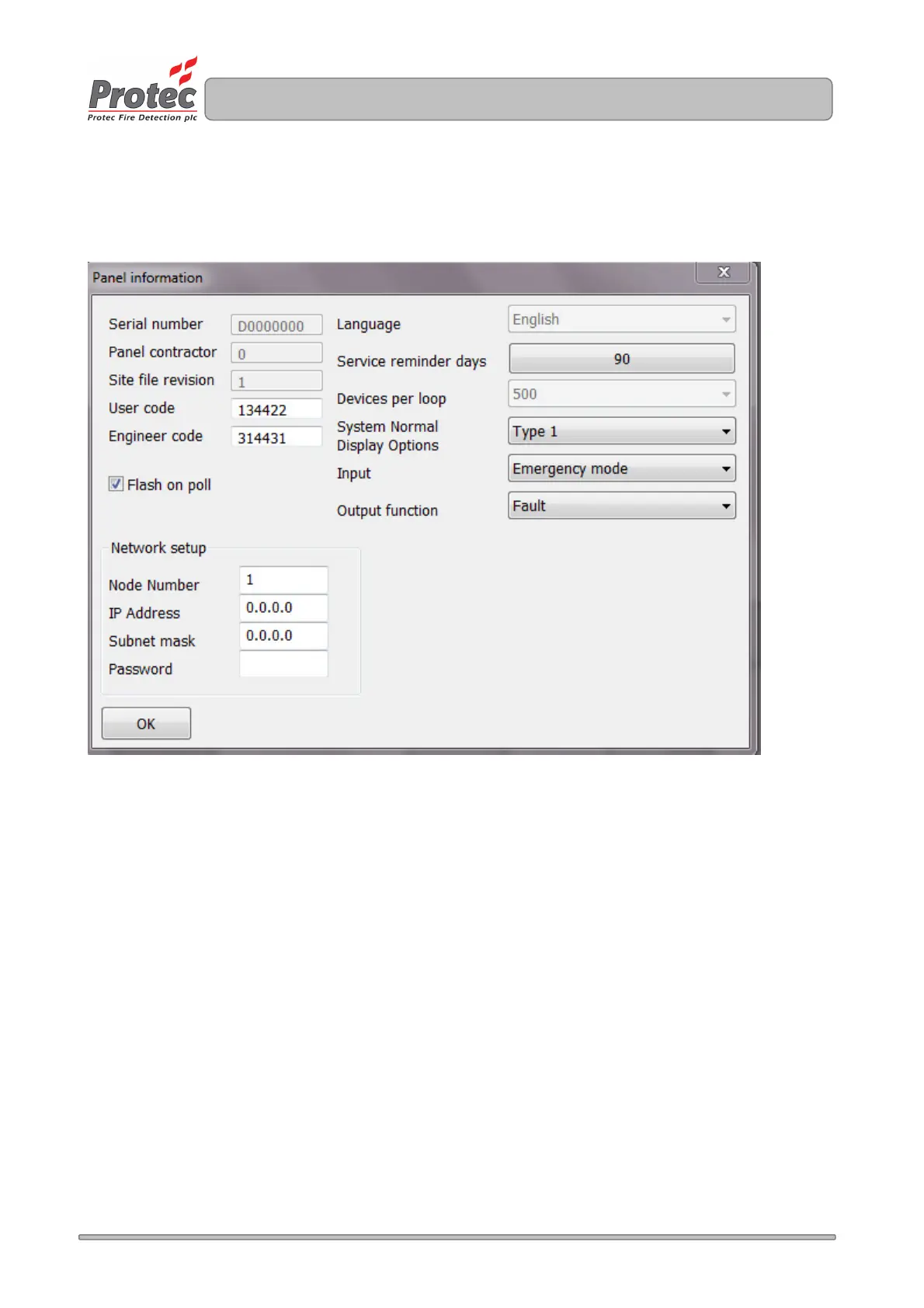
Panel information is entered in the Edit -> Panel Information window, as illustrated in figure 14.0 (Default
values are shown).
Figure 14.0
14.1 Changing the User and Engineer Access Codes
The Digilite® DL500 uses two 6 digit codes to permit access to various parts of the system. The codes are
entered in the User Code and Engineer Code fields of the Panel Information window.
Click in the relevant field and enter a 6 digit code, using only numbers 1 , 2, 3 and 4.
14.2 Setting up 'Flash on Poll' for Loop Devices
Some loop devices include an LED indicator to show when they are sending data back to the Digilite®
DL500 (particularly useful when commissioning the system). The feature may be enabled and disabled by
checking / un-checking the 'Flash on poll' checkbox.
14.3 Configuring System Normal Display Options
The default system normal display be programmed by setting the 'System Normal Display Options' choice to
either 'Type 1' or 'Type 2'.
Type 1 displays the text 'System Normal'
Type 2 display the time and date.
Click in the 'System Normal Display Options' box and choose the required option.



 To Next Page