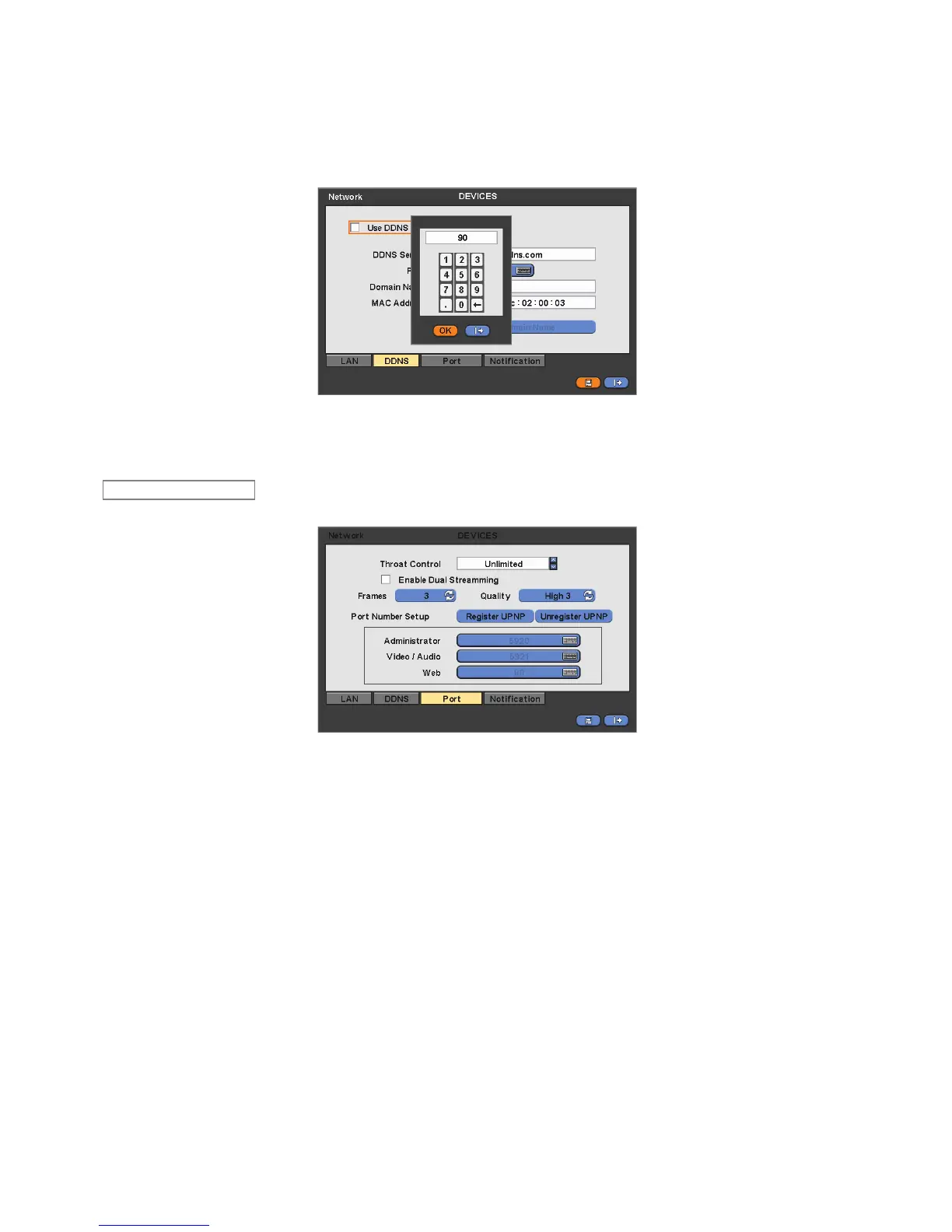
varies every time when user access. The best alternative is DDNS (Dynamic Domain Naming System) which uses name
(domain name) instead of IP address (numbers). DDNS automatically recognizes ever changing, floating IP addresses, so it
will allow easy Internet access.
Check a checkbox of Use DDNS to use DDNS function.
As for DDNS Server, dvrdomain.com name will be showing as default.
As for Port, 95 is shown by default. If ‘95’ is unable, please consult with a product distributor.
When user press Get Domain Name button, Domain Name and MAC Address value will automatically display after 10
seconds.
Choose ‘OK’ to confirm the setting.
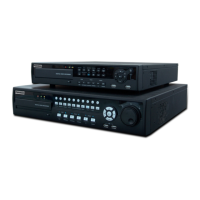
Please click ( ) Port and the following screen will appear.
Network Throat is for setting an average transfer speed.
Please choose the suitable speed according to the users’ network environment.
If users want to use dual streaming, please click on the check box beside the “Enable Dual Streaming”. If not, please
uncheck the check box.
There are total of 14 different network throat controls users may choose. (bps: bit per second) 26 kbps, 128 kbps, 256 kbps,
512 kbps, 1 Mbps, 2 Mbps, 4 Mbps, 8 Mbps, 10 Mbps, 20 Mbps, 40 Mbps, 80 Mbps, 100 Mbps, Unlimited(default).
- Ethernet support Max. 1000Mbps.
Network video transmission speed and quality can be configured by pressing “Frames” and “Quality” buttons as follows.
- Frames : H Series - 1, 2, 3, 4, 5, 7, 15 frames for NTSC (1, 2, 3, 4, 5, 6, 12.5 frames for PAL)
H / FH / MH / VH /AQH Series DVR - 1, 2, 3, 4, 5, 7, 15, 30 frames for NTSC (1, 2, 3, 4, 5, 6, 12.5, 25 frames for
PAL)
- Quality : Std. 1, Std. 2, Std. 3, Std. 4 (standard), High 1, High 2, High 3, Super 1, Super 2, Super 3
The Port Number Setup menu will allow users to set Administrator and Port Number for Video/Audio and Web Port.
The Port Number Setup menu has two selections of “Register UPNP” or “Unregister UPNP”.
Click ( ) “Register UPNP” for automatic port forwarding.
Click ( ) “Unregister UPNP” to do port forwarding manually.
For Port Number Setup, please get an approval of the network administrator in connection with CMS program.
Port number
- Administrator: 5000~65535
- Video / Audio: 5000~65535
- Web: 1~65535
Choose ‘OK’ to confirm the setting.


 To Next Page