CAUTION
If the HD-SDI input signal is 1080p, then the frame resolution of 360 x 240, 720 x 240 and 720 x 480 are decreased in half.
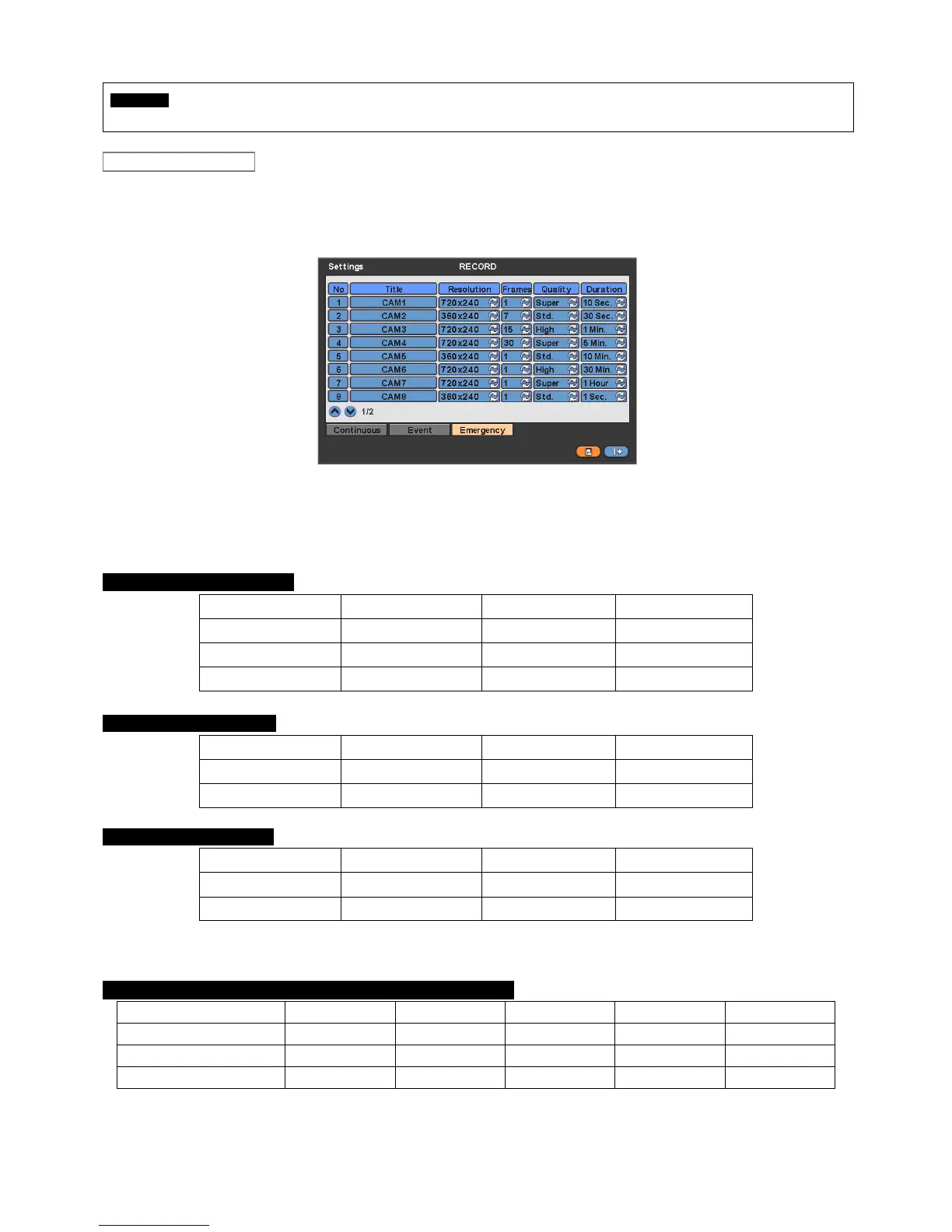
Please click ( ) Emergency and the following screen will appear Emergency.
The Emergency menu will allow user to set Emergency videos.
Each frame on Title column shows camera title registered in DEVICES>Camera/PTZ. User may not change camera titles
here.
Click ( ) each frame on Resolution column to select recording resolution of a corresponding camera. User may select one
of 360x 240(288), 720x240(288), 720x480(576), 1280x720 and 1920x1080
Click ( ) each frame on Frames column to select recording rate of a corresponding camera. Recording rate varies by
camera. Below lists the maximum recording rate of each camera.
ProVisual H / FH Series DVR
NTSC(PAL) 360x240 (360x288) 720x240 (720x288) 720x480 (720x576)
4 Channel DVR
120 (100) 120 (100) 60 (50)
8 Channel DVR
240 (200) 120 (100) 60 (50)
16 Channel DVR
480 (400) 240 (200) 120 (100)
ProVisual MH Series DVR
NTSC(PAL) 360x240 (360x288) 720x240 (720x288) 720x480 (720x576)
8 Channel DVR
240 (200) 240 (200) 120 (100)
16 Channel DVR
480 (400) 240 (200) 120 (100)
ProVisual VH Series DVR
NTSC(PAL) 360x240 (360x288) 720x240 (720x288) 720x480 (720x576)
8 Channel DVR
240 (200) 240 (200) 240 (200)
16 Channel DVR
480 (400) 480 (400) 480 (400)
-HD-SDI Type-
ProVisual DVR-412-AQH / DVR-824-AQH / DVR-1648-AQH
360x 240(288) 720x240(288) 720x480(576) 1280 x 720 1920 x 1080
4 Channel DVR
120(100) 120(100) 120(100) 60 30
8 Channel DVR
240(200) 240(200) 240(200) 120 60
16 Channel DVR
480(400) 480(400) 480(400) 240 120
Emergency


 To Next Page