ProVisual DVR-400-AQH
360x 240(288) 720x240(288) 720x480(576) 1280 x 720 1920 x 1080
4 Channel DVR
120(100) 120(100) 120(100) 120 100
ProVisual DVR-16214-AQH
HD-SDI Input (CH 1~2)
360x 240(288) 720x240(288) 720x480(576) 1280 x 720 1920 x 1080
2 Channel
60(50) 60(50) 60(50) 60 50
Analog Input (CH 3~16)
NTSC(PAL) 360x240 (360x288) 720x240 (720x288) 720x480 (720x576)
14 Channel
420 (350) 420 (350) 210 (175)
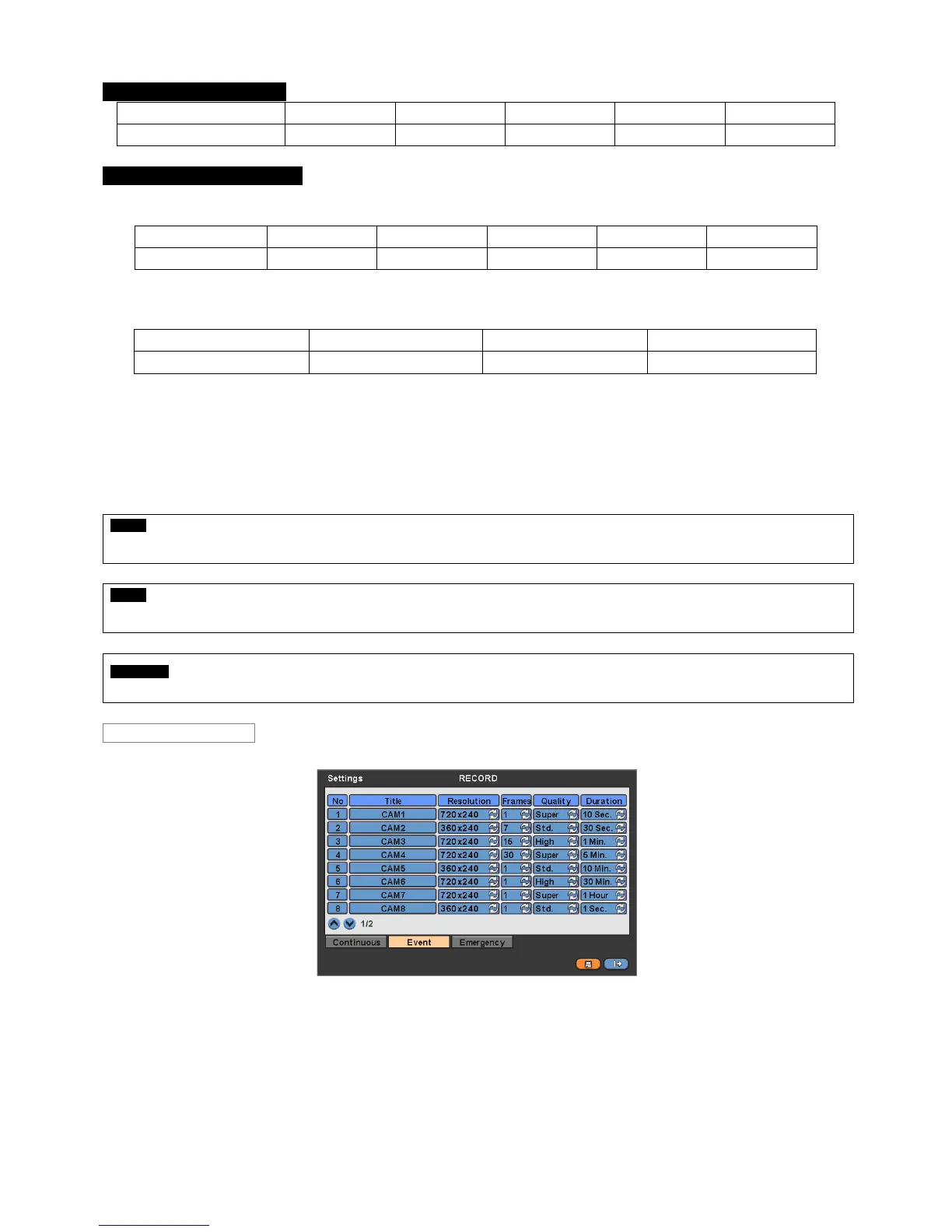
Click ( ) each frame on ‘Quality’ column to select recording quality of a corresponding camera. User may select its
recording quality from Super, High and Std.
Click ( ) each frame on ‘Duration’ column to select recording duration (i.e., 1 second ~3 hours) of a corresponding camera.
User may change the setting values of Resolution, Frames, Quality and Duration at a time by clicking the menu tab.
Choose ‘OK’ to confirm the setting.
NOTE
For DVR-400-AQH and DVR-16214-AQH, users can select the input standard from 720P 24, 720P 25, 720P 30, 720P 50, 720P 60, 1080I 50,
1080I 60, 1080P 24, 1080P 25, 1080P 30, 1080P 50, 1080P 60 (Manual Selection)
NOTE
For DVR-412-AQH /DVR-824-AQH/DVR-1648-AQH Type, all channels must use same format. For example, if the input signal is 720p, then
all input signal need to be 720p. (Auto Selection)
CAUTION
If the HD-SDI input signal is 1080p, then the frame resolution of 360 x 240, 720 x 240 and 720 x 480 are decreased in half.
Please click ( ) Event and the following screen will appear.
The Event menu will allow user to set Event videos.
Each frame on Title column shows camera title registered in DEVICES>Camera/PTZ. User cannot change camera titles
here.
Click ( ) each frame on Resolution column to select recording resolution of a corresponding camera. User may select one
of 360x 240(288), 720x240(288), 720x480(576), 1280x720 and 1920x1080
Click ( ) each frame on Frames column to select recording rate of a corresponding camera. Recording rate varies by
camera. Below lists the maximum recording rate of each camera.


 To Next Page