Chapter 3: Technical Information
26
Rear View
16-Port MPS1000
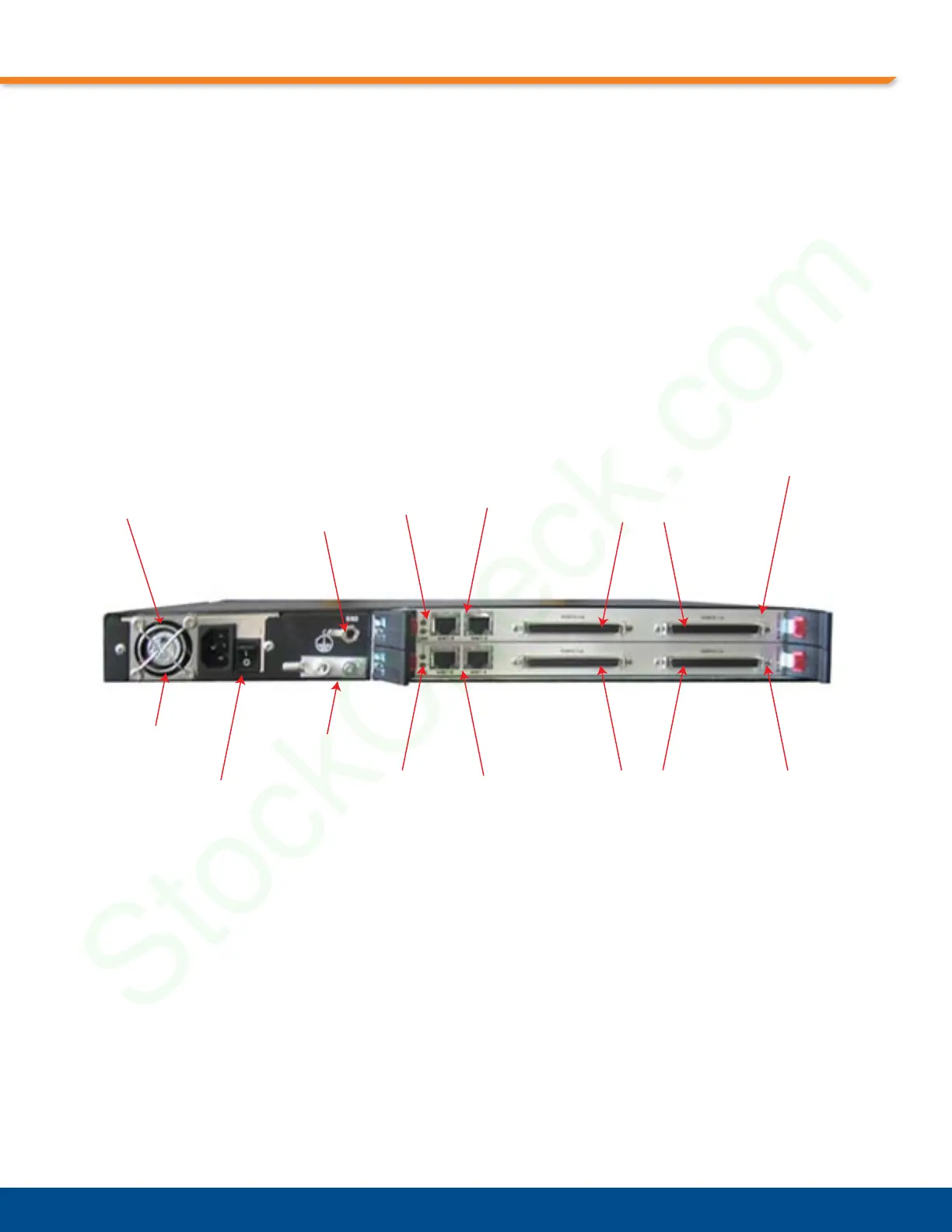
Figure 3-3, “Rear View 16-Port MPS1000,” shows an example of the back of a 16-port
MPS1000. The 16-port MPS1000 contains two RTM358 cards in the rear of the chassis.
Cabling
* ENET B (Ports “B”) should be connected using the supplied Crossover Cable. ENET A (Ports
“A”) should not be connected with a Crossover Cable. This only applies to the 16-port version.
No cable is needed for the 8-port or 4-port version of the MPS1000.
Figure 3-3: Rear View 16-Port MPS1000
Eight-Port MPS1000
The MPS1000 8-port version looks similar to the 16-port version but does not have a second
RTM358 in the rear of the chassis. The empty slot in the back of the 8-port version contains a
rear filler panel.
Ethernet
LEDs
Power Cord
Connector
RTM358
(Rear I/O)
RTM358
(Rear I/O)
ESD Jack
Power Supply
Fan (Exhaust)
Grounding
Lug
RJ45 Ethernet
Ports A & B
80-Pin Connectors
Power Switch
80-Pin Connectors
RJ45 Ethernet
Ports A & B
Ethernet
LEDs


 To Next Page