16 —MOUNTING AND WIRING
RELEASE 1.0.1 —15 JULY, 2020
# INSTRUCTIONS
1
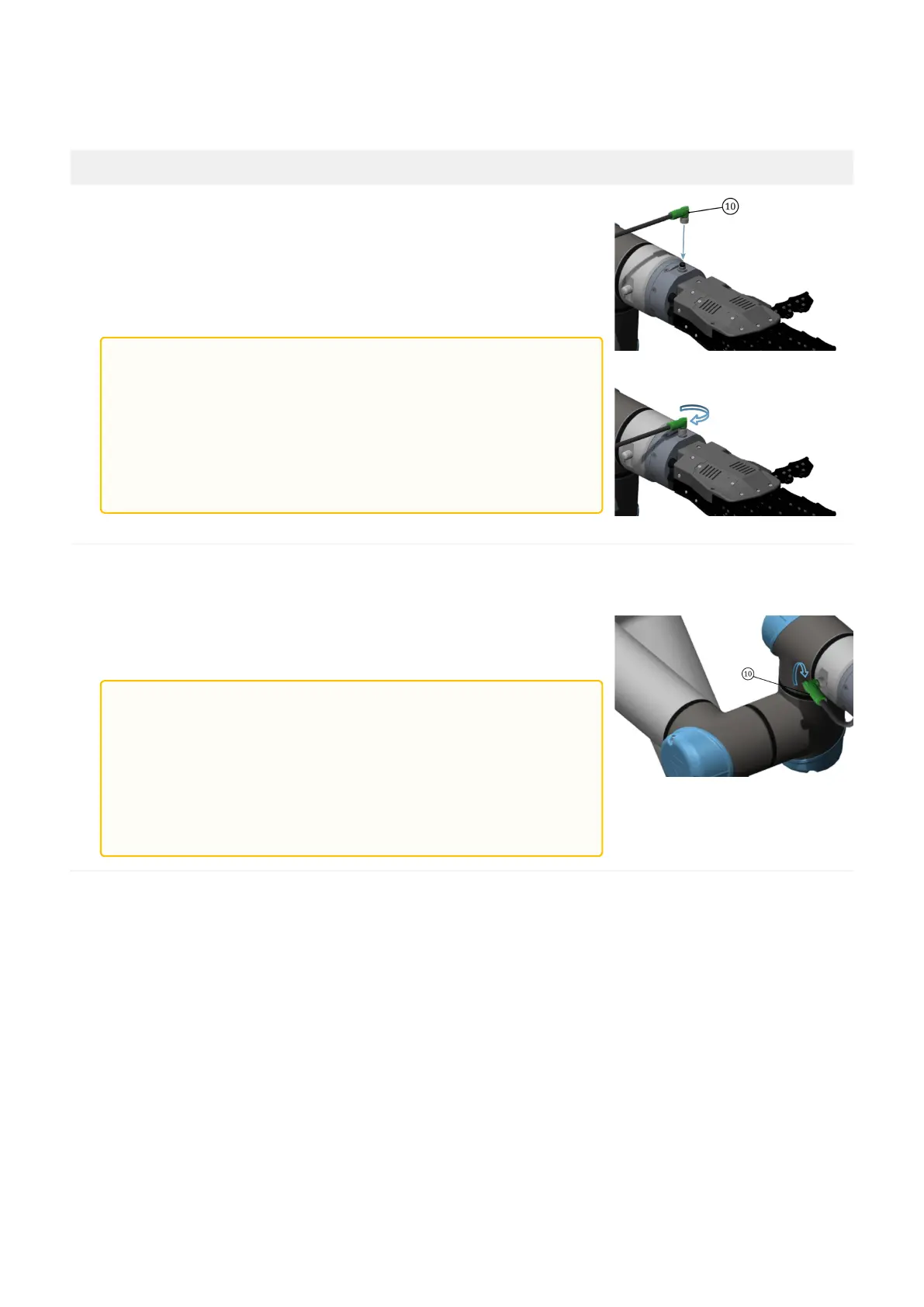
Insert one of the two M8 connectors of (10) into the receptacle on
the hand wrist flange. Lock the M8 connector by manually
tightening its threaded ring on the body of the receptacle (max
tightening torque= 0.2 Nm).
2
Do the same on the other M8 connector of (10) w.r.t. thereceptacle
on the robot wrist flange. Lock the M8 connector by manually
tightening its threaded ring on the body of the receptacle (max
tightening torque= 0.2 Nm).
Table 2. — Installation guidelines of the SoftHand research on UR. Referring to the ballons in the pictures:
(10) EC_CBL_26_M8FA8_M8FA8_030.
If you use this type of connection, you must set up the robot as follows, in order to properly communicate
over RS485 through the wrist connector:
WARNING:
Be careful to insert the connector in the correct
direction.
Do not rotate the M8 connector when inserted into the
receptacle.
Minimum curve radius of the cable (10) = 51 mm.
WARNING:
Be careful to insert the connector in the correct
direction.
Do not rotate the M8 connector when inserted into the
receptacle.
Minimum curve radius of the cable (10) = 51 mm.


 To Next Page