RELEASE 1.0.1 —15 JULY, 2020
•
•
•
•
•
•
•
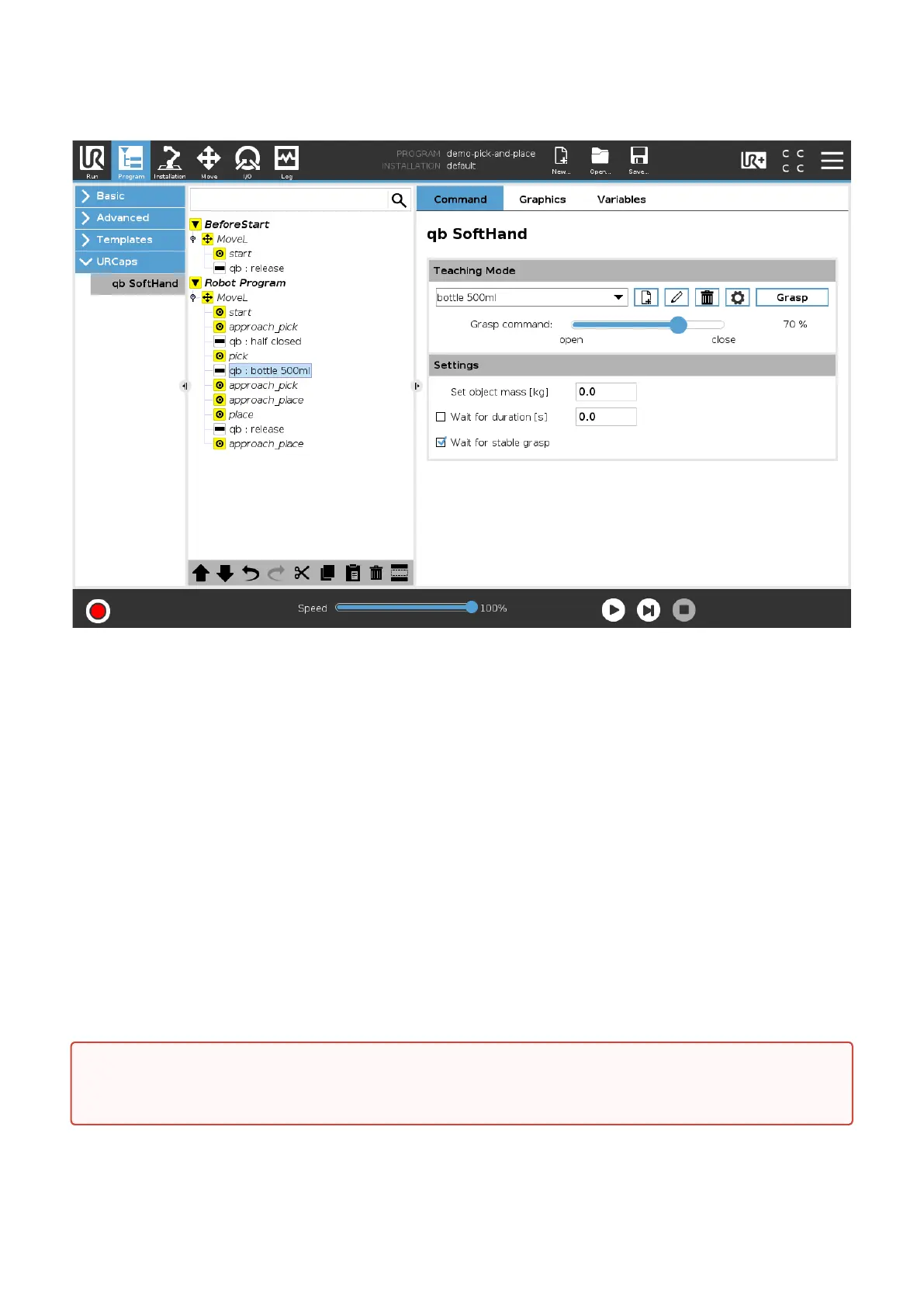
Figure 11. — qb SoftHand URCap program example
6.1.7 URCap enabled script functions
Apart from the UI features described above, you can add some custom function in your robot program by
using our script methods:
string qbsofthand.connect(): starts the serial communication with the device and returns the name
of the acquired serial port;
void qbsofthand.disconnect(): closes the serial communication and frees the serial resource;
string qbsofthand.getCycles(): returns the number of the device cycles since the last maintenance;
string qbsofthand.getInfo(): returns details about device internal parameters and it is mainly
aimed to our support team during incident investigation;
int[] qbsofthand.getMeasurements(): returns a two-integer vector data; the first value is the
current motor position in percent value (0% — 100%), while the second represents the motor current
consumption expressed in mA;
bool qbsofthand.isReachable(): returns "true" if the serial communication is active;
void qbsofthand.setCommand(int command): sends a reference position command to the device; the
integer parameter must be a percent value, i.e. in range 0 — 100.
CRITICAL:
These commands are meant to be used by expert users only.


 To Next Page