Note
• The TVS-x72XT has two M.2 SSD slots. For a list of compatible M.2 SSDs, go to https://
www.qnap.com/compatibility.
• QNAP recommends installing heatsinks on M.2 SSD controllers to enhance cooling
eciency and ensure consistent performance.
• Before installing non-QNAP heatsinks, ensure that they are of the appropriate size and
shape.
1. Power o the NAS.
2. Disconnect the power cord from the electrical outlet.
3. Disconnect all cables and external attachments.
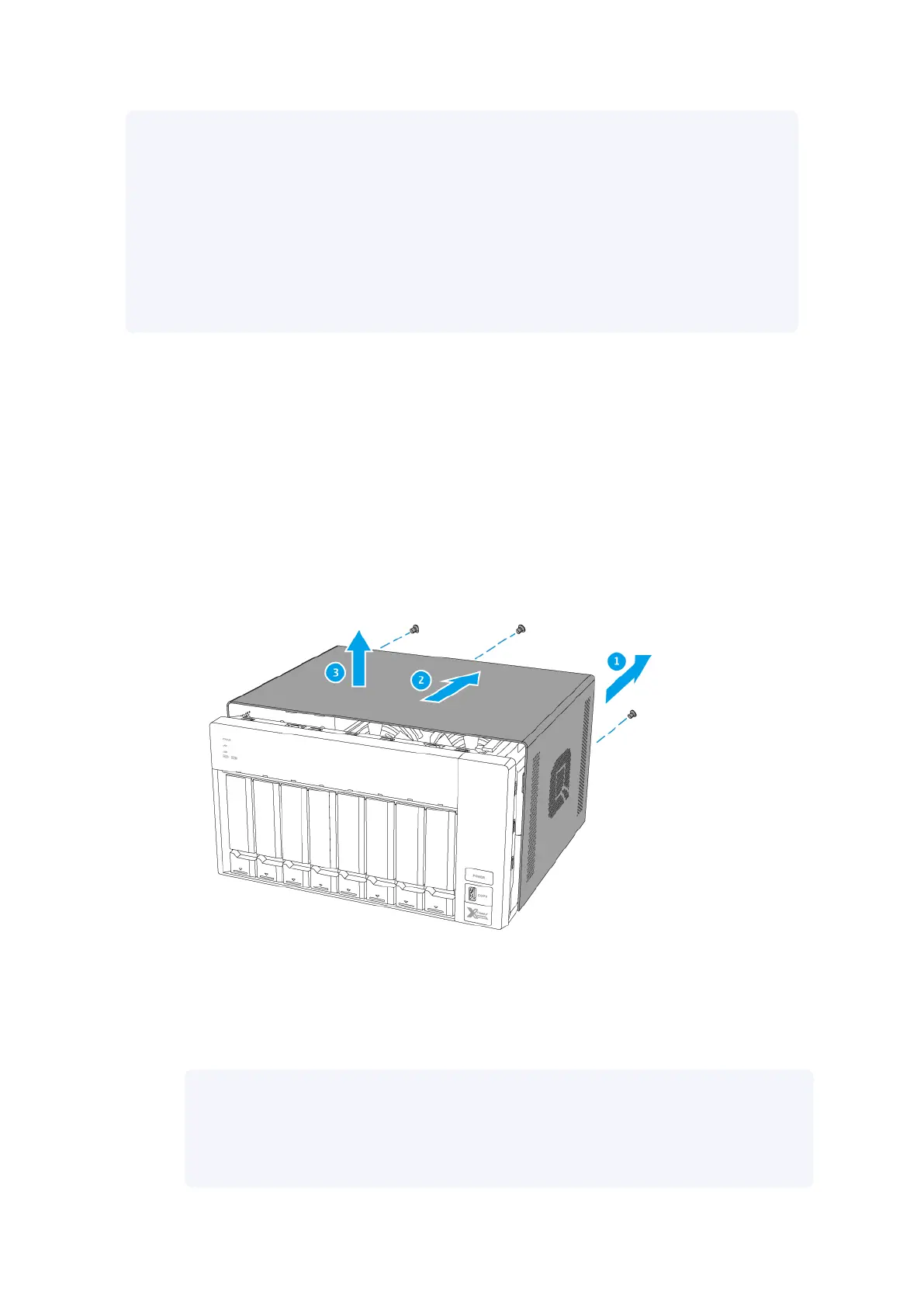
4. Remove the case cover.
a. Remove the screws that secure the case cover to the chassis.
b. Slide the cover back.
c. Lift the cover until it is completely detached from the chassis.
5. Position the NAS on its right side.
6. Install a heatsink on the M.2 SSD controller.
a. Locate the controller on the M.2 SSD.
Note
The location of the controller varies depending on the model and manufacturer of the
M.2 SSD.
For details, refer to the documentation or contact the manufacturer.
TVS-x72XT User Guide
Installation and Conguration 27



 To Next Page