page 20
PRO 9 DRIVE THRU MODULE
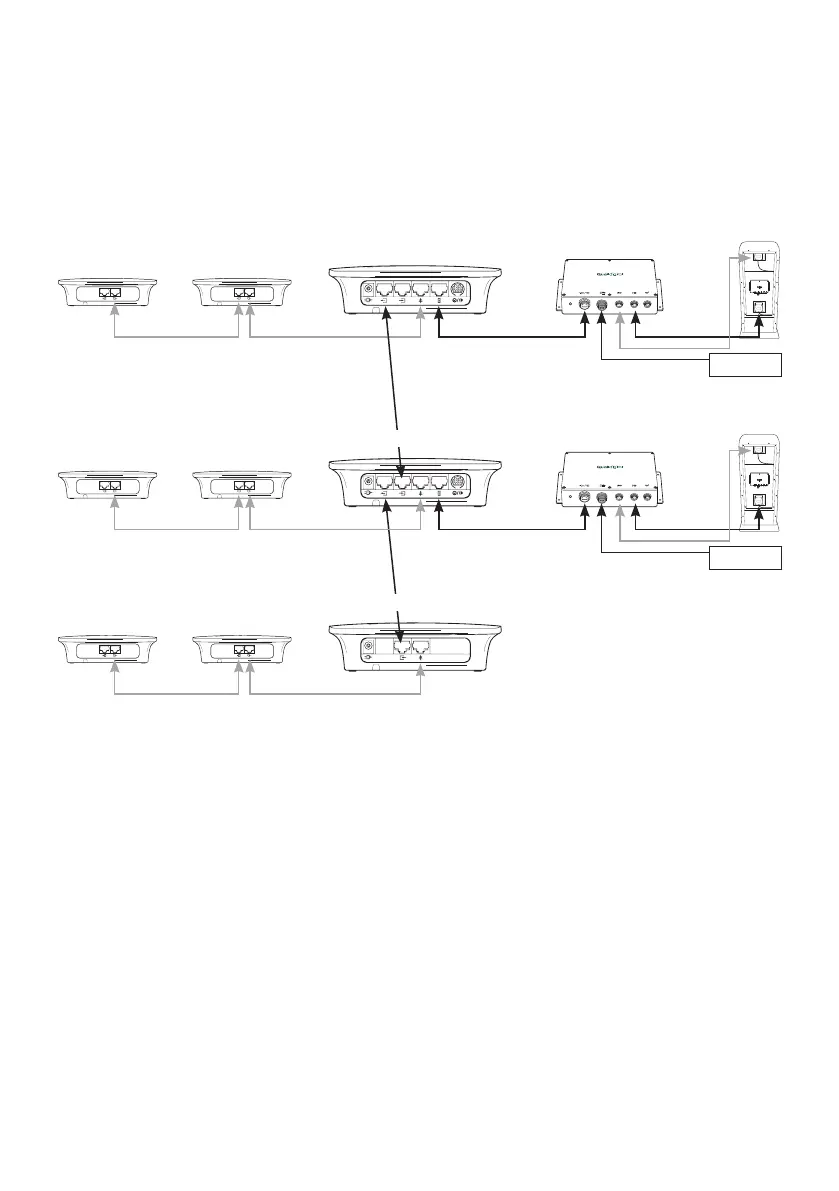
Q-P9DTM
Loop 1
Lane 1 base
Repeater 2 Repeater 1
Lane 1 DTM
Order
point 1
Mic
Spk
PRO 9 DRIVE THRU MODULE
Q-P9DTM
Loop 2
Repeater 2 Repeater 1
Lane 2 DTM
Order
point 2
Mic
Spk
Lane 2 baseLane 2 base
Repeater 2 Repeater 1
Table service base
Appendix I
Setting up Pro9 as dual lane/tandem and table service configuration (Q-P9BSDL)
You will require two Q-P9BSDL base stations to operate two order points and one Q-P9TSBS.
Note: for lane timer and grill speaker auxiliary box connections, please refer to Appendix D.
To configure two order point system, first follow Steps 1 to 13 in this manual. Essentially, treat it as
two separate single lane systems for initial installation and set-up. Once you have completed Step 13
follow the instructions below.
Note that each base station uses its own power. And note that if range extension is required a
REPEATER is required to be connected to each base station.
1. Disconnect the power from both base stations.
2. Identify which base station is connected to the first order point and connect a short Cat5 cable
from the ‘OUT’ port of this base station to the ‘IN’ port of the second base station.
Figure 23 - Pro9 dual lane system with
table service and optional repeaters



 To Next Page