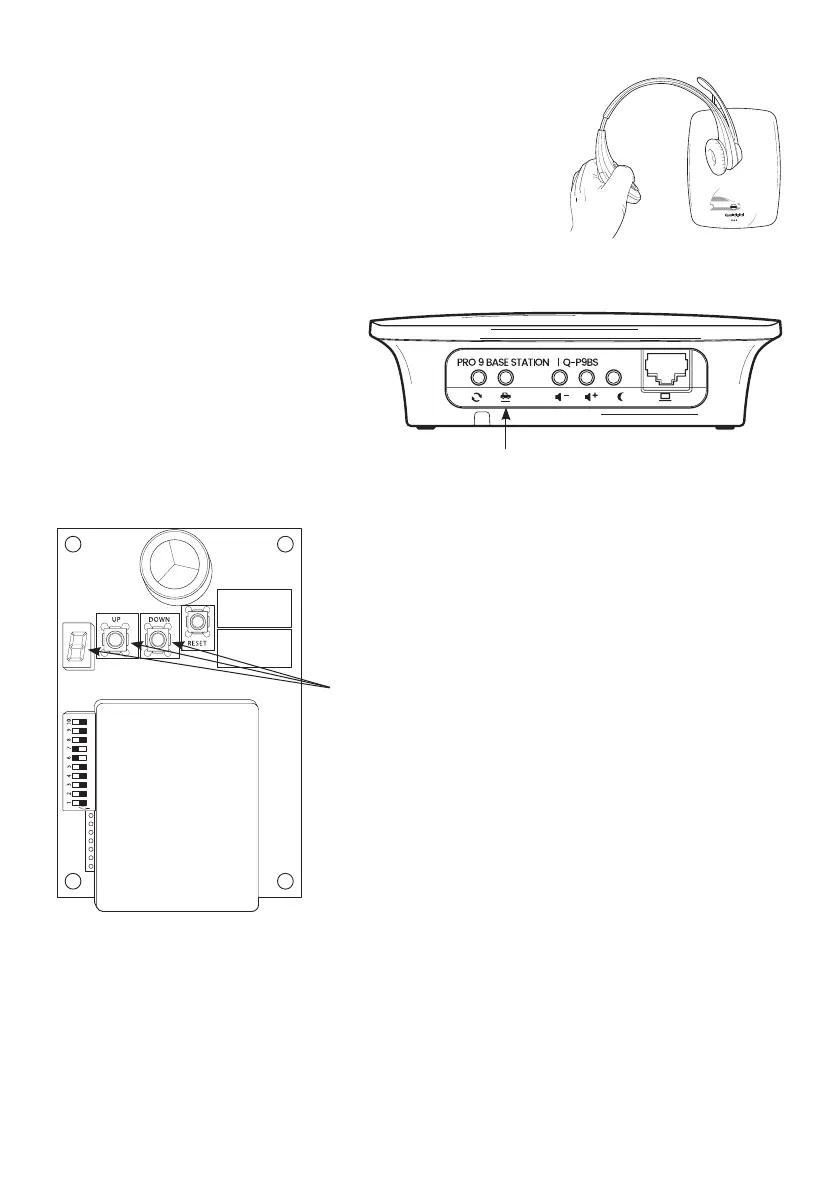
Step 14 Now register the headsets to the base station. Take the
charged batteries and insert one into each headset. The headsets
will pulse white initially then red when not registered. Hold the
headset to the base station as shown. The LED on the end of the
boom will fast-flash green during the registration process, then
pulse green on and off when registered. Repeat this process one
at a time until each headset is registered.
Step 15 To test the audio link to the order
point, have someone go out to the order
point. Press vehicle detection override on
the base station. The microphone at the
order point is live. Press T1 on the headset
to talk with the person at the order point.
When you’ve spoken and heard the person
outside, the test is done. Press vehicle
detection override again to de-activate it.
Step 16 Set the road loop sensitivity so the arrival of every
vehicle is picked up accurately by the DTM.
a. Remove the lid from the DTM and then park an average
sized car (not SUV or van) on the road loop at the order point.
b. Identify the detector PCB in the DTM and then use the ‘Up’
and ‘Down’ buttons to adjust the displayed number to 5 from
whatever it shows now.
c. Drive the vehicle off the loop and check the loop reading
returns to ‘0’ and when the vehicle returns back onto the loop
make sure the number displayed is 5, then replace the lid.
Step 17 Now check the order point volume. The microphone level is pre-set and is unlikely to need
adjusting by you, but the outbound volume through the speaker can be adjusted to suit the local
environment. To do this you need to access the Pro9 settings menu as below which you do via your
laptop or cellphone (see Appendix G and H for access).
page 7
Figure 7 - Registering the headset
Vehicle detection override
Figure 8 - Testing the audio link
Figure 9 - Vehicle detector board, inside DTM



 To Next Page