Chapter 7: Status
Hardware
Quantum DXi6900 User’s Guide 174
Value - The throughput capacity of the port (if connected).
Status The status of the port.
l Up - (Green) The port is connected.
l Down - (Green) The port is not connected.
NetworkPorts
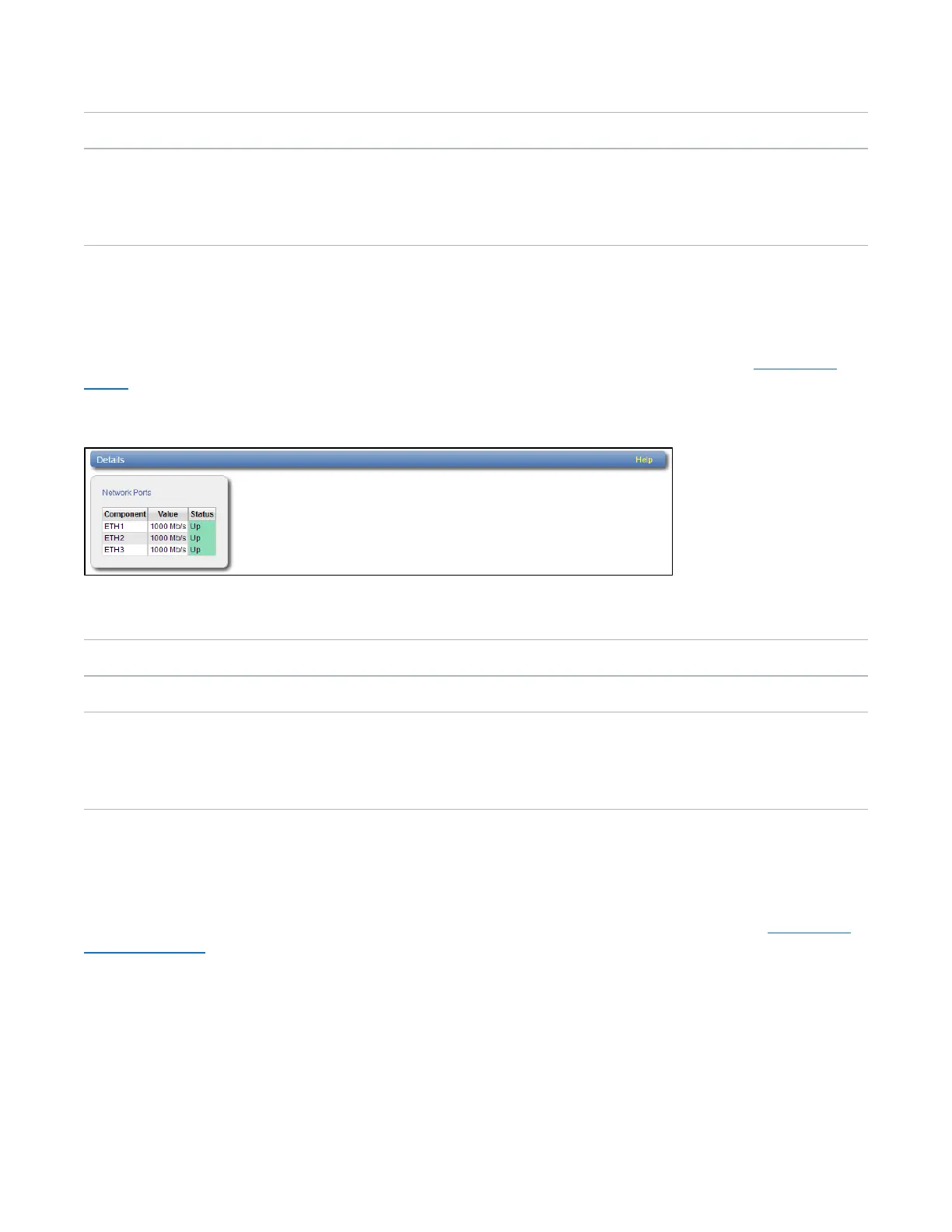
The NetworkPorts page allows you to view information about Ethernet ports in the system. The DXi6900
includes three or more Ethernet ports (depending on the configuration).
To access the NetworkPorts page, on the Details page, click the NetworkPorts tab (see Figure 109
below).
Figure109:Network Ports Page
The NetworkPorts page displays the following information:
Component The number of Ethernet port.
Value The speed of the port in Mb/s
Status The status of the Ethernet port.
l Up - (Green) The port is connected.
l Down - (Green) The port is not connected.
StorageArrays
The StorageArrays page allows you to view information about storage arrays and controllers in the
DXi6900.
To access the StorageArrays page, on the Details page, click the StorageArrays tab (see Figure 110
on the next page).










 To Next Page