Page 43 of 57
Sofia and Virena Router Connection Installation
Please refer to the Sofia Surveillance Mode Installation Instructions that are supplied in the
separate Virena Router package.
Set Network Configuration
Refer to the Network Configuration section (page 39).
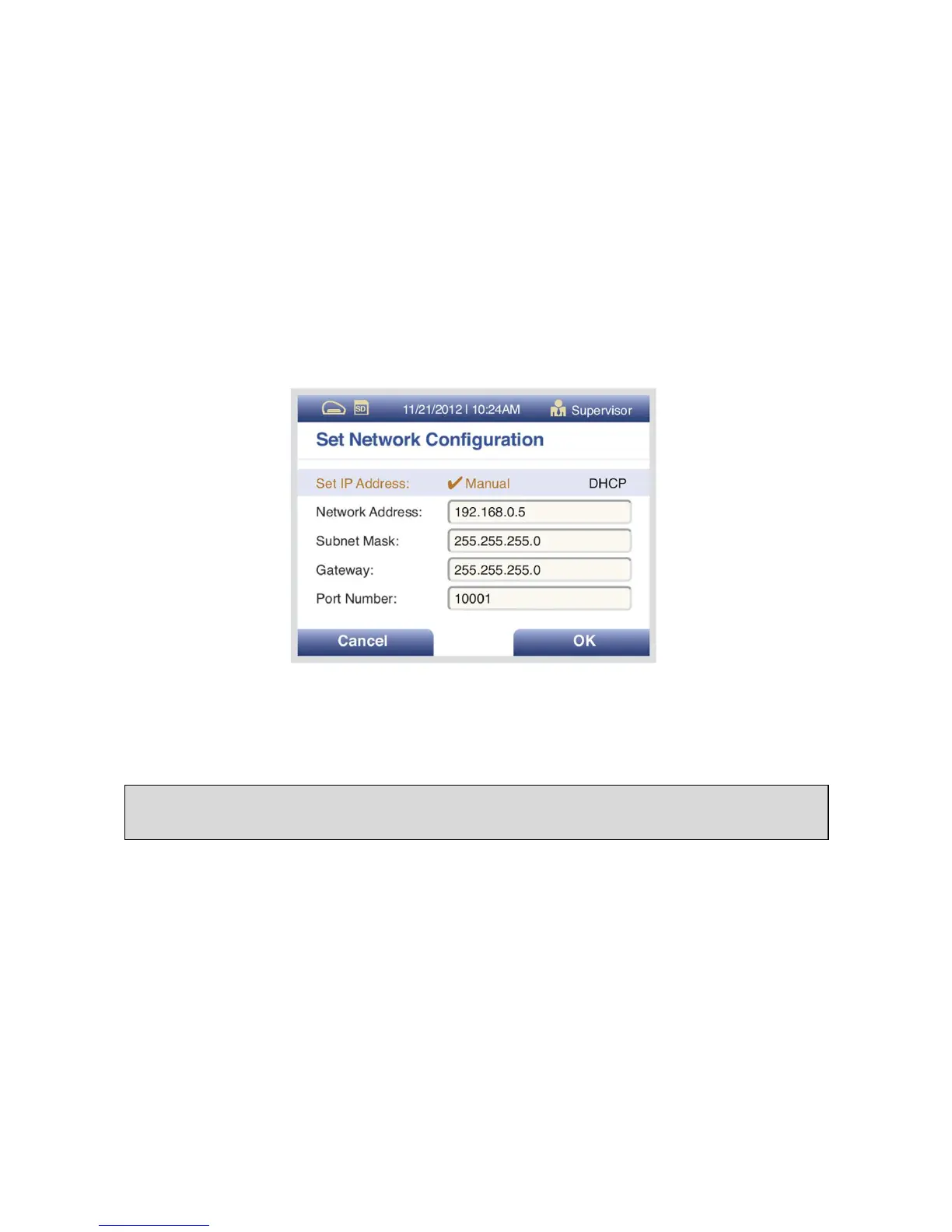
Scroll to Set IP Address and ensure Manual is checked, see Figure 19. Scroll to Network Address
and enter IP network address to 192.168.0.5. Verify that all configurations on Sofia including:
Subnet Mask, Gateway and Port Number match what is shown in Figure 19. If it does not match,
please enter the correct numbers. Then select OK.
Figure 19
Wait 1 minute, then go to View Network Settings under Statistics and ensure that you have a
valid IP address.
Surveillance Mode Set Up
Go to Surveillance Settings, then under Set SURV Parameters, select the following using the
Left/Right/Up/Down arrows:
Age Required: Yes
Transmit Patient ID: Off
Transmit Order Nr: Off
Auto Send: On
Queue Results: On
When completed, screen will display as Figure 20.



 To Next Page