Function
• To display the actual value of the measured data (analog inputs) and the status of the digital
inputs (e.g. emergency stop contact, motor overload relay, etc.).
• To select the digital input to be shown on the chart in the main screen.
Procedure
Starting from the main screen,
• Move the cursor to the action button Menu and press the Enter key.
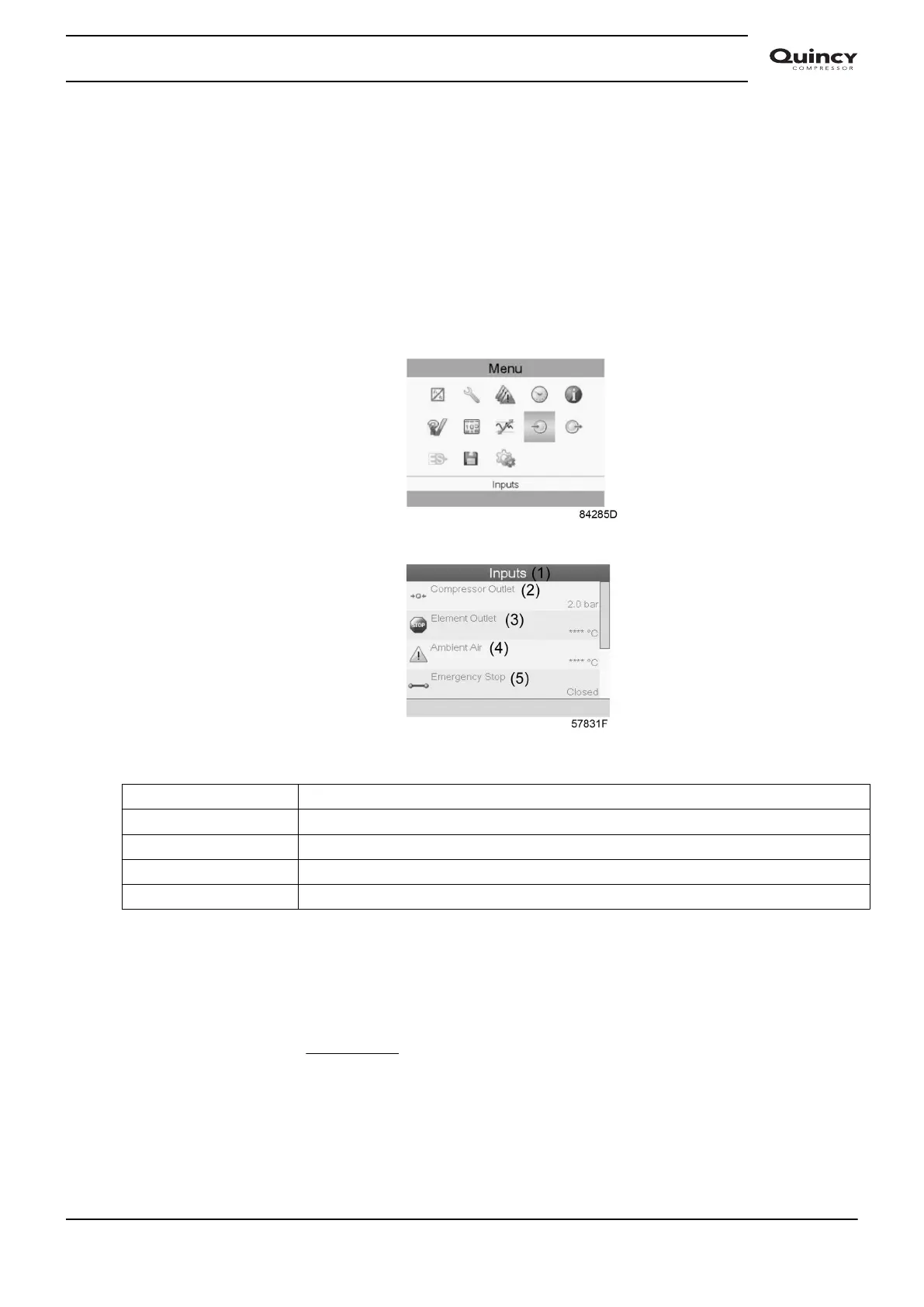
• Using the Scroll keys, move the cursor to the Inputs icon, as shown in the following screen:
• Press the Enter key. A screen similar to the one below appears:
Text on image
(1) Inputs
(2) Compressor outlet
(3) Element outlet
(4) Ambient air
(5) Emergency stop
• The screen shows a list of all inputs with their corresponding icons and readings.
• If an input is in warning or shutdown, the original icon is replaced by the warning or
shutdown icon respectively (i.c. the Stop icon and the Warning icon in the screen shown
above).
A small chart icon, shown below an item in the list means this input signal is shown on the chart
at the main screen. Any
analog input can be selected.
Selecting another input signal as main chart signal
With the Modify button active (light grey background in above screen), press the Enter button on
the controller. A screen similar to the one below appears:
Instruction book
2920 7190 02 37






 To Next Page