Section V - Servicing
Resetting the Controller
After performing service, the dryer must
be restarted according to the start-up
procedure on page 14, and the controller
must be reset.
To reset the controller, use the reset disc
(supplied with the service kits) as follows:
Hold tHe disc AgAinst tHe Blue pAd on tHe front displAy
of tHe dryer pAnel for 5 seconds.
during tHis five second period, tHe poWer indicAtor d
Will flAsH green. WHen tHe reset HAs Been successful
indicAtor B Will flAsH red once to confirm tHAt it HAs
Been completed successfully.
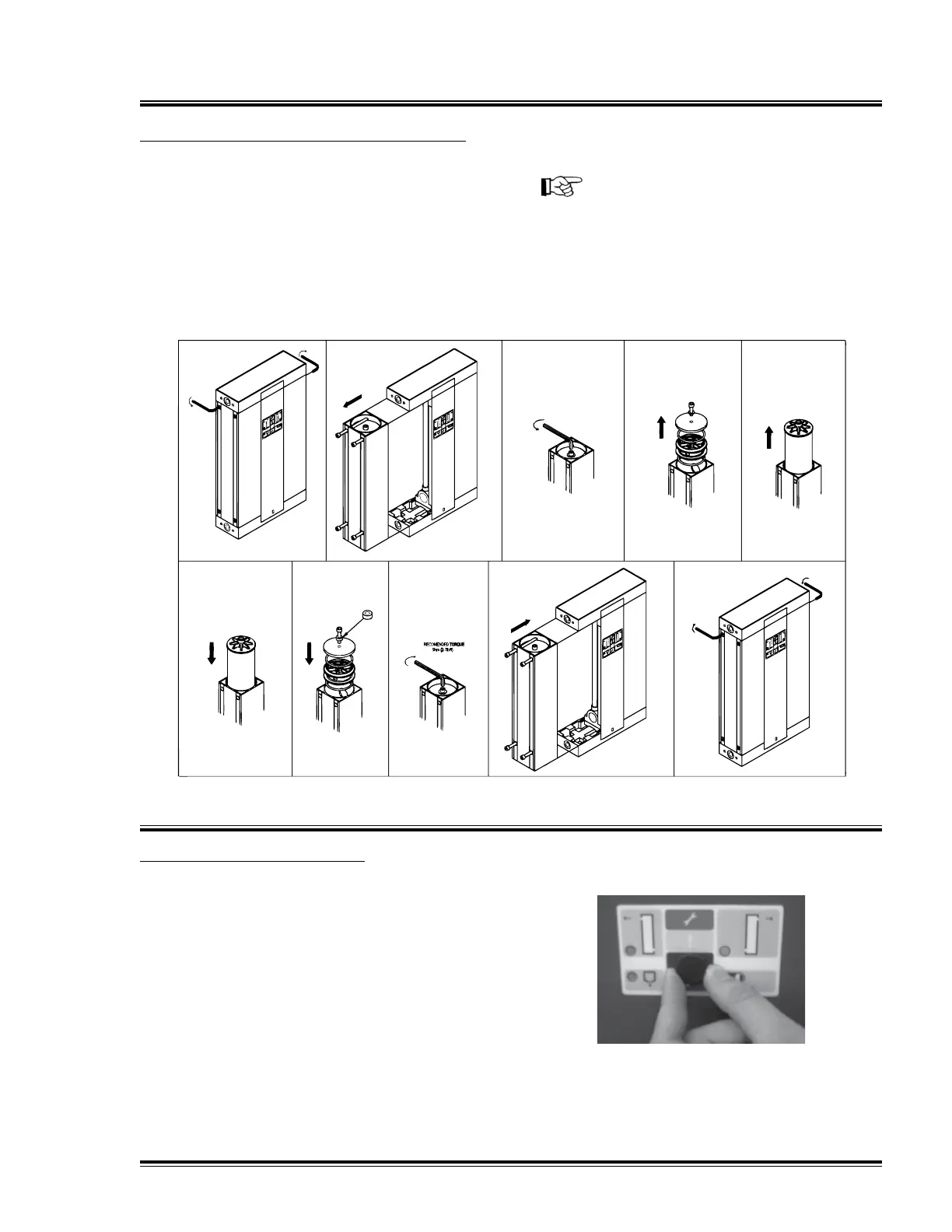
Changing the Desiccant Cartridges
Follow the procedure displayed in the
illustration below to replace the desiccant
cartridges.
Repeat the procedure for both towers.
Dispose of desiccant cartridges in
accordance with local waste regulations.
NOTICE!
Do not fully tighten retaining bolts until
both towers have been serviced. When
service is complete, tighten all bolts to
torque 5nm.
Quincy Compressor-QMOD 25



 To Next Page