Q150T Sample Preparation System
Q150T - Instruction Manual 17 10473 - Issue 5
3 Operation
This chapter describes the basic operation of the Q150T. For more advanced use,
please see Working with Profiles on page 21 and Application Guidelines on page 28.
3.1 Switching On for the First Time
1. Ensure that you have completed the installation as described in the previous
sections.
2. Switch the instrument on using the rocker switch located on the rear panel. The
front panel LCD display should illuminate and show the initialising message.
3. Once the instrument hardware and software has initialised, the standby screen is
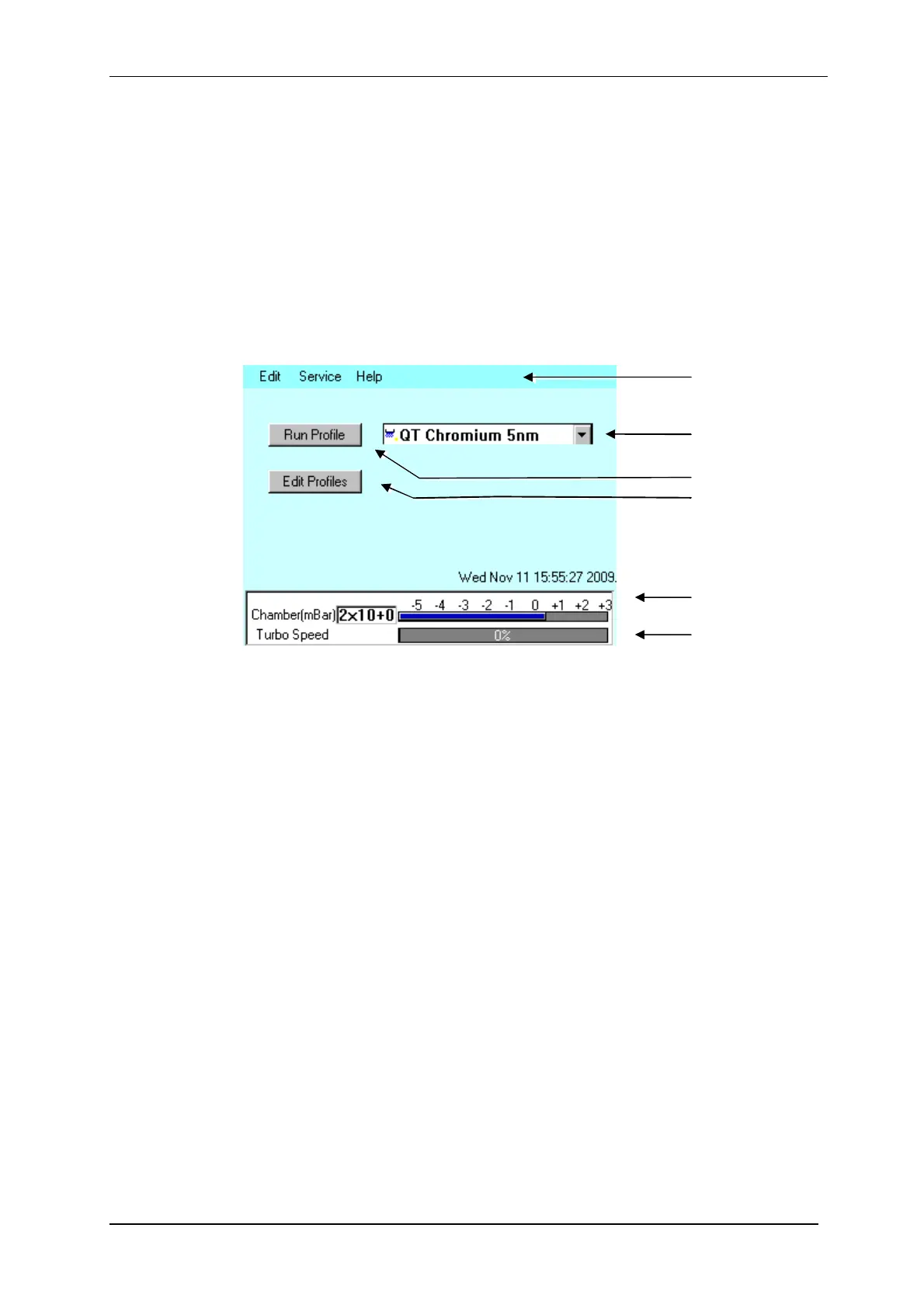
displayed (see Figure 3-1).
Figure 3-1. Standby screen
3.1.1 The Standby screen
The Standby screen has three main parts:
A menu bar with Edit, Service and Help categories (see page 42).
Run Profile and Edit Profile buttons and a profile selector. Operate the instrument
simply by selecting a profile and tapping on the Run Profile button.
Pumping/vacuum information display: Chamber pressure reading and meter, and a
turbo speed indicator.
Menu bar
Profile list box
Run Profile button
Edit Profiles button
Chamber pressure
reading and meter
Turbo pump speed
meter


 To Next Page
 Loading...