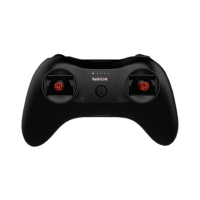
The RadioLink T8FB is an 8-channel remote controller designed for various RC models, including fixed-wing aircraft, gliders, multirotors, cars, boats, and robots. It features app-based parameter setting via Bluetooth connection, offering a modern and convenient way to configure the device.
Function Description:
The T8FB remote controller allows users to precisely control their RC models through its 8 channels. It supports both PWM and SBUS/PPM signal outputs, making it compatible with a wide range of receivers. The device is designed for ease of use with intuitive controls and a clear LED indicator system.
Important Technical Specifications:
- Size: 173102206mm
- Weight: 0.47kg
- Operating Voltage: 4.8~18V
- Operating Current: <80mA
- Output Frequency: 2.4GHz ISM band (2400MHz~2483.5MHz)
- Modulation Mode: GFSK
- Spread Spectrum: FHSS 67 channels pseudo-random frequency hopping
- Control Range: 2000 meters (maximum range tested in unobstructed areas free of interference and may vary depending on local regulations)
- Transmitter Power: <100mW (20dBM)
- Section Precision: 4096, 0.5us/section
- Compatible Receivers: R8EF (Standard), R8SM, R8FM, R8F, R7FG, R6FG, R6F, R4FGM, R4F
The standard receiver included with the T8FB is the R8EF, which has the following specifications:
- Size: 41.521.511.5mm
- Weight: 14g
- Channel: 8CH
- Signal Output: SBUS&PPM&PWM
- Operating Current: 30mA
- Operating Voltage: 4.8-10V
- Control Range: 2km in the air (maximum range tested in unobstructed areas free of interference and may vary depending on local regulations)
- Compatible Transmitters: T8FB/T8S/RC6GS V2/RC4GS V2
Usage Features:
The T8FB offers a comprehensive set of features for both basic and advanced users:
- Control Layout: The T8FB (Mode 2 by default) features one two-way switch (SwA, CH7), one three-way switch (SwB, CH5), two VR switches (VrA, CH8; VrB, CH6), four trimmer buttons, and two joysticks. The stick mode can be personalized to Mode 1 (throttle on right hand) or Mode 2 (throttle on left hand), or both sticks can return to center points with included accessories.
- Battery Compatibility: It uses a universal JST battery connector, supporting multiple battery types including 4pcs AA batteries or 2S/3S/4S LiPo batteries. The low battery alarm voltage is automatically set based on the battery used, but can also be customized via the mobile app or computer software.
- Receiver Signal Modes: The R8EF receiver supports two signal working modes:
- PWM Working Mode: The receiver indicator is RED, and all 8 channels output PWM signal.
- SBUS/PPM Working Mode: The receiver indicator is Blue (Purple), with 8 channels output in total. Channel 1 is SBUS signal, channel 2 is PPM signal, and channels 3 to 8 output PWM signal.
- Signal Mode Switching: Users can switch between SBUS/PPM and PWM signal modes by short pressing the binding button on the receiver twice within 1 second.
- Binding Process: Each transmitter has a unique ID code. The binding process involves powering on both the transmitter and receiver, pressing the binding button on the receiver until its LED flashes quickly, and waiting for the LED to stop flashing and remain solid, indicating successful binding.
- Calibration: The T8FB can be calibrated for stick range and central points. This is done by pressing the rudder trimmer left and turning on the transmitter, then toggling sticks to their maximum/minimum and central points, followed by pressing the rudder trimmer right.
- Mobile App Parameter Setting: The T8FB supports parameter setup via a mobile app (Android and Apple iOS).
- Android APP: Downloadable from the RadioLink website, offering comprehensive settings.
- Apple APP: Available on the Apple App Store, with a slightly more limited feature set compared to the Android version (e.g., fewer programmable mixing controls).
- Bluetooth Connection: The app connects to the T8FB via Bluetooth. After opening the app and granting Bluetooth permission, users select the RadioLink device from a list.
- Parameter Menus: The app includes menus for SERVO, BASIC, ADVANCED, and SYSTEM settings. Android APP V7.1 and above also include SYSTEM2, TH/CURE, DR/CURE, and RESET menus.
- Data Management: Users can READ current parameters from the T8FB, WRITE modified data back, STORE data as files on the mobile device, and LOAD saved files.
- Computer Software Parameter Setting: Parameters can also be set up using computer software.
- USB Connection: Connect the T8FB to a computer via an Android USB data cable.
- Software Interface: The software allows users to select the COM port, set baud rate (115200, 8-1-None), and access BASIC and ADVANCED menus.
- Data Management: Similar to the mobile app, the computer software allows reading, loading, updating, and saving parameter data.
- BASIC Menu Parameters:
- REV (Reverse): Defines the relationship between transmitter controls and receiver output (NORM/REV).
- SUB (Sub-Trim): Makes small corrections to the neutral position of each servo.
- EPA-L & EPA-R (End Point Adjustment): Sets the travel range of each channel independently for both directions (0-120%).
- F/S (Fail-Safe): Configures responsive actions in case of signal loss or low T8FB voltage.
- DELAY: Adjusts the synchronous ratio between servo position and actual operation (default 100).
- ADVANCED Menu Parameters:
- D/R (Dual Rate): Controls max/min values of channel range using an auxiliary switch.
- ATTITUDE: Selects preferred channels (CH5-CH8) for switching attitudes, with values corresponding to flight controller settings (e.g., PIXHAWK/MINI PIX/APM/TURBO PIX).
- ELEVON: Adjusts aileron distance and allows aileron differential, requiring CH1 and CH2.
- V-TAIL: Combines elevator and rudder functions for V-tail aircraft, requiring CH2 and CH4.
- SYSTEM Menu Parameters:
- AUX-CH: Personalizes CH5/6/7/8 to different switches or sets to NULL if not used.
- TX-ALARM: Sets the low voltage alarm for the transmitter.
- STK-MODE (Stick Mode): Displays the current stick mode (Mode 1, 2, 3, or 4).
- VERSION: Displays current firmware version.
- SYSTEM2 Menu Parameters (Android APP V7.1+):
- EXT-ALARM: Sets low voltage alarm for the model (requires RadioLink telemetry receivers like R7FG or R8F).
- RSSI-ALARM: Personalizes RSSI alarm value.
- PROG.MIX (Programmable Mix Controls): Allows for advanced mixing configurations, with up to four mixing controls on Android APP V7.1+ and two on Apple APP.
- TH/CURE (Throttle Curve): Sets the output travel by throttle to coordinate motor response and throttle operation (Android APP V7.1+).
- DR/CURE (Dual Rate Curve): Switches between different servo travels for various flight statuses (Android APP V7.1+).
- RESET: Restores factory settings.
Maintenance Features:
- Firmware Upgrade: The T8FB firmware can be updated with the latest functions. The process involves installing a driver, connecting the T8FB to a computer via USB, opening the upgrade software, selecting the COM port, clicking CONNECT, and then selecting and starting the APROM firmware upgrade.
- Data Backup: The device supports data backup, allowing users to copy parameters from one model to another or save personalized settings.
- Receiver Care:
- Keep antennas straight and away from metal conductors, carbon fiber, motors, ESCs, and other interference sources.
- Use sponge or foam material to prevent vibration when installing the receiver.
- Protect the receiver from strong vibration, high temperature, humidity, and dust by keeping it in a well-sealed plastic bag.
- Regular Updates: RadioLink regularly updates manuals and firmware, encouraging users to visit their official website for the latest versions and tutorials.

 Need help?
 General




 To Next Page