1.4 Quick Installation
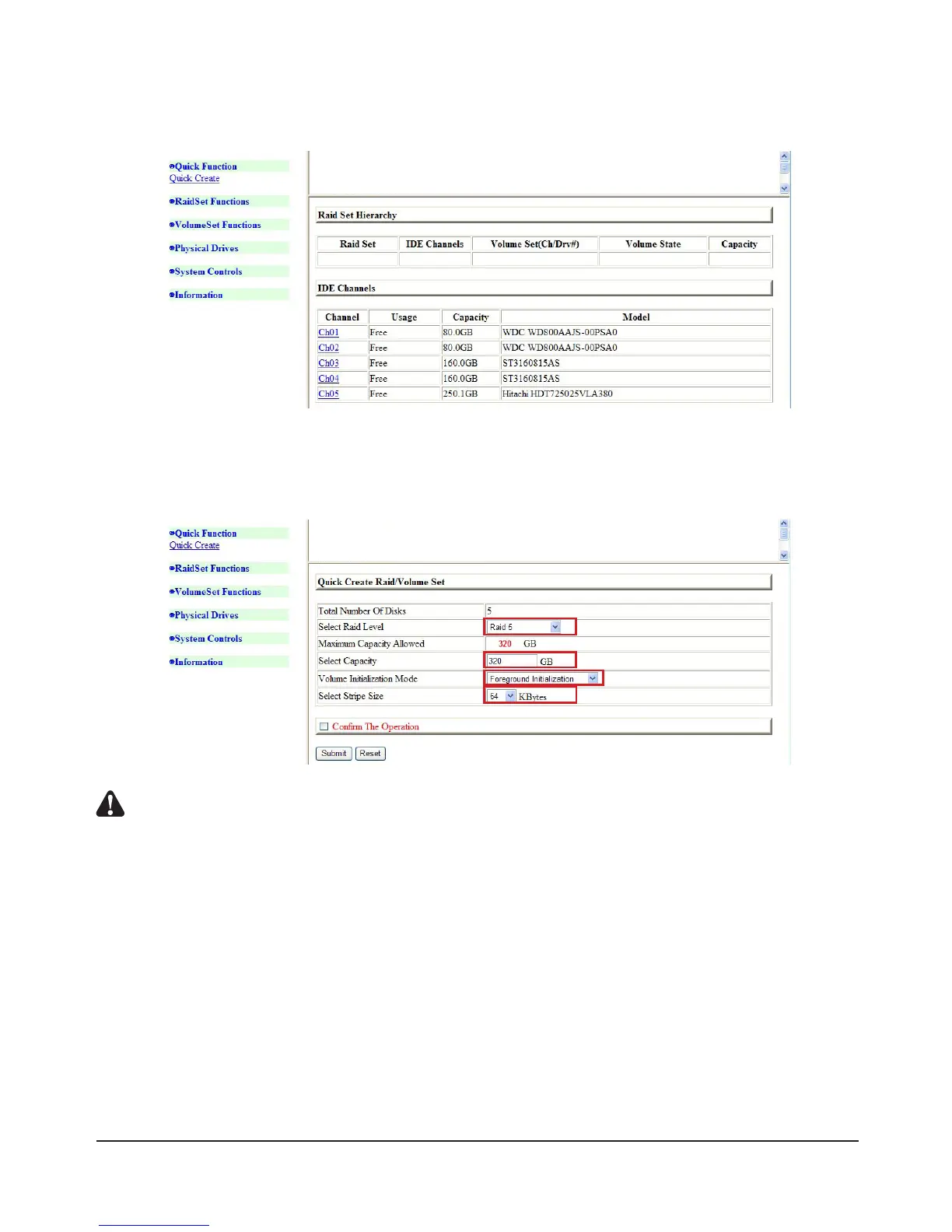
1) Click “Quick Function” and “Quick Create” will pop up. Click to enter it.
2) This screen displays Total Number of Disks, Raid Mode, Capacity of Disk, and Initialization Mode.
Basic setups require no changes. You may simply follow the default settings (User may also make
changes as needed)
Notes : A : The Raid Mode supports RAID0、1+0、1+0+Spare、3、3+Spare、5、5+Spar、 6、6+ Spare
B : The hard disk can be partitioned into user’s desired volume. The remaining capacity can still be used, so
there is no waste of disk space.
C : Initialization Mode includes the three options:
a.BackgroundInitialization:ItallowsuseofharddiskduringInitializationbutdeliverslowerefciency.
b. Foreground Initialization: Use of the hard disk will follow Initialization.
c. No Int (To Rescue Volume): Use of hard disk without Initialization. You are advised to choose option 2
(system default setting.)
D:Youmaychoosefrom4K,8K,16K,32K,64K,and128K.UserswhooftenAccesslarge-volumeles
(suchasmpgvideoles)areadvisedtosetto128Kforbetterperformance.Userswhooftenuse
small-sizedtextdocumentsareadvisedsetto4Kforbetteraccessefciency.Thedefault64Kisusedas
an example here.



 To Next Page