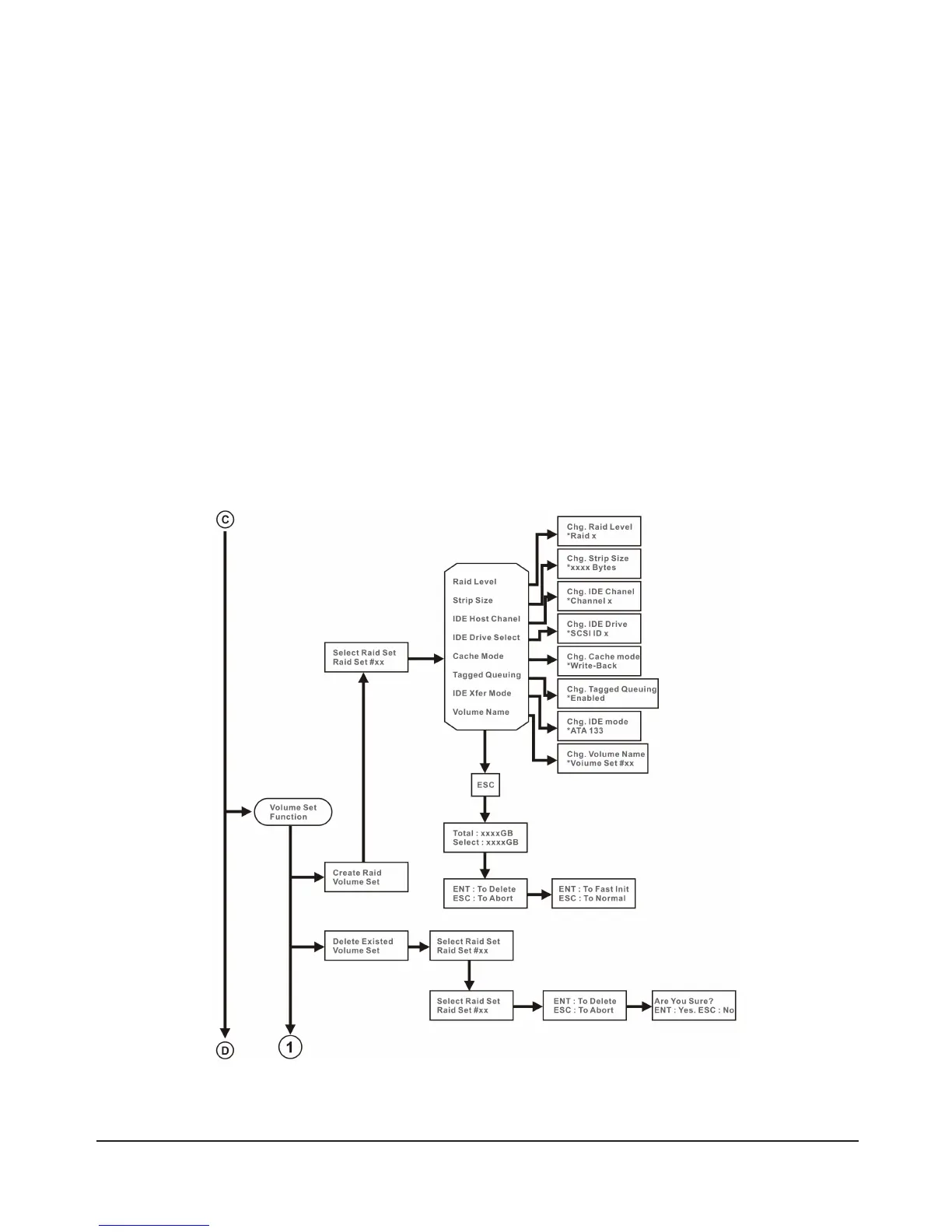
Under “Volume Set Functions”, the available setup functions include:
•CreateVolumeSet
•DeleteVolumeSet
•ModifyVolumeSet
•CheckVolumeSetConsistency
•StopVolumeSet
2.4.1 Create RAID Volume Set
The SR6600-5S-U3 uses a difference interface from the other models so information available under this
function will vary as well. For the SR6600-5S-WBS2 you will see: RAID Level, Strip Size, Cache Mode,
IDE Host Channel, IDE Drive Select, Tagged Queuing, IDE Xfer Mode and Volume Name.
For the SR6600-5S-U3 you will see: RAID Level, Strip Size, Cache Mode, SCSI Host, SCSI ID, SCSI
LUN, Tagged Queuing, SCSI Max Rate and Volume Name.
Please refer to the chart below for more details:
For SR6600-5S-WBS2



 To Next Page