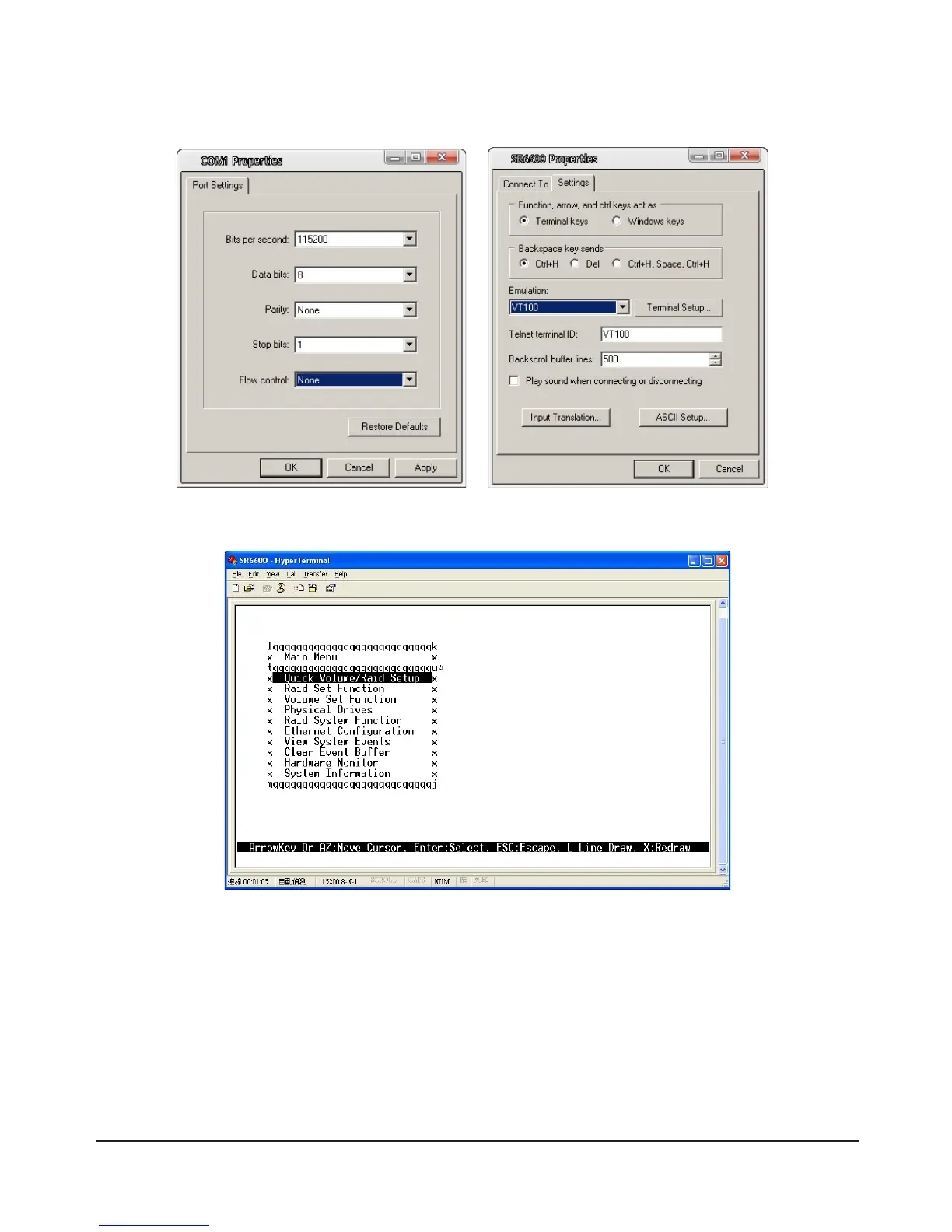
3)Conguretherelevantdatasettings(refertothetablebelow).Oncesetupiscomplete,selectFile→
Contentt→Settingsandsettheterminalmodetovt100.Oncethesettingshavebeensetselect“OK”
to make the connection.
4) Once connected, enter the password to log in. Default Password: 0000
1.2.2 Login to Web GUI via RS232 Cable (Windows systems only)
IfyouchoosetologinviatheWebGUIoveraRS232Connection,youmustrstinstallthe“GUI-
Com2Http” software. Insert the included CD-ROM in the CD-ROM Drive then under “Management
Software” select “GUI-COM2Http” to install the software automatically. Alternatively, you can go directly
into the CD-ROM’s contents, open the “GUI-COM2Http” folder under “Management Software” and click
on “Setup.exe” to launch the installer.



 To Next Page