Appendix A Frequently Asked Questions
Q:Howtoupdatethermware?
A: Ifeverythingisworkingnormallyonyoursystem,armwareupgradeisnotrecommendedtoavoid
unnecessaryproblems.Newrmwarecanbedownloadedfromwww.RAIDON.com.tw. Before
updatingthermware,werecommendthatyoucontactcustomersupportorsendane-mailto
supporting@raidon.com.tw.Toupdatethermware,logintothesystemviaaRS232orLAN
connection then select “Upgrade Firmware” under “System Controls”.
Q:Howdoyouresetthepasswordifyouhavelosttheoldpasswordandcan’tlogintothesystem?
A : You can change the password using one of the two following methods if you have lost the old
password and can’t log into the system.
(1) Reset Password by Logging in through the LCD After the system boots up, press the “ENTER’’
button the LCD panel then enter the universal password “xxxxxxxxx” to log in. Once you are
logged in, select “Change Password” under “RAID System Functions” to set up a new password.
(2) Reset Password by Logging in over RS232 Once you have connected to the system over a
RS232 cable, press “X” and select “RAID System Functions”. At “Verify Password”, enter the
universal password “xxxxxxxxx” to log in. Once you are logged in, select “Change Password” to
set up a new password.
(3) Please contact supporting@raidon.com.tw for the universal password “xxxxxxxxx”.
Appendix B 2.2TB Setting Instruction(Only
SR6600-5S-WBS2)
Please pay attention, this process only can be worked
with eSATA cable, and SR6600-5S- U3, and 64bit
operating system.
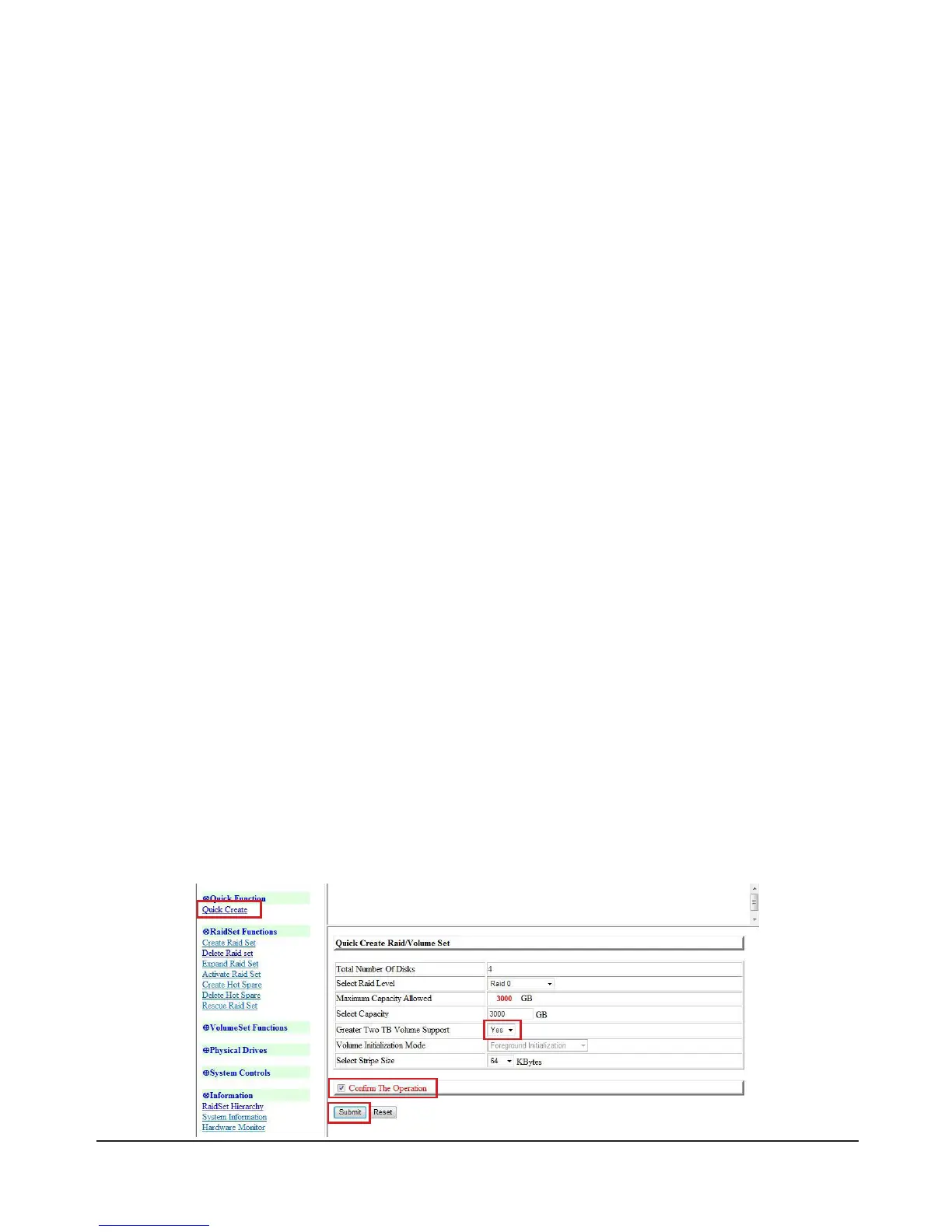
1. GUI Instruction
Click“QuickCreate”,nd“GreaterTwoTBVolumeSupport”andselect“Yes”.Tick“ConrmThe
Operation” and press “Submit” to complete the setting process.
30 Appendix A Frequently Asked Questions & Appendix B 2.2TB Setting Instruction(Only SR6600-5S-WBS2)



 To Next Page