ESP-2WIRE Controller
14
cd
a
e
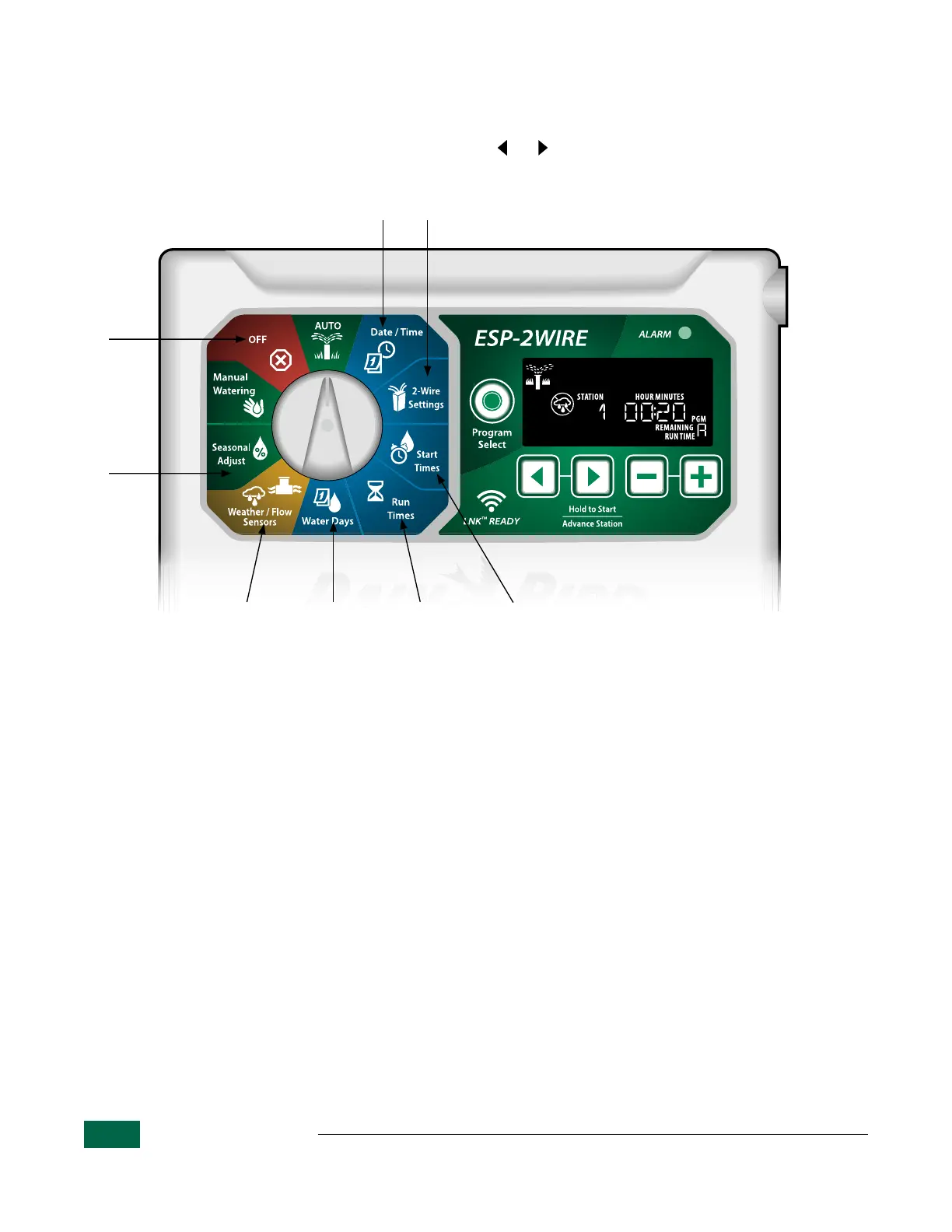
ESP-2WIRE Controller Special Features
• Turn the dial to the desired position indicated to access each Special Feature.
• After turning the dial to the desired position, press and hold and at the same time.
a
Save Programming
Saves current programming for restore later.
b
Troubleshooting
Find and correct faults or solve problems. See
ESP-2WIRE Troubleshooting Guide for more
information.
c
Restore Programming
Restores the previously saved programming.
d
Set Master Valve By Station
Allows a station to be controlled by a master
valve or pump start relay.
e
Set To Odd Or Even Day Watering
Set watering to occur on all ODD or EVEN
calendar days.
Set Rain Sensor Bypass By Station
Tells a station to obey or ignore a rain sensor.
Set Flow Sensor Bypass By Station
Turns a fl ow sensor on or off by station.
Reset To Factory Defaults
All programmed schedules will be erased.
Set Interstation Delay
A station delay (from 1 second to 9 hours)
ensures that a valve has completely closed
before the next one opens. Press Program
Select to set delay for diff erent programs.
b
Figure 3 - ESP-2WIRE Controller - Dial Confi guration and Special Features.


 To Next Page