ESP-2WIRE Controller
15
Options
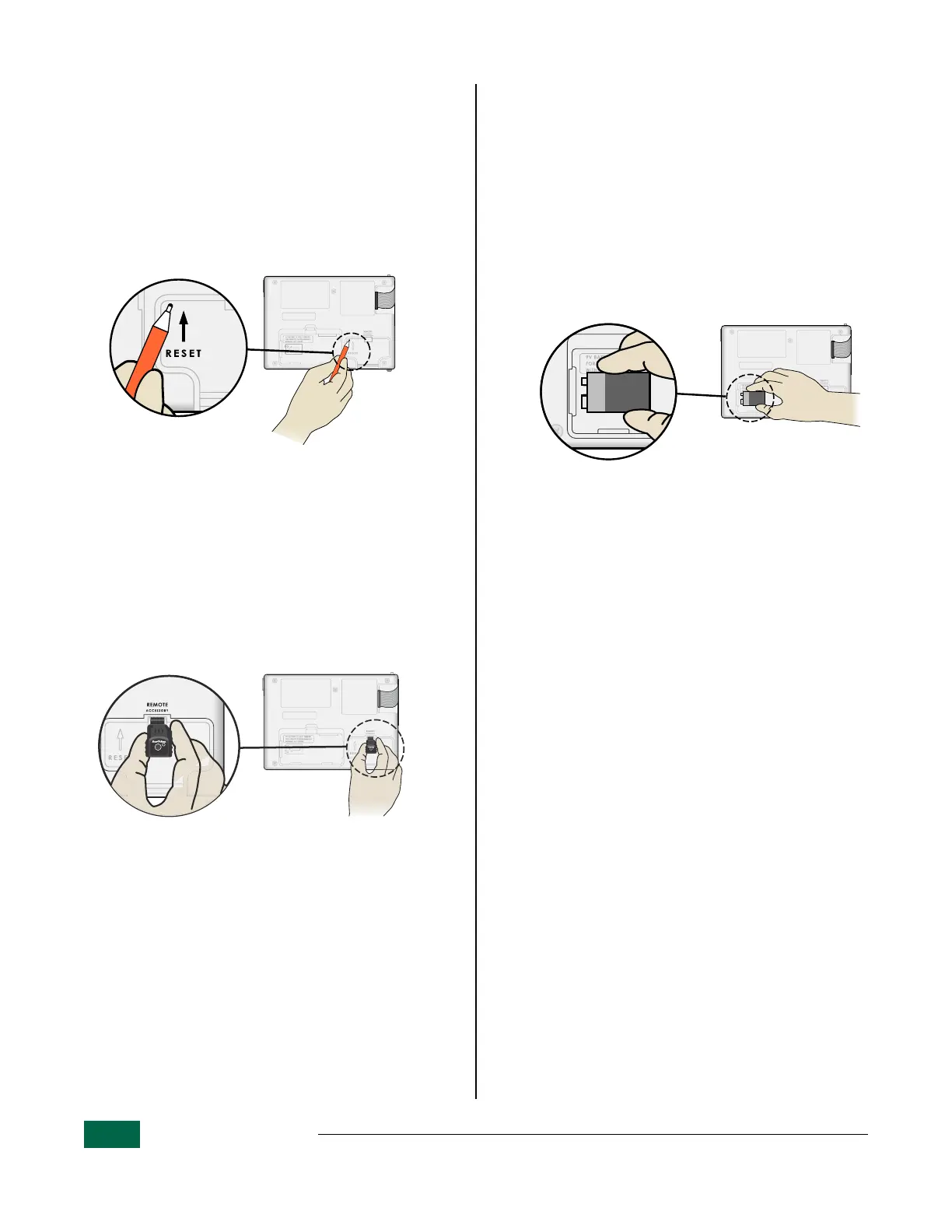
Reset Button
If the controller is not working properly, you can try
pressing RESET.
Insert a small tool such as a paper clip, into the
access hole and press until the controller is reset.
All previously programmed watering schedules will
remain stored in memory.
Reset Button Location.
Remote Accessories
LNK2
TM
WiFi Module Installation
A 5 pin accessory port is available for Rain Bird
approved external devices, including the LNK2
TM
WiFi Module.
a
Insert LNK2 WiFi Module in the Remote
Accessory port, located on back of the
controller interface panel.
Accessory Port Location.
Detached Programming
Program the front panel remotely on battery power.
The front panel can be removed from the controller
and programmed remotely using a 9 volt battery
for power.
B
NOTE: Decoder addresses cannot be learned
when the front panel is removed.
a
Remove the front panel.
b
Install a 9V battery in the battery compartment.
c
Program the controller.
Battery Compartment Location.
B
NOTE: Program information is stored in non-
volatile memory so it is never lost if the front
panel loses power.
d
Replace the front panel (refer to Complete
Installation in the Installation section).
Battery Life
If the display repeatedly shows “-- -- -- -- --”, or there
is no display when using a 9V battery for remote
programming, replace the battery.


 To Next Page