ESP-2WIRE Controller
9
de
b ca
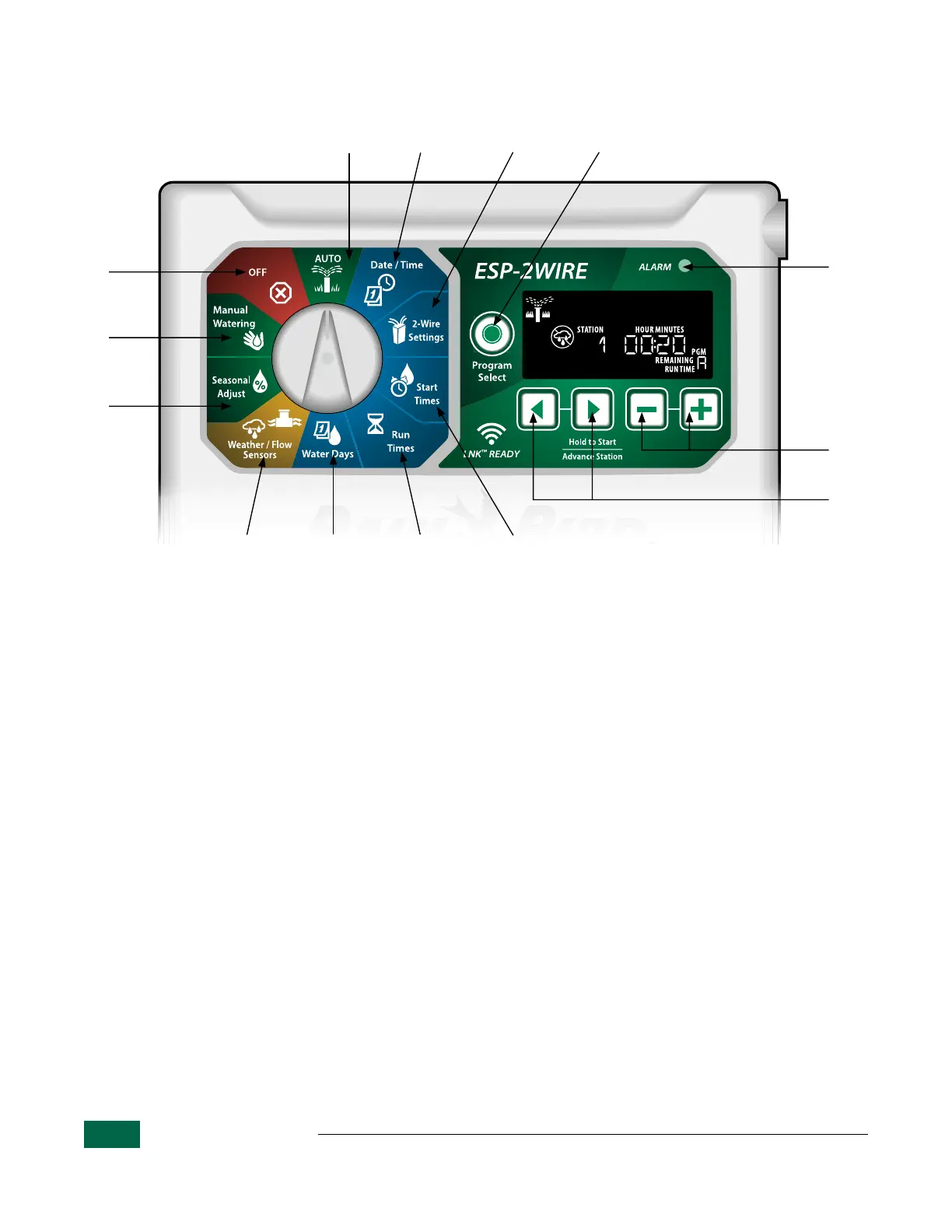
ESP-2WIRE Controller Features
Controls and Settings
a
AUTO
Watering occurs automatically
b
Date/Time
Set the current Date and Time
c
2-Wire Settings
Set 2-Wire settings
d
Start Times
Up to 6 Start Times per program
e
Run Times
Set station Run Times
Water Days
Select days to allow watering
Weather Sensor
Set controller to obey or ignore a
weather sensor
Flow Sensor
Set controller to obey or ignore a fl ow
sensor
Seasonal Adjust
Adjust Run Times from 5% up to
200%
Manual Watering
Start watering for one or all stations
OFF
Disables automatic irrigation
Program Selection Button
Select Program A, B, C or D
ALARM
Indicator
– / + Buttons
Adjust feature settings
Back/Next Buttons
Select programming options
Hold to Start
Manual irrigation
Figure 2 - ESP-2WIRE Controller - Dial Confi guration and Button Controls.


 To Next Page