V4.1.0R
21
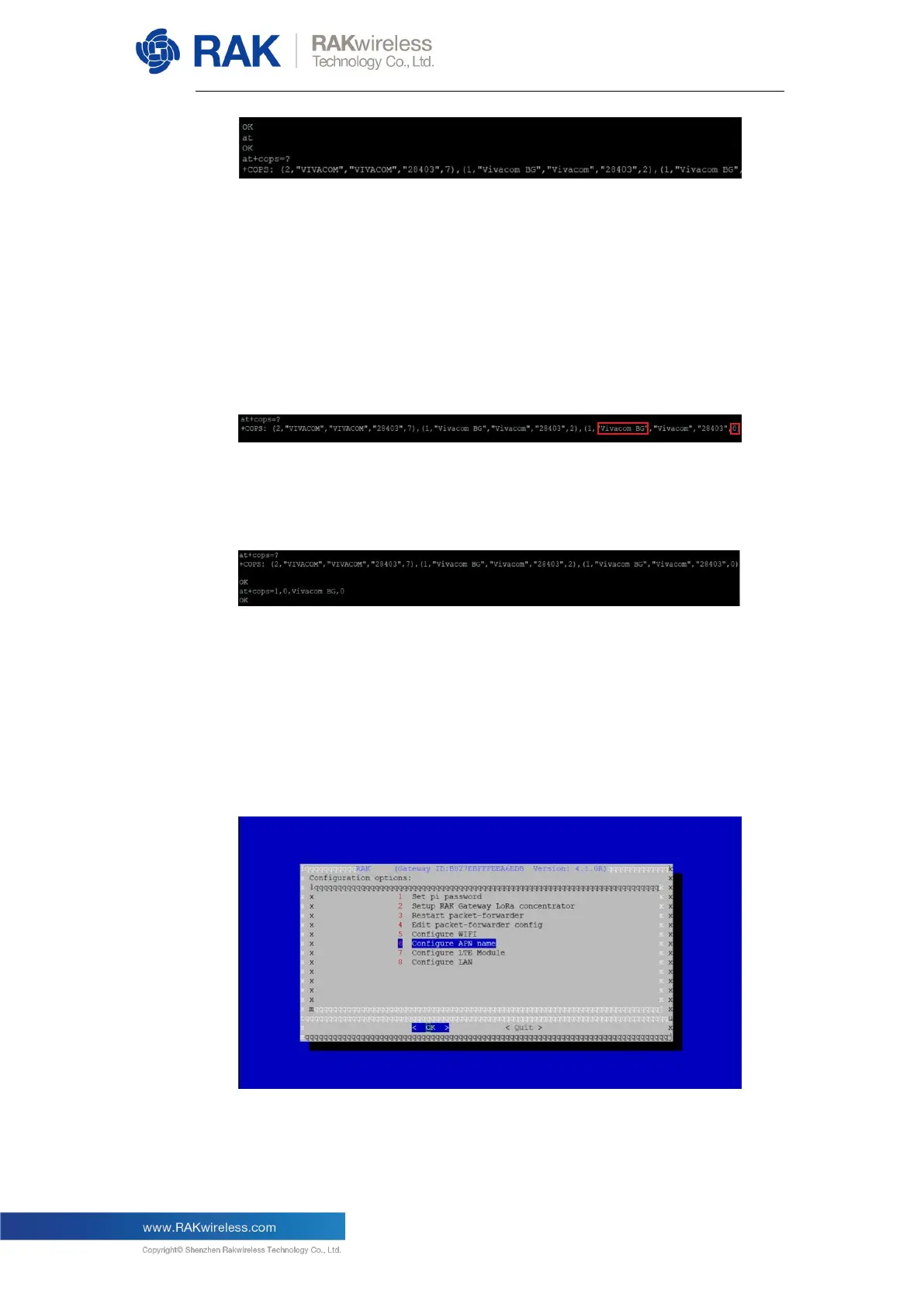
Next, execute the AT command “at+cops=1,0,XXX,YYY” to set the
information of the LTE network operator that you want to use. “XXX” is the
operator identifier, for example, “CHINA MOBILE”, “CHN-UNICOM”, or
“CHN-CT” in the above picture (“Vivacom BG”, “Telenor BG”, or “Mtel” for the
EU example). “YYY” is the last value of every operator, choose the one with
the 0 value as this is the currently used network.
Now let’s take the EU example this time:
Now using the command as described above for the example:
at+cops=1,0,XXX,YYY
Getting “OK” as the output of the command, means you have successfully
configured the LTE network.
Proceed to setting the APN name for the pppd process.
In the main configuration menu choose “6 Configure APN name”:


 To Next Page