WARNING
Changing parameter settings during running may cause a hazardous situation.
Parameter settings must not be changed during running.
5.1 Control Panel
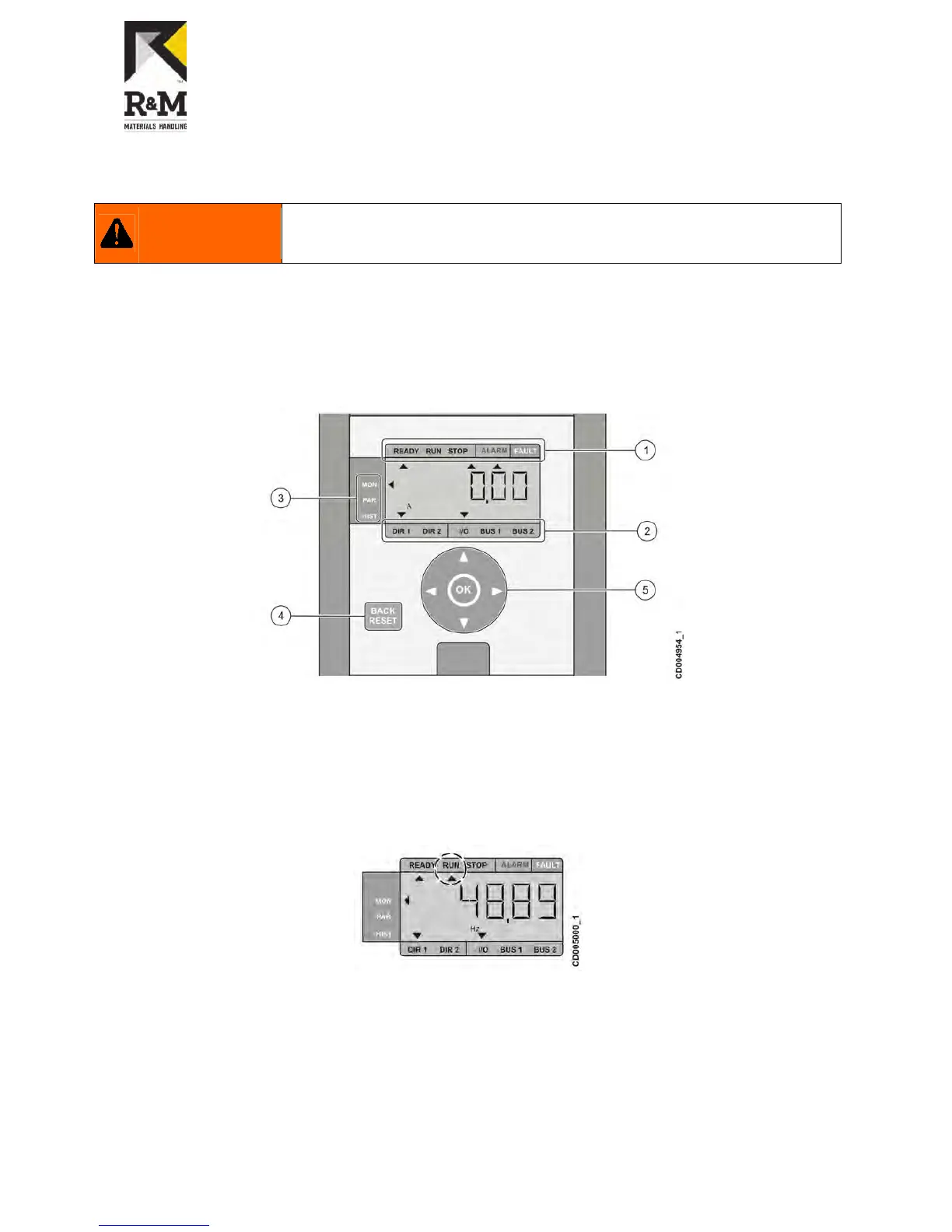
The control panel contains:
LCD display with backlight.
Display options (1-3) indicating drive status, control selection, and current menu.
Buttons (4-5) with four arrow navigation buttons and buttons for back/reset and confirmation, which are used in
navigating in the menu structure and in adjusting parameter values.
1 – Drive status
2 – Drive control indication
3 – Main menu
4 – Back/Reset button
5 – Navigation and confirmation (OK) buttons
5.2 Display options
5.2.1 Drive status
The drive status is located above the LCD display. The status of the drive is indicated with different states:
The Ready state indicates that the drive is ready to start.
The Run state indicates that the drive is running.
The Stop state indicates that the drive has been stopped.
The Alarm state indicates that an alarm has been occurred and it is active.
The Fault state indicates that a fault has been occurred and drive has been stopped due to the fault.
The state is active when an arrow is pointing towards the corresponding text. For example, when the drive is
running, an arrow is shown under the text RUN.


 To Next Page