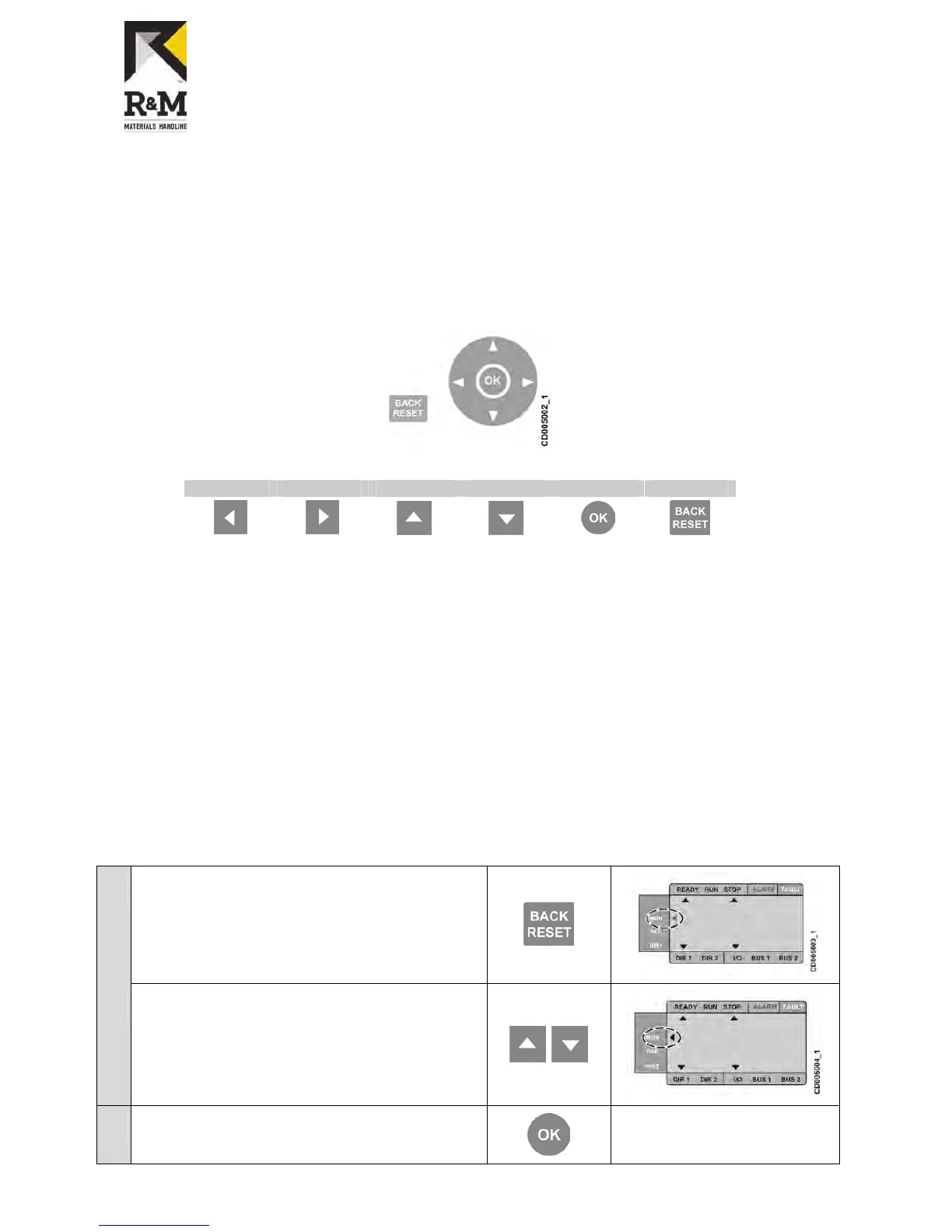
5.3 Navigating in the menu
The user interface consists of the following menus:
The Monitoring menu allows you to view the monitoring values.
The Parameter menu allows you to view and edit the parameter settings.
The Fault history menu allows you to view the latest fault indications.
5.3.1 Using buttons
The control panel contains buttons for navigating in the menu.
Left Right Up Down OK Back/Reset
Use the navigation buttons to view, select, and edit the wanted menu items.
Activate the menu by pressing an arrow button.
Move between the menus and menu items by using the arrow buttons.
Select the parameter to be edited or save a new value by pressing OK.
Increase or decrease the activated value by using the up and down arrow buttons.
Navigate between menu options by using the right and left arrow buttons.
Reset and return the display to the previous mode by pressing the Back/Reset button.
5.3.2 Monitoring menu
The monitoring menu consists of:
T
he actual values of the measured signals
Statuses of some control settings
The monitoring values are visible, but they cannot be edited.
Accessing the monitoring menu
1
Press back/reset button until the display momentarily empties and
the main selection arrow blinks.


 To Next Page