10
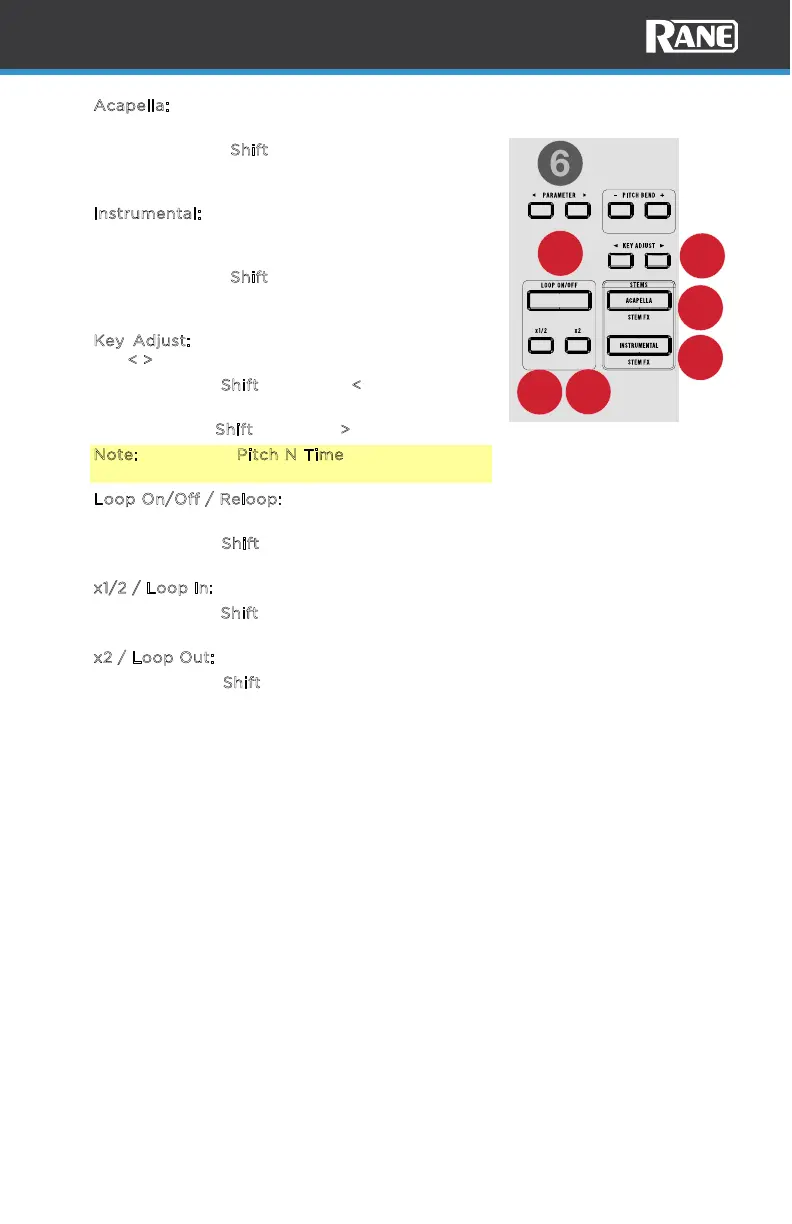
8. A
capella: Press to filter out the instrumental and
only play the vocals for the current track.
Press and hold S
hift and press this button to
apply an echo out eect to the removed stem
elements.
9. I
nstrumental: Press this button to filter out the
vocals of the current track to create an
instrumental for the current track.
Press and hold S
hift and press this button to
apply an echo out eect to the removed stem
elements.
10. K
ey Adjust: Adjusts the key of the active deck.
Use <
> to move up or down the key scale.
Press and hold S
hift and press < to turn on Key
Sync.
Press and hold S
hift and press > to reset the key.
Note: The Serato Pitch N Time plugin is required
to use Key Adjust.
11. L
oop On/Off / Reloop: Press this button to create an auto-loop with the length
that is set in the software.
Press and hold S
hift and press this button to skip to the last-played loop and
activate it immediately.
12. x
1/2 / Loop In: Press this button to halve the length of the current loop.
Press and hold S
hift press this button to create a Loop In point at the current
location.
13. x
2 / Loop Out: Press this button to double the length of the current loop.
Press and hold S
hift and press this button to create a Loop Out point at the
current location.
10
10
33 RPM 45 RPM
LOOP IN LOOP OUT
KEY SY NC
RESET
RELOOP
11
12
8
9
13



 To Next Page