5
1. Make sure you have downloaded and installed the latest version of your DJ
software and driver from r
ane.com/downloads.
Note: Driver installation is required to connect PERFORMER with macOS or
Windows computers.
2. Place PERFORMER on a flat, stable surface.
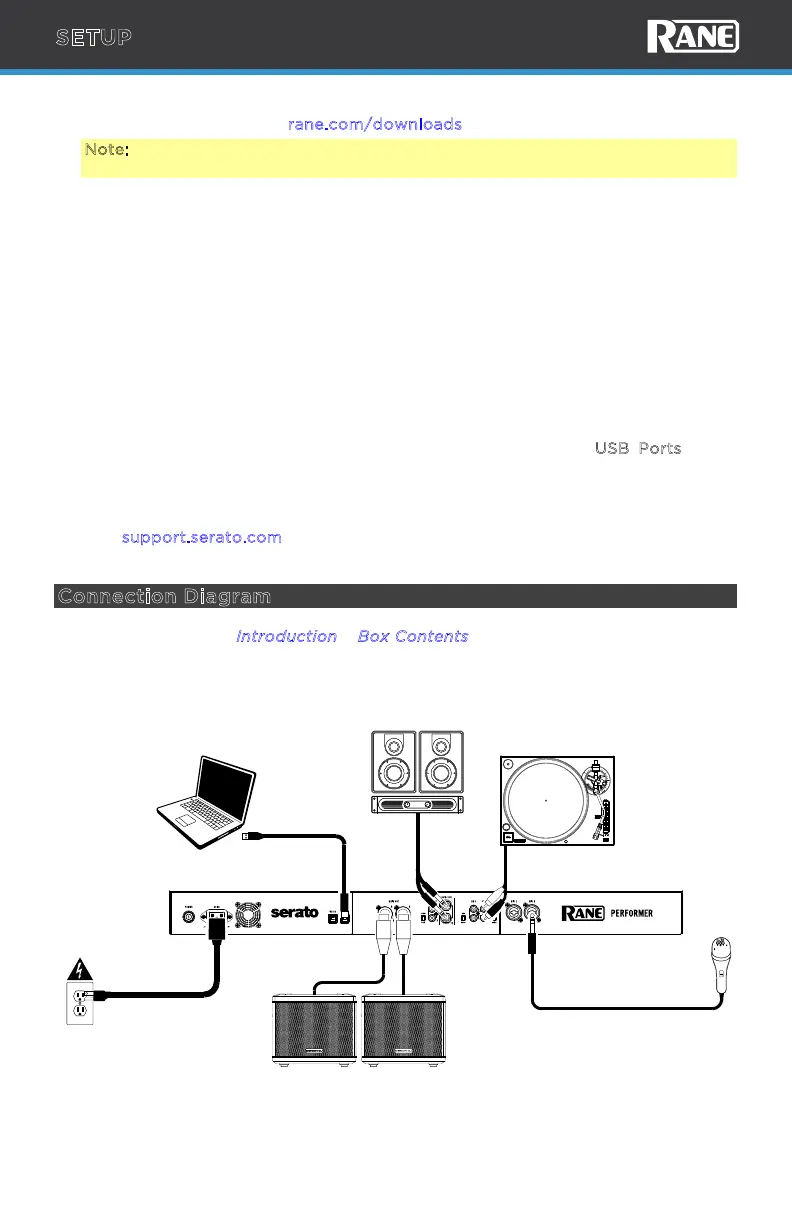
3. While the power is switched o, plug the included power cable into PERFORMER
first, then plug the cable into a power outlet.
Connect audio input sources (microphones, turntables, etc.) to PERFORMER.
Connect audio output devices (headphones, power amplifiers, loudspeakers, etc.)
to PERFORMER.
4. Connect all devices to power outlets, and power on the devices in proper order:
• When starting a session, turn on (1) input sources, (2) PERFORMER, (3)
output devices.
• When ending a session, turn o (1) output devices, (2) PERFORMER, (3)
input sources.
5. Use a standard USB cable (included) to connect one of the U
SB Ports to an
available USB port on your computer.
6. Open Serato DJ Pro and go!
For more information on how to use Serato DJ Pro with the PERFORMER, please
visit s
upport.serato.com.
Connection Diagram
Items not listed under I
ntroduction > Box Contents are sold separately.
Main Monitors
Microphone
Turntable
Computer
Power
Booth
Monitors
SETUP



 To Next Page