9
Performance Pads
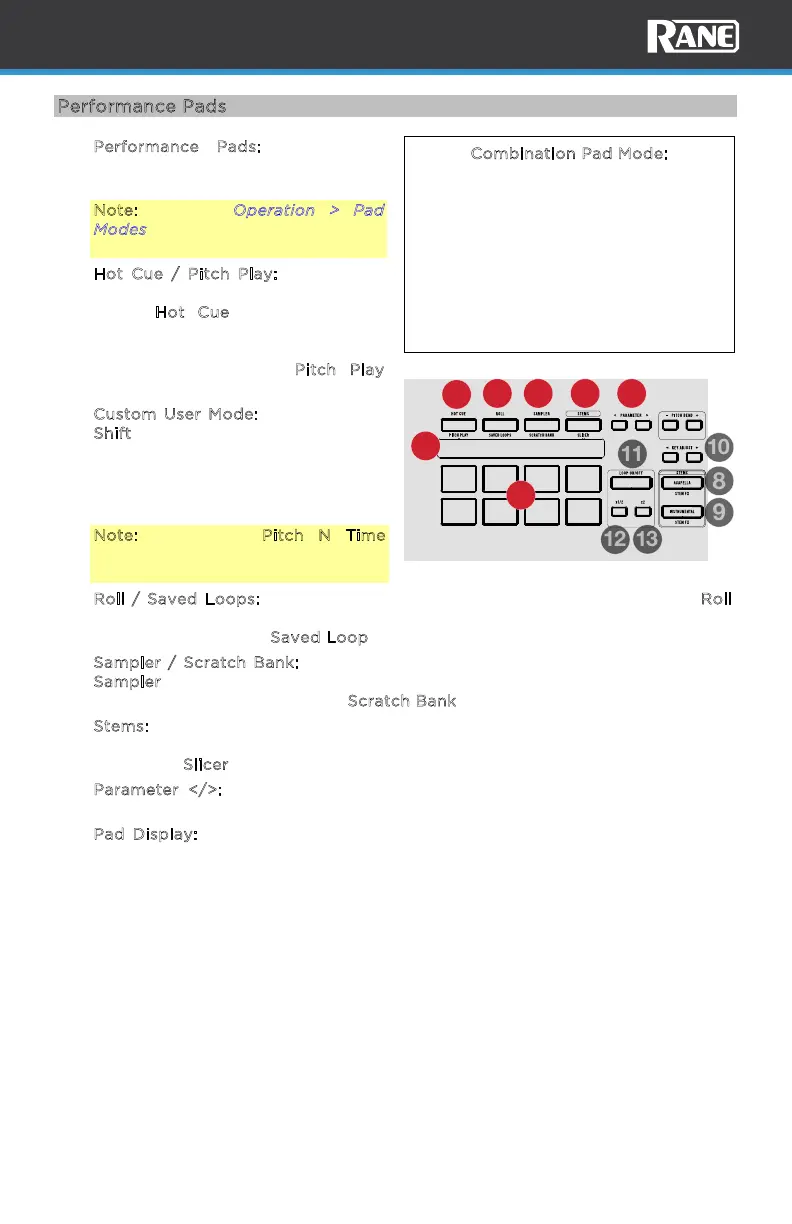
1. Performance Pads: Strike these
pads to perform the function of the
current pad mode.
Note: See the Operation > Pad
Modes section to learn how to use
the pads in each mode.
2. H
ot Cue / Pitch Play: Single press
this button to enter the first pad
mode, H
ot Cue mode. Press the
button two consecutive times in
quick succession to enter the
secondary pad mode, P
itch Play
mode.
C
ustom User Mode: Press and hold
S
hift and press this button to access
the custom user pad mode where all
eight pads and the parameter
buttons can be assigned to various
software features.
Note: The Serato Pitch N Time
plugin is required to use Pitch Play
mode.
3. R
oll / Saved Loops: Single press this button to enter the first pad mode, Roll
mode. Press the button two consecutive times in quick succession to enter the
secondary pad mode, S
aved Loop mode.
4. S
ampler / Scratch Bank: Single press this button to enter the first pad mode,
S
ampler mode. Press the button two consecutive times in quick succession to
enter the secondary pad mode, S
cratch Bank mode.
5. S
tems: Single press this button to enter the first pad mode, Stem mode. Press
the button two consecutive times in quick succession to enter the secondary
pad mode, S
licer mode.
6. P
arameter </>: Use these buttons to access various functions in each pad
mode.
7. P
ad Display: Displays the current pad mode and/or specific pad info such as
sample name and hot cue names.
Combination Pad Mode:
Pressing and holding one of the pad mode
buttons and then pressing another one will
enter combination pad mode. The first
button pressed from the top row of pads
(1-4) will be the first pad mode and the
second pad mode will be accessed from
the lower pads (5-8). While in combination
pad mode the parameter buttons control
the first pad mode.
33 RPM 45 RPM
LOOP IN LOOP OUT
KEY SYN C
RESET
RELOOP
2
3 4 5
7
1
6



 To Next Page