11
Platter Display
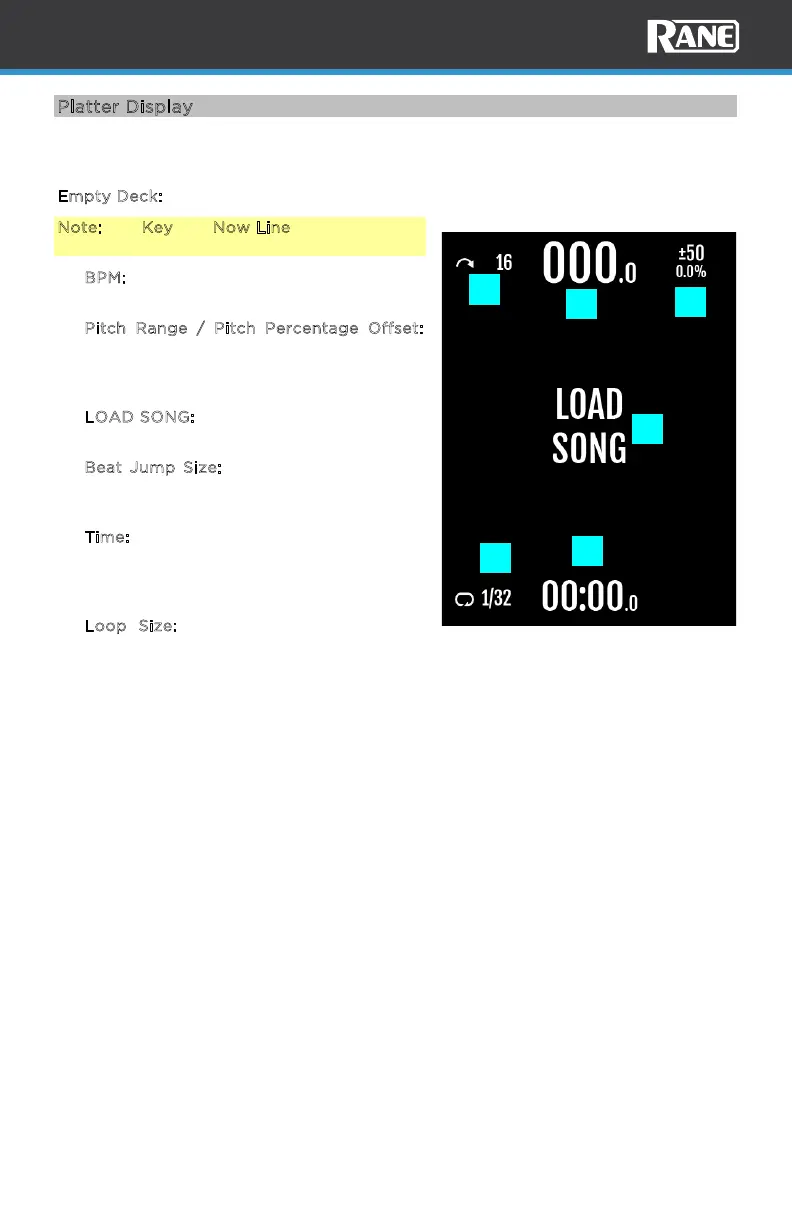
The platter displays are populated with a waveform, graphics, and text. The display
view will change depending on the mode you are in, which is detailed in this section.
E
mpty Deck:
Note: The Key and Now Line features will not
appear until a song is loaded.
1. B
PM: Displays zeros '000.0' when no
song is loaded.
2. P
itch Range / Pitch Percentage Offset:
Displays the current pitch range value and
the pitch percentage oset for the active
deck.
3. L
OAD SONG: This appears when the deck
has no song loaded.
4. B
eat Jump Size: Displays the Beat Jump
icon and current beat jump size for the
active deck.
5. T
ime: Displays the remaining time as all
zeros ‘-00:00.0’. The text flashes when
the Track End Warning has been
triggered.
6. L
oop Size: Displays the loop icon and
current loop size for the active deck. The
icon and text are White when a loop is
inactive and orange when active.
1
2
3
4
5
6



 To Next Page