13
Needle On
N
eedle Off
D
ay Mode
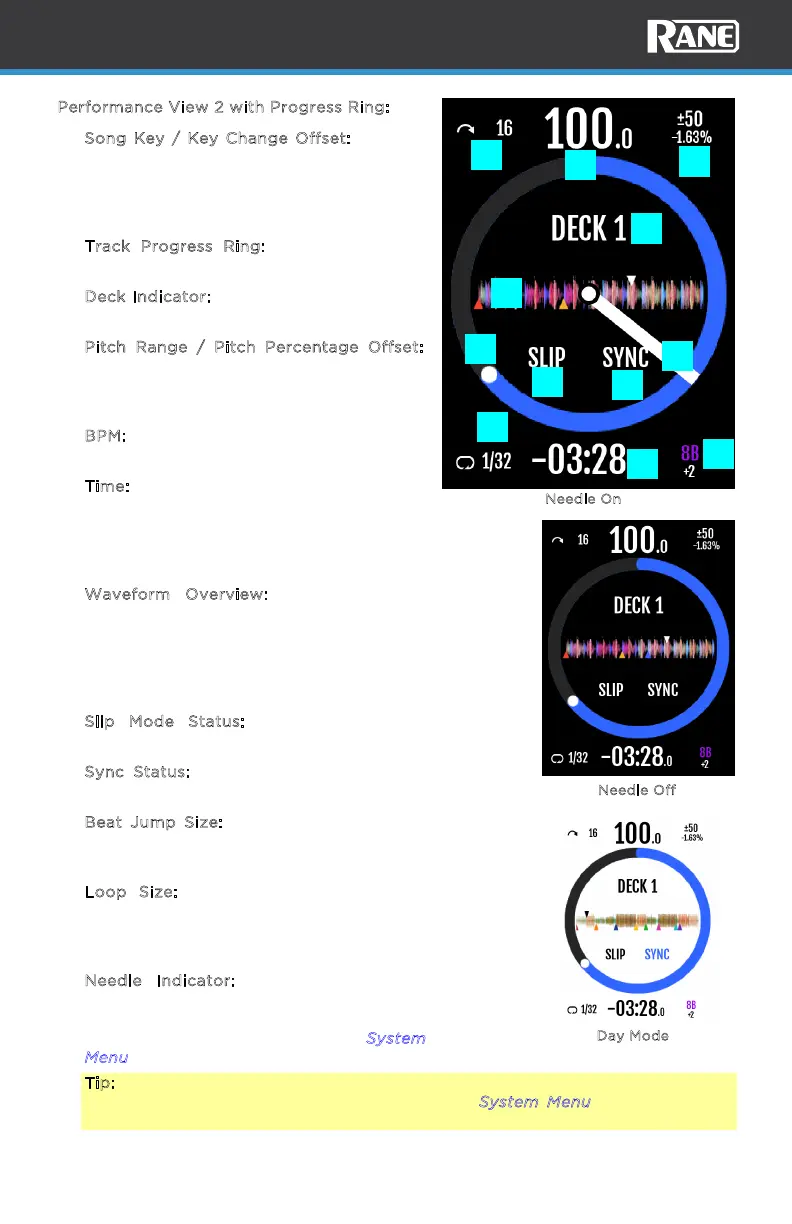
Performance View 2 with Progress Ring:
1. S
ong Key / Key Change Offset: Displays
song key value. The key value will change
when transposed up or down. When
transposed, the + or - oset value is
shown below the new key value.
2. T
rack Progress Ring: Displays the total
track progress in the outer ring.
3. D
eck Indicator: Displays the current deck
in focus.
4. P
itch Range / Pitch Percentage Offset:
Displays the current pitch range value and
the pitch percentage oset for the active
deck.
5. B
PM: Displays Beats Per Minute of the
current track to the tenth decimal.
6. T
ime: Displays time for the current song.
This value may be shown as elapsed or
remaining, depending on the setting of the
device menu. The text flashes when the
Track End Warning has been triggered.
7. W
aveform Overview: Displays the full
track waveform with playhead position
(white), temp cue, hot cue indicators
matching their assigned hot cue colors,
and the active loop region as specified by
Serato.
8. S
lip Mode Status: Displays Slip mode
state.
9. S
ync Status: Displays the Sync state for
the deck.
10. B
eat Jump Size: Displays the Beat Jump
icon and current beat jump size for the
active deck.
11. L
oop Size: Displays the loop icon and
current loop size for the active deck. The
icon and text are white when a loop is
inactive and orange when active.
12. N
eedle Indicator: This rotating needle
indicator shows the current playhead
position. This element can be turned o
from the system menu. See the S
ystem
M
enu section for more details.
Tip: The display colors can be inverted to Day Mode in the device menu for
better visibility in bright environments. See the System Menu section for more
details.
1
2
3
4
5
6
7
8
9
10
11
12



 To Next Page