15
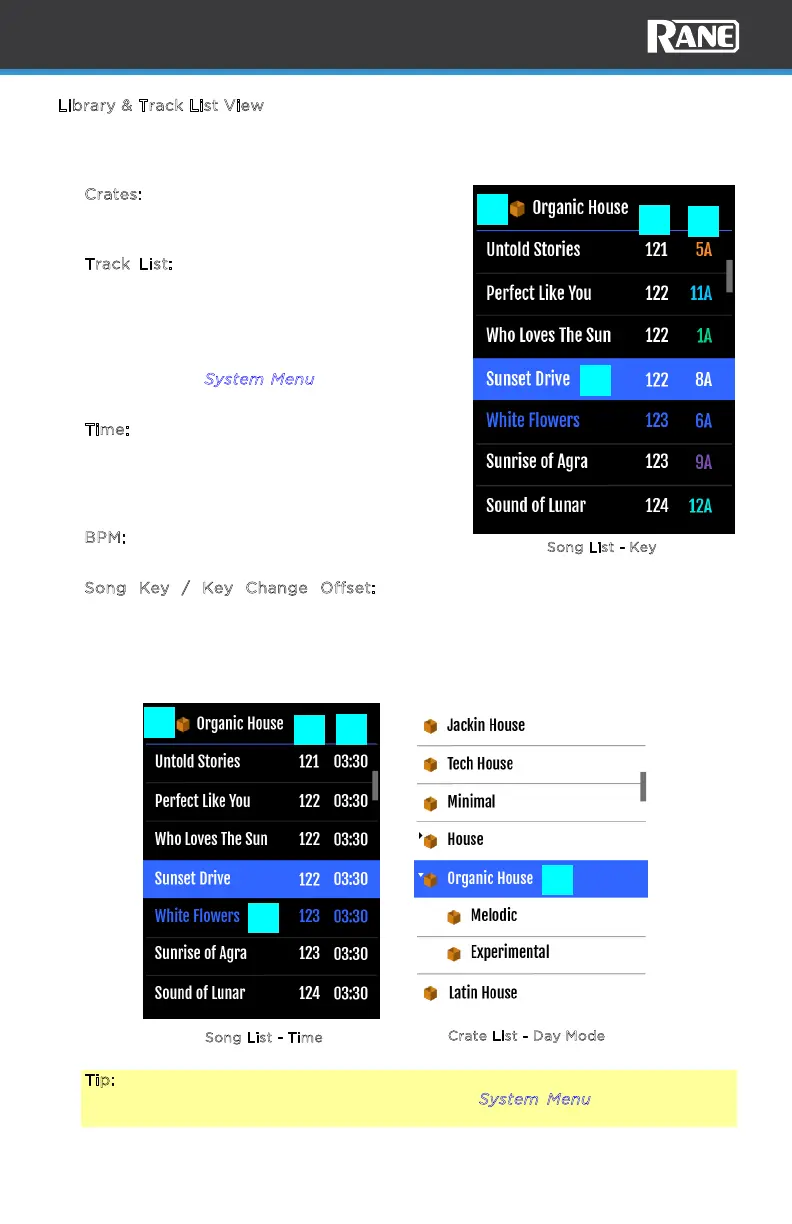
Song List - Time
S
ong List - Key
C
rate List - Day Mode
L
ibrary & Track List View
The library & track list view is shown automatically when the scroll/load knob is
turned. This feature can be disabled in the device menu.
1. C
rates: Shows Serato DJ Crate structure
including third-party libraries. Longer Crates
names scroll momentarily.
2. T
rack List: Shows the Track list structure. A
blue highlight will follow the current selection.
Tracks that have been played are shown in
the played color. Longer song titles scroll
momentarily. The third column can be set to
show TIME instead of KEY in the system
menu. See the S
ystem Menu section for more
details.
3. T
ime: Displays time for the current song. This
value may be shown as elapsed or remaining,
depending on the setting of the device menu.
The text flashes when the Track End Warning
has been triggered.
4. BPM: Displays Beats Per Minute of the current
track.
5. Song Key / Key Change Offset: Displays
song key value. The key value will change
when transposed up or down. When
transposed, the + or - oset value is shown
below the new key value.
Tip: The display colors can be inverted to Day Mode in the device menu for
better visibility in bright environments. See the System Menu section for more
details.
1
1
1
2
2
3
5
4
4



 To Next Page