÷
LOCATION OF CONTROLS
FRONT
f
lid
|
3 4 5 6
REAR
7 8
16 17 18
uI
20
I
19
÷
9 10 11 12 13 14 15
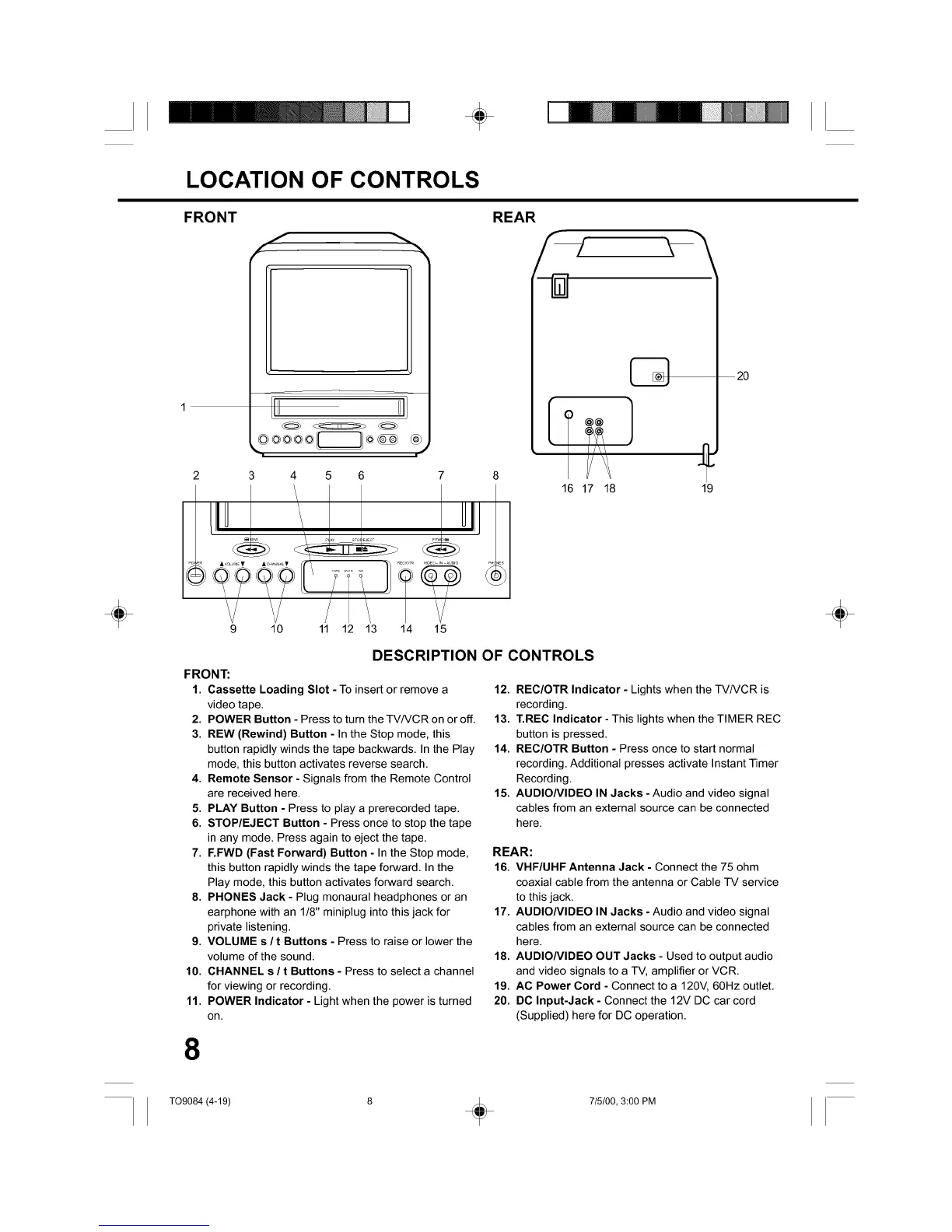
DESCRIPTION OF CONTROLS
FRONT:
1. Cassette Loading Slot - To insert or remove a
video tape.
2. POWER Button - Press to turn the TV/VCR on or off.
3. REW (Rewind) Button - In the Stop mode, this
button rapidly winds the tape backwards. In the Play
mode, this button activates reverse search.
4. Remote Sensor - Signals from the Remote Control
are received here.
5. PLAY Button - Press to play a prerecorded tape.
6. STOP/EJECT Button - Press once to stop the tape
in any mode. Press again to eject the tape.
7. F.FWD (Fast Forward) Button - In the Stop mode,
this button rapidly winds the tape forward. In the
Play mode, this button activates forward search.
8. PHONES Jack - Plug monaural headphones or an
earphone with an 1/8" miniplug into this jack for
private listening.
9. VOLUME s / t Buttons - Press to raise or lower the
volume of the sound.
10. CHANNEL s / t Buttons - Press to select a channel
for viewing or recording.
11. POWER Indicator - Light when the power is turned
on.
12. REC/OTR Indicator - Lights when the TV/VCR is
recording.
13. T.REC Indicator - This lights when the TIMER REC
button is pressed.
14. REC/OTR Button - Press once to start normal
recording. Additional presses activate Instant Timer
Recording.
15. AUDIONIDEO IN Jacks -Audio and video signal
cables from an external source can be connected
here.
REAR:
16. VHF/UHF Antenna Jack - Connect the 75 ohm
coaxial cable from the antenna or Cable TV service
to this jack.
17. AUDIONIDEO IN Jacks - Audio and video signal
cables from an external source can be connected
here.
18. AUDIONIDEO OUT Jacks - Used to output audio
and video signals to a TV, amplifier or VCR.
19. AC Power Cord - Connect to a 120V, 60Hz outlet.
20. DC Input-Jack - Connect the 12V DC car cord
(Supplied) here for DC operation.
8
÷
T09084 (4-19) 8 _ 715/00, 3:00 PM



 To Next Page