÷
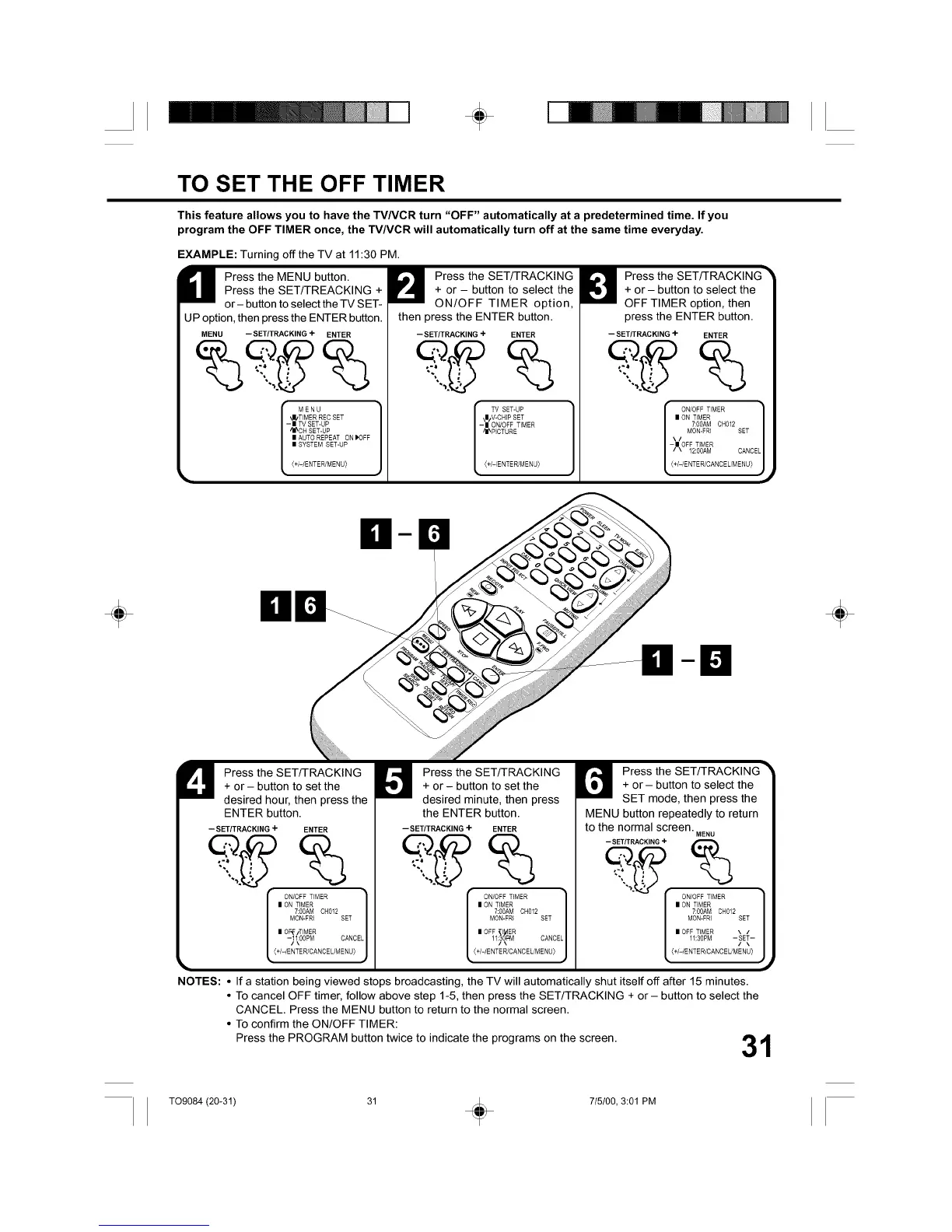
TO SET THE OFF TIMER
This feature allows you to have the TVNCR turn "OFF" automatically at a predetermined time. If you
program the OFF TIMER once, the TV/VCR will automatically turn off at the same time everyday.
EXAMPLE: Turning off the TV at 11:30 PM.
M ress the MENU button.
Press the SET/TREACKING +
or- button to select the TV SET-
UP option, then press the ENTER button.
MENU iSETtTRACKING + ENTER
r MENU
'J/TIMER REC SET
- II TV SET-UP
"/_ C H SET-UP
| AUTO REPEAT ON I'OFF
| SYSTEM SET-UP
(+I-/ENTER/MENU)
t
Press the SET/TRACKING
+ or - button to select the
ON/OFF TIMER option,
then press the ENTER button.
--SET/TRACKING + ENTER
TV SET-UP
•m/V-CHIPSET
-| ON/OFF TIMER
/I_PICTURE
(+/-/ENTER/MENU_
Press the SET/TRACKING _
+ or - button to select the
OFF TIMER option, then
press the ENTER button.
--SET/TRACKING + ENTER
\ / MON-FRI SET
[ ON/OFFTIMER 11_
II ON TIMER
7:00AM CH012
-II OFF TIMER
/ \ 12:00AM CANCEL
(+f-/EMTER/CANCE L/M EN U}
÷ ÷
U ress the SET/TRACKING
+ or- button to set the
desired hour, then press the
ENTER button.
--SET/TRACKING + ENTER
I ON TIMER
7:00AM CH012
MON-FRI SET
I OF_/TIMER
_iOOPM CANCEL
(+/-/ENTER/CANCEUMENU)
Press the SET/TRACKING
+ or - button to set the
desired minute, then press
the ENTER button.
i SETtTRACKING + ENTER
ON/OFF TIMER I
| ON TIMER
7:00AM CH012
MON-FRI SET
| OFF I ER
11_oM_EF_ CANCEL
" J
(+l-/ENTER/CANCEL]MENU)
Press the SET/TRACKING
+ or- button to select the
SET mode, then press the
MENU button repeatedly to return
to the normal screen. MENU
_J'_'--SETITRACKING +
[ ON/OFFTIMER 1,_
II ON TIMER
7:00AM CH012
MON-FRI SET
II OFF TIMER \ /
11:3OPM-y-
(+I-/EMTER/CANCEL/MENU)
NOTES: • If a station being viewed stops broadcasting, the TV will automatically shut itself off after 15 minutes.
• To cancel OFF timer, follow above step 1-5, then press the SET/TRACKING + or- button to select the
CANCEL. Press the MENU button to return to the normal screen.
• To confirm the ON/OFF TIMER:
Press the PROGRAM button twice to indicate the programs on the screen, fib ,41
/
T09084 (20-31) 31 _ 715100, 3:01 PM



 To Next Page