÷
TV OPERATION
÷
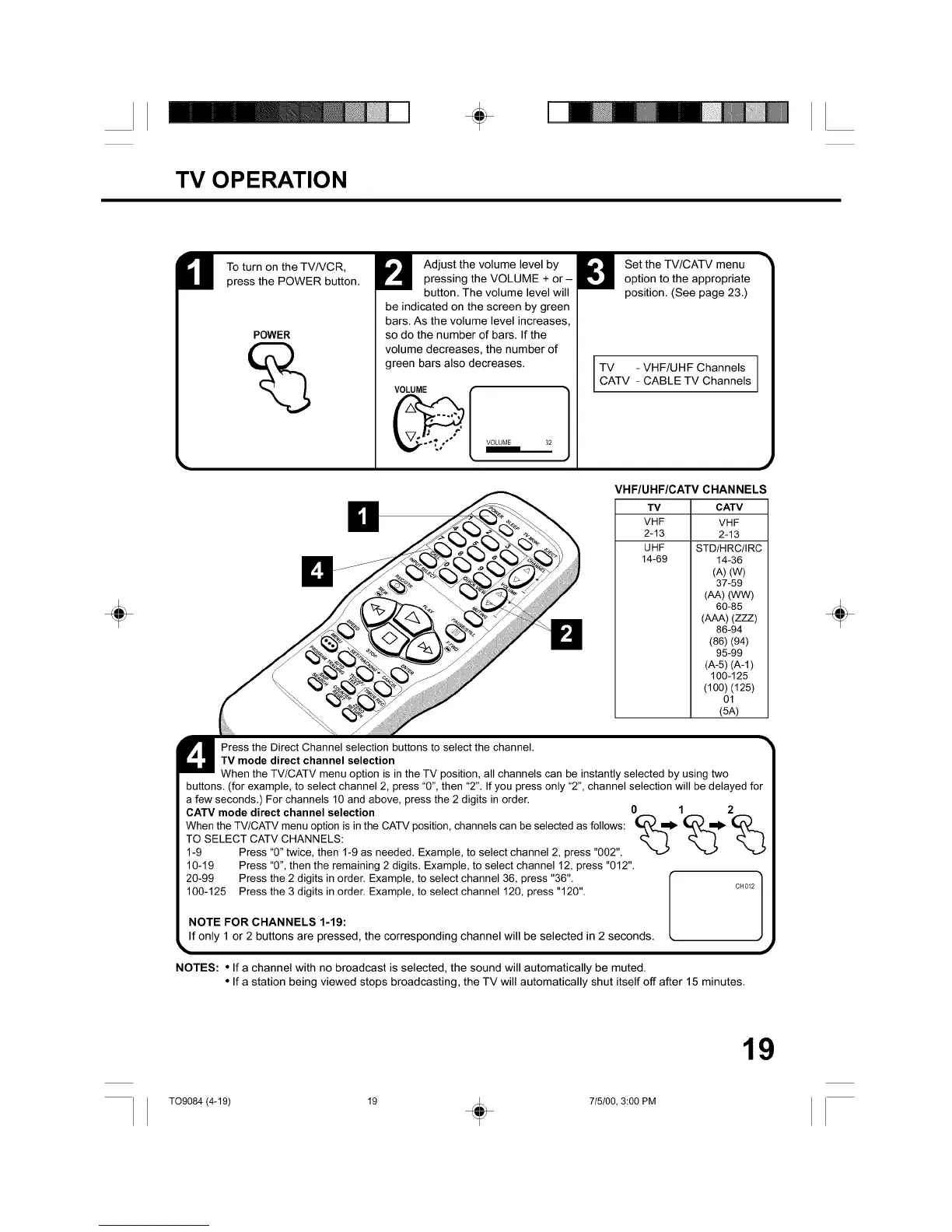
To turn on the TV/VCR,
press the POWER button.
POWER
Adjust the volume level by
pressing the VOLUME + or-
button. The volume level will
be indicated on the screen by green
bars. As the volume level increases,
so do the number of bars. If the
volume decreases, the number of
green bars also decreases.
VOLUME
Set the TV/CATV menu
option to the appropriate
position. (See page 23.)
TV - VHF/UHF Channels
CATV CABLETV Channels
VHF/UHF/CATV CHANNELS
TV CATV
VHF VHF
2-13 2-13
UHF STD/HRC/IRC
14-69 14-36
(A) (W)
37-59
(AA)(WW)
60-85
(AAA)(ZZZ)
86-94
(86) (94)
95-99
(A-5) (A-l)
100-125
(100) (125)
01
(5A)
Press the Direct Channel selection buttons to select the channel.
TV mode direct channel selection
When the TV/CATV menu option is in the TV position, all channels can be instantly selected by using two
buttons. (for example, to select channel 2, press "0", then "2". If you press only "2", channel selection will be delayed for
a few seconds.) For channels 10 and above, press the 2 digits in order.
CATV mode direct channel selection O 1 2
ToWhenthe TV/CATV menu option is in the CATV p°sition' channels can be selected as f°ll°ws: _1_ _1_I_SELECTCATV CHANNELS:
1-9 Press "0" twice, then 1-9 as needed. Example, to select channel 2, press "002".
10-19 Press "0", then the remaining 2 digits. Example, to select channel 12, press "012".
20-99 Press the 2 digits in order. Example, to select channel 36, press "36".
100-125 Press the 3 digits in order. Example, to select channel 120, press "120". c.0_2
NOTE FOR CHANNELS 1-19:
If only 1 or 2 buttons are pressed, the corresponding channel will be selected in 2 seconds
NOTES: • If a channel with no broadcast is selected, the sound will automatically be muted
• If a station being viewed stops broadcasting, the TV will automatically shut itself off after 15 minutes
÷
19
TO9084 (4-19) 19 _ 715100, 3:00 PM



 To Next Page