÷
TIMER RECORDING
Timer recording can be programmed on-screen with the remote control. The built=in timer allows automatic
unattended recording of up to 8 programs within 1 month.
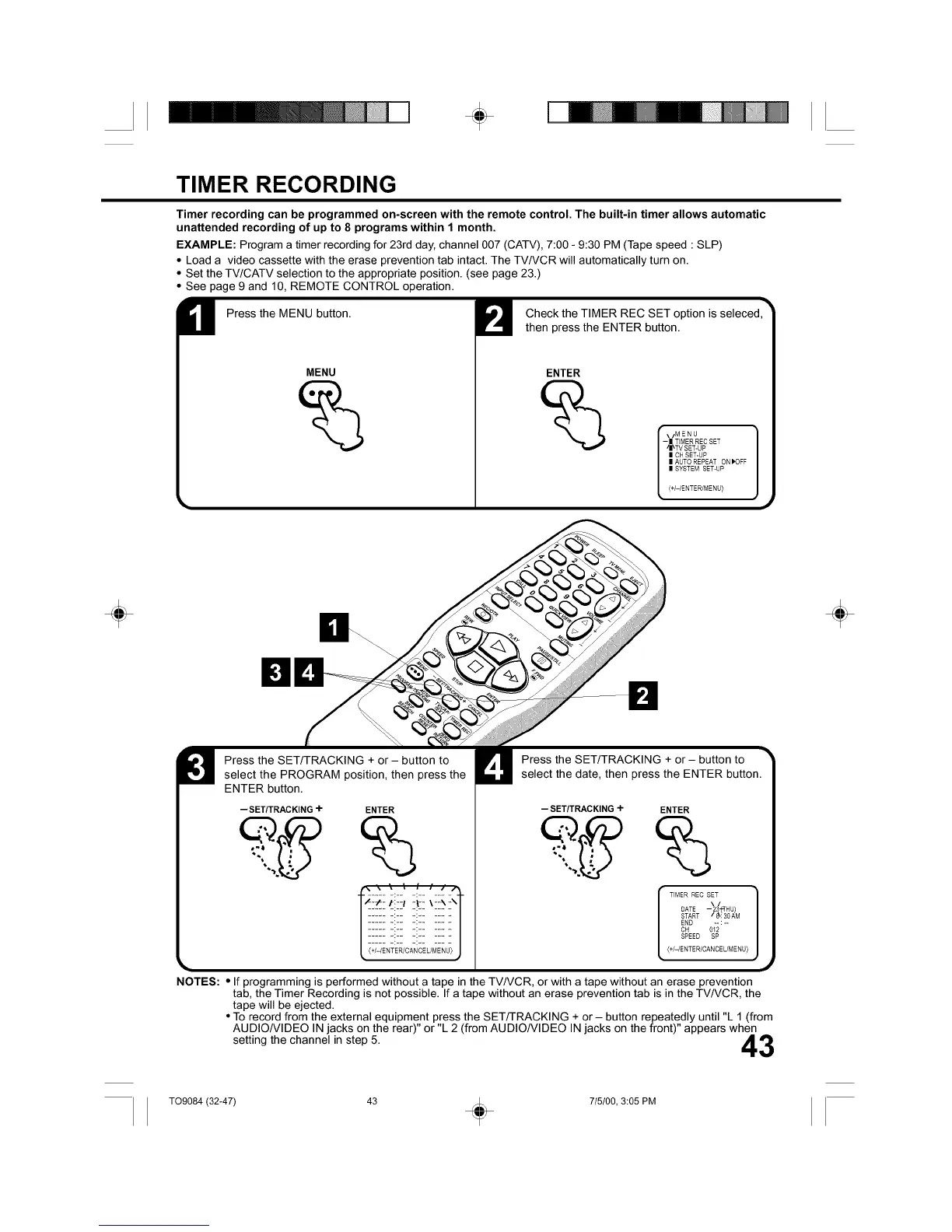
EXAMPLE: Program a timer recording for 23rd day, channel 007 (CATV), 7:00 - 9:30 PM (Tape speed : SLP)
• Load a video cassette with the erase prevention tab intact. The TV/VCR will automatically turn on.
• Set the TV/CATV selection to the appropriate position. (see page 23.)
• See page 9 and 10, REMOTE CONTROL operation.
Press the MENU button.
MENU
Check the TIMER REC SET option is seleced,
then press the ENTER button.
ENTER
\/MENU
-II TIMER REC SET
'II_TV SET-UP
II CH SET-UP
II AUTO REPEAT ON IK)FF
II SYSTEM SET-UP
(+/-/ENTER/MENU)
÷ ÷
Press the SET/TRACKING + or - button to
select the PROGRAM position, then press the
ENTER button.
-- SET/TRACKING-I- ENTER
%
\ \ ; : ; /
Press the SET/TRACKING + or- button to
select the date, then press the ENTER button.
--SET/TRACKING-I- ENTER
%
TIMER REC SET
\!
DATE - 23_THU)
START / 8k: 30 AM
END -- : --
CH 012
SPEED SP
{+/-/ENTE R/CANCE L/M ENU)
NOTES: • If programming is performed without a tape in the TV/VCR, or with a tape without an erase prevention
tab, the Timer Recording is not possible. If a tape without an erase prevention tab is in the TV/VCR, the
tape will be ejected.
• To record from the external equipment press the SET/TRACKING + or- button repeatedly until "L 1 (from
AUDIO/VIDEO IN jacks on the rear)" or "L 2 (from AUDIO/VIDEO IN jacks on the front)" appears when
setting the channel in step 5. A_'_
i,l,,_l!
T09084 (32-47) 43 + 715100, 3:05 PM



 To Next Page